'%20d='M0%208a8%208%200%200%201%208-8h24a8%208%200%200%201%208%208v24a8%208%200%200%201-8%208H8a8%208%200%200%201-8-8V8Z'/%3e%3cpath%20fill='%23fff'%20d='M32.576%206C12.293%206%208.776%2025.887%207.424%2034H9.1c.45-2.977%203.493-14.748%2010.899-20.287%200%200-5.633%206.976-6.572%2015.051%203.426-.652%2013.845-3.372%2016.056-12.927l-3.84-.61c1.352-1.351%204.909-5.17%206.931-9.226V6Z'/%3e%3cdefs%3e%3clinearGradient%20id='reapit-lettings__a'%20x1='20.702'%20x2='20.702'%20y1='.351'%20y2='31.228'%20gradientUnits='userSpaceOnUse'%3e%3cstop%20stop-color='%235573FD'/%3e%3cstop%20offset='.575'%20stop-color='%234E56EA'/%3e%3c/linearGradient%3e%3c/defs%3e%3c/svg%3e)
What is the 'Successful' status for an Application
This article will explain the components of a successful application status and outline how you can customise the messaging in Reapit Lettings. If an application has been approved, payment made, and the application finalised it will be set to a particular status. This is the Approved/Successful Applications status. The Approved/ Successful status is triggered once the tenant has paid the deposit on the property, subsequently the application is then finalised.
What is the 'Successful' status for an Application
This article will explain the components of a successful application status and outline how you can customise the messaging in Reapit Lettings.
If an application has been approved, payment made, and the application finalised it will be set to a particular status. This is the Approved/Successful Applications status.
The Approved/ Successful status is triggered once the tenant has paid the deposit on the property, subsequently the application is then finalised.
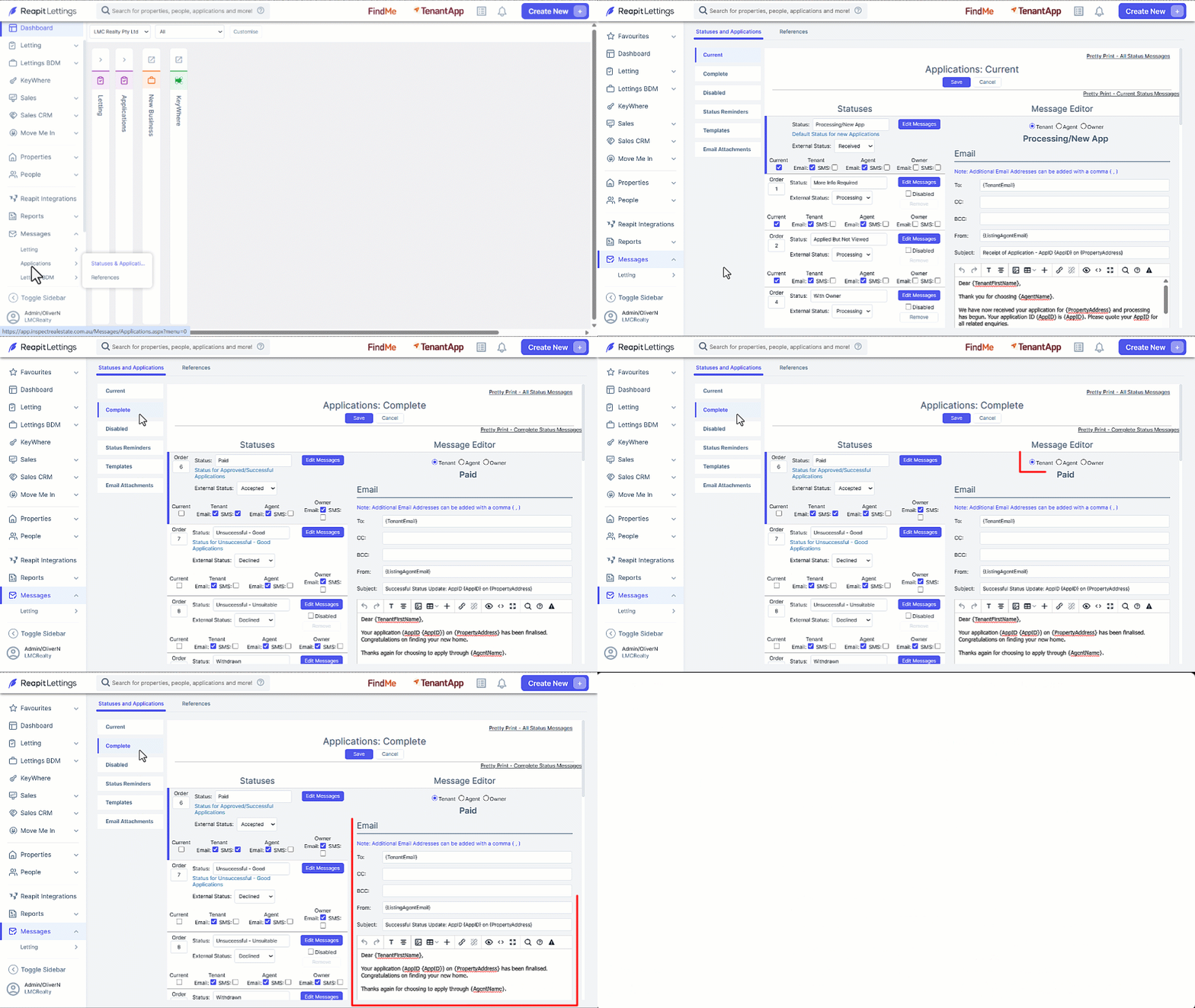
- Click on Messages.
- Click on Applications.
- Click on Statuses and Applications.
- Click the Complete template category.
- Make changes to the recipients by utilizing the Tick Box selectors as required.
- Make changes to each of the messages by selecting Tenant, Agent or Owner, then updating the message in the message editor as required.
- Once any changes are made, click on Save.