'%20d='M0%208a8%208%200%200%201%208-8h24a8%208%200%200%201%208%208v24a8%208%200%200%201-8%208H8a8%208%200%200%201-8-8V8Z'/%3e%3cpath%20fill='%23fff'%20d='M32.576%206C12.293%206%208.776%2025.887%207.424%2034H9.1c.45-2.977%203.493-14.748%2010.899-20.287%200%200-5.633%206.976-6.572%2015.051%203.426-.652%2013.845-3.372%2016.056-12.927l-3.84-.61c1.352-1.351%204.909-5.17%206.931-9.226V6Z'/%3e%3cdefs%3e%3clinearGradient%20id='reapit-lettings__a'%20x1='20.702'%20x2='20.702'%20y1='.351'%20y2='31.228'%20gradientUnits='userSpaceOnUse'%3e%3cstop%20stop-color='%235573FD'/%3e%3cstop%20offset='.575'%20stop-color='%234E56EA'/%3e%3c/linearGradient%3e%3c/defs%3e%3c/svg%3e)
How to Sync Your Lettings BDM Calendar with Google/Gmail
This article will run through how to sync your Lettings BDM Calendar with Google/ Gmail in Reapit Lettings.
Calendar sync allows you to integrate appraisals into your Google/Gmail calendar.
Before you begin, these instructions need to be completed by the person that wants the integration.
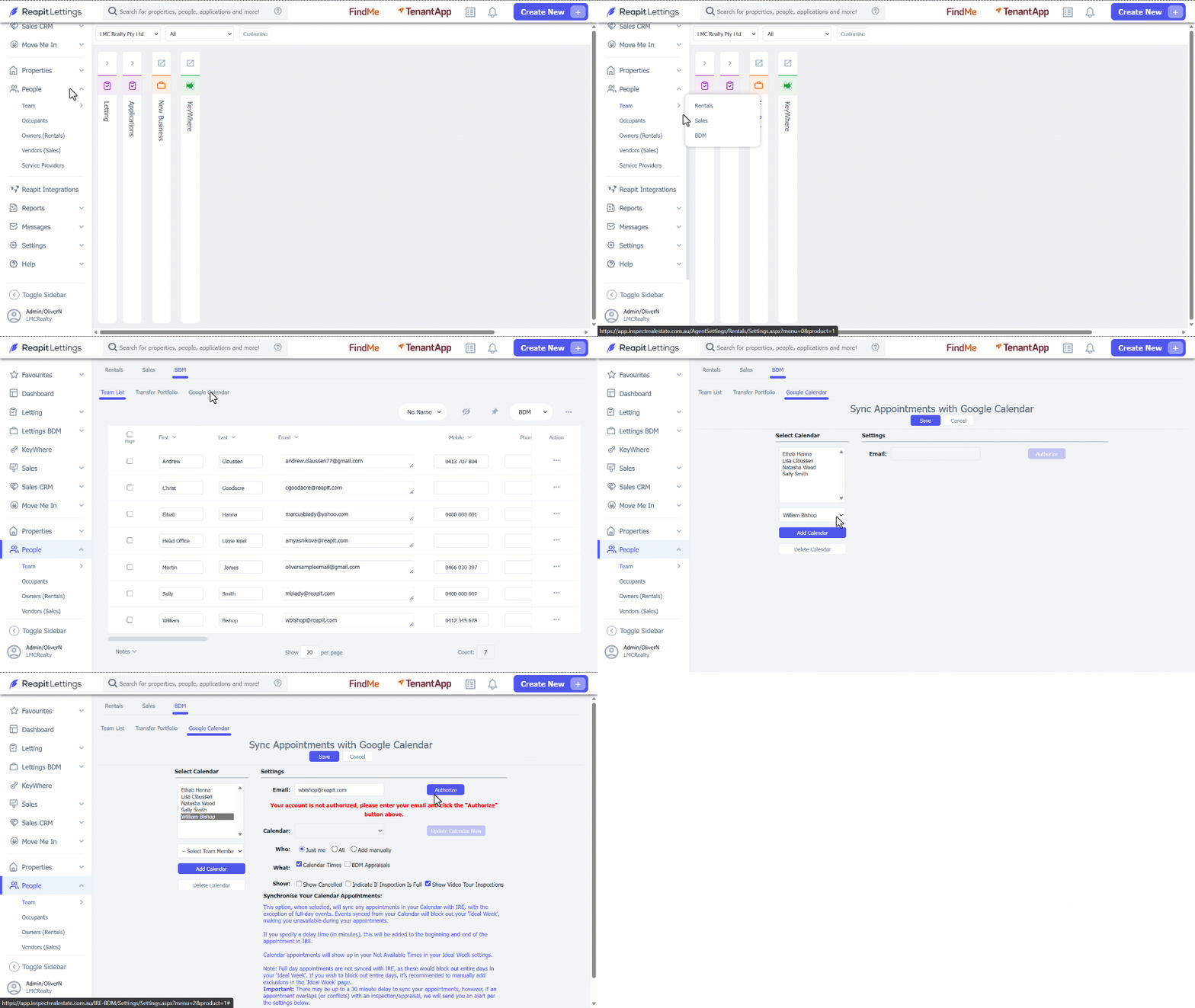
1. Click on People.
2. Click on Team.
3. Select BDM.
4. Navigate to Google Calendar tab.
5. Select your name from the dropdown.
6. Click on Add Calendar.
7. Check the settings and adjust if needed.
8. Click on Authorize.
10. This will open a Google sign-in page, where it will ask you to log in and authorise access. Once this has been done, the calendar sync will be finalised. You will now be able to view any appraisals booked within Reapit Lettings in your Google calendar now (please allow up to one hour for appointments to appear).