'%20d='M0%208a8%208%200%200%201%208-8h24a8%208%200%200%201%208%208v24a8%208%200%200%201-8%208H8a8%208%200%200%201-8-8V8Z'/%3e%3cpath%20fill='%23fff'%20d='M32.576%206C12.293%206%208.776%2025.887%207.424%2034H9.1c.45-2.977%203.493-14.748%2010.899-20.287%200%200-5.633%206.976-6.572%2015.051%203.426-.652%2013.845-3.372%2016.056-12.927l-3.84-.61c1.352-1.351%204.909-5.17%206.931-9.226V6Z'/%3e%3cdefs%3e%3clinearGradient%20id='reapit-lettings__a'%20x1='20.702'%20x2='20.702'%20y1='.351'%20y2='31.228'%20gradientUnits='userSpaceOnUse'%3e%3cstop%20stop-color='%235573FD'/%3e%3cstop%20offset='.575'%20stop-color='%234E56EA'/%3e%3c/linearGradient%3e%3c/defs%3e%3c/svg%3e)
KeyWhere V2 Panels and FAQs
How can I tell if a panel is v1 or v2?
How can I tell if a panel is v1 or v2?
Hardware
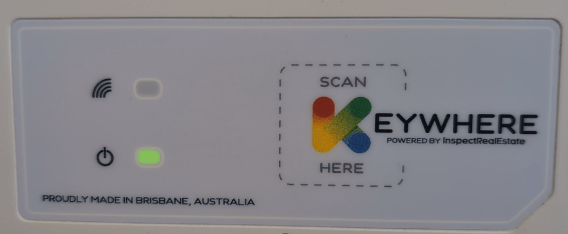
The v1 Panel has a coloured K logo. The power light will pulse green on start-up.
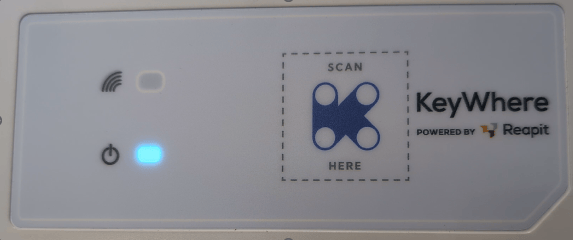
The v2 Panel will have Purple K Logo. The power light will pulse blue on start-up.
Software
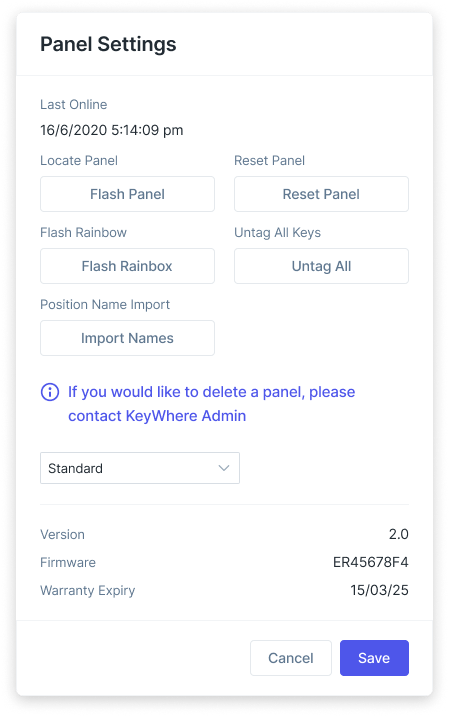
Panel Settings in KeyWhere shows v1 or v2
Does v2 allow multiple keysets for per hook?
Yes, v2 panels now support 2 tags per hook. Effectively doubling capacity with the intended use of two keysets for the same property held on one hook (for example the PM keyset and vacancy/sales keyset)
How much quicker do the lights respond?
The refresh is now near instantaneous when you add or remove a tag.
How much weight can the board hold?
v1 panels & v2 panels are both rated to support 24kgs of keysets
How much weight a single hook hold?
v1 panels & v2 panels are both rated to support 200g per hook
Are v1 and v2 panels compatible with each other?
Yes, a combination of v1 and v2 can work together on same wifi.
Are panel status lights the same between v1 and v2?
No. The power light for v2 panels will pulse blue on start-up. There are also new error states on v2 panels.