'%20d='M0%208a8%208%200%200%201%208-8h24a8%208%200%200%201%208%208v24a8%208%200%200%201-8%208H8a8%208%200%200%201-8-8V8Z'/%3e%3cpath%20fill='%23fff'%20d='M32.576%206C12.293%206%208.776%2025.887%207.424%2034H9.1c.45-2.977%203.493-14.748%2010.899-20.287%200%200-5.633%206.976-6.572%2015.051%203.426-.652%2013.845-3.372%2016.056-12.927l-3.84-.61c1.352-1.351%204.909-5.17%206.931-9.226V6Z'/%3e%3cdefs%3e%3clinearGradient%20id='reapit-lettings__a'%20x1='20.702'%20x2='20.702'%20y1='.351'%20y2='31.228'%20gradientUnits='userSpaceOnUse'%3e%3cstop%20stop-color='%235573FD'/%3e%3cstop%20offset='.575'%20stop-color='%234E56EA'/%3e%3c/linearGradient%3e%3c/defs%3e%3c/svg%3e)
How To Allow Inspections Before Available Date
This article will run through how to allow inspection before the available date in Reapit Lettings.
How to Allow Inspections Before Available Date
This article will run through how to allow inspection before the available date in Reapit Lettings.
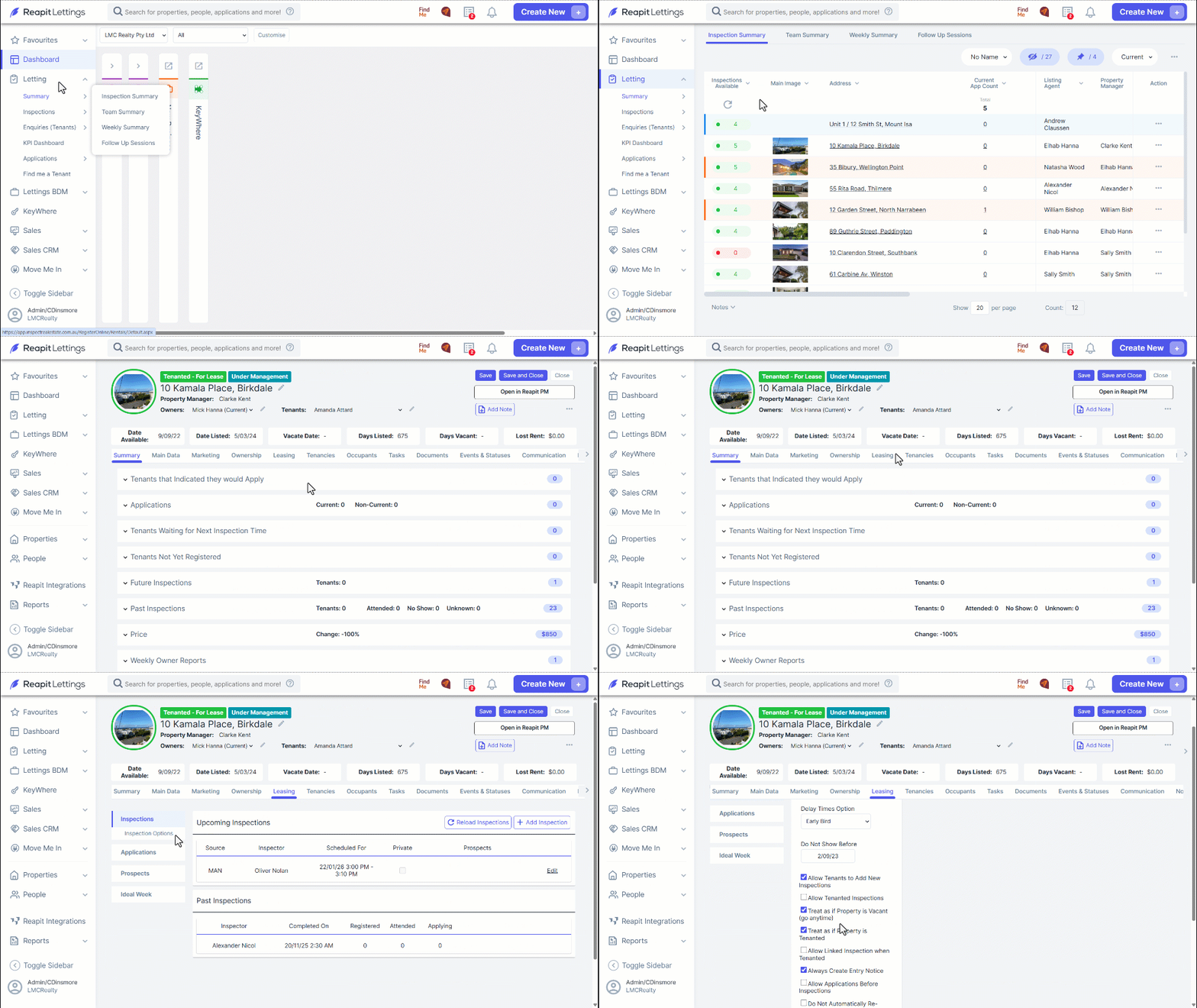
- Navigate to Letting.
- Click Summary.
- Click Inspection Summary.
- Find the property and then click on the address, this will load up the details for that property.
- Click the Leasing tab and then select the Inspection options section.
- In the Inspection Options, there are two settings to allow inspections before the available date:
- The Allow Tenanted Inspections setting allows people to book inspections, but they must be booked in advance (usually set to 3 days) so you have time to contact the tenant.
- The Treat as if Property is Vacant setting allows people to book inspections as they would for properties that are available now.