'%20d='M0%208a8%208%200%200%201%208-8h24a8%208%200%200%201%208%208v24a8%208%200%200%201-8%208H8a8%208%200%200%201-8-8V8Z'/%3e%3cpath%20fill='%23fff'%20d='M32.576%206C12.293%206%208.776%2025.887%207.424%2034H9.1c.45-2.977%203.493-14.748%2010.899-20.287%200%200-5.633%206.976-6.572%2015.051%203.426-.652%2013.845-3.372%2016.056-12.927l-3.84-.61c1.352-1.351%204.909-5.17%206.931-9.226V6Z'/%3e%3cdefs%3e%3clinearGradient%20id='reapit-lettings__a'%20x1='20.702'%20x2='20.702'%20y1='.351'%20y2='31.228'%20gradientUnits='userSpaceOnUse'%3e%3cstop%20stop-color='%235573FD'/%3e%3cstop%20offset='.575'%20stop-color='%234E56EA'/%3e%3c/linearGradient%3e%3c/defs%3e%3c/svg%3e)
Enquiry Email Forwarding Setup - All Emails (Outlook)
This article will run through how to set up Email Forwarding from an Outlook email account
Enquiry Email Forwarding Setup - All Emails (Outlook)
This article will run through how to set up Email Forwarding from an Outlook email account. This will redirect ALL emails from the nominated inbox to Reapit Lettings to process as an enquiry.
Note: Do not use this option if the inbox receives any emails other than enquiry emails.
Go to www.office.com and sign in using your email credentials. Alternatively, if you are using the latest version of Outlook, you may be able to complete the following steps from within Outlook on your computer.
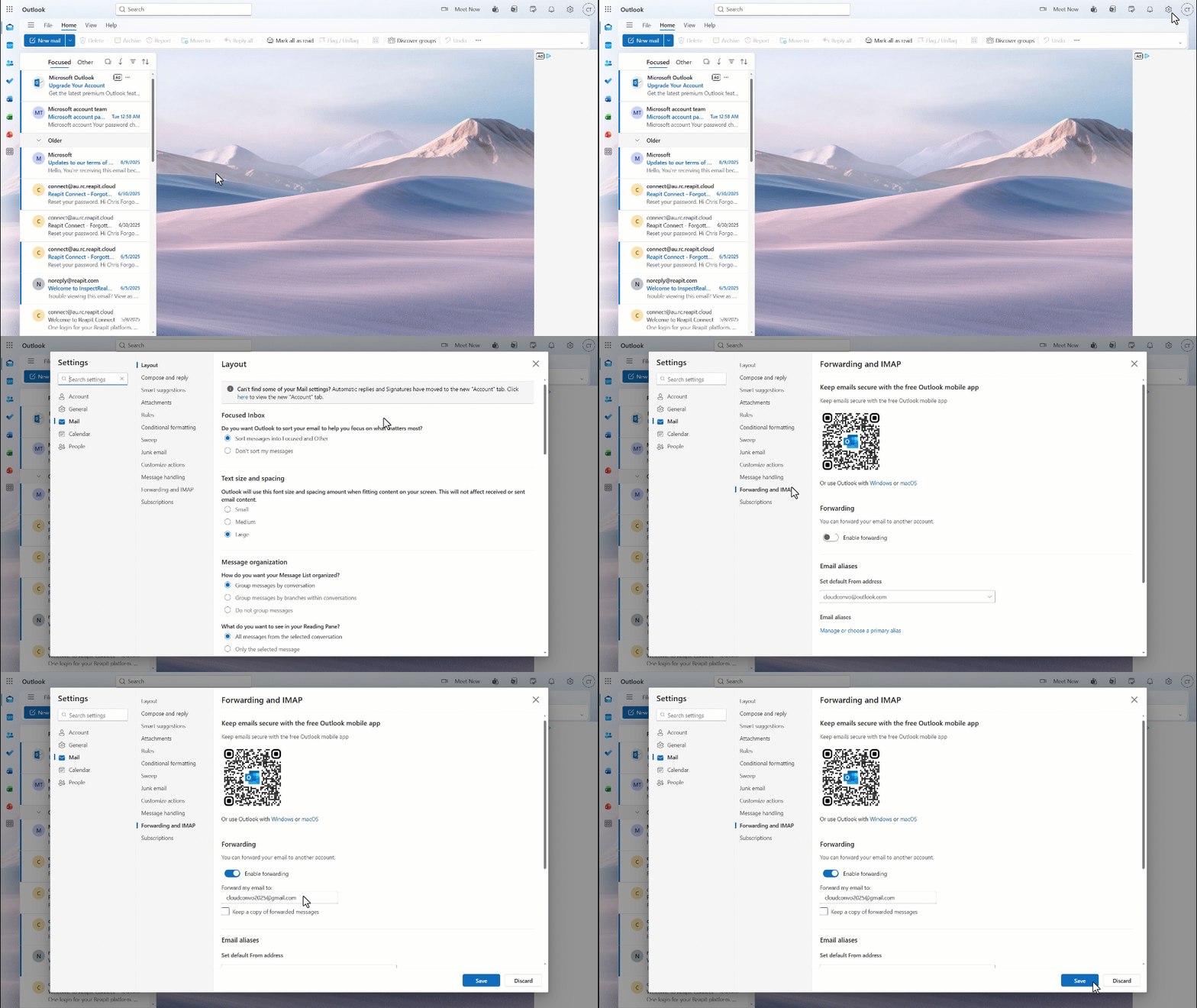
- Click on the Settings cog in the bar at the top of the screen.
- Click Mail.
- ****Click Forwarding and IMAP.
- Click the Enable forwarding toggle and enter the email address. If you wish to keep a copy of all forwarded messages, tick the additional box.
- Click Save.