'%20d='M0%208a8%208%200%200%201%208-8h24a8%208%200%200%201%208%208v24a8%208%200%200%201-8%208H8a8%208%200%200%201-8-8V8Z'/%3e%3cpath%20fill='%23fff'%20d='M32.576%206C12.293%206%208.776%2025.887%207.424%2034H9.1c.45-2.977%203.493-14.748%2010.899-20.287%200%200-5.633%206.976-6.572%2015.051%203.426-.652%2013.845-3.372%2016.056-12.927l-3.84-.61c1.352-1.351%204.909-5.17%206.931-9.226V6Z'/%3e%3cdefs%3e%3clinearGradient%20id='reapit-lettings__a'%20x1='20.702'%20x2='20.702'%20y1='.351'%20y2='31.228'%20gradientUnits='userSpaceOnUse'%3e%3cstop%20stop-color='%235573FD'/%3e%3cstop%20offset='.575'%20stop-color='%234E56EA'/%3e%3c/linearGradient%3e%3c/defs%3e%3c/svg%3e)
What is the Inspector Performance Report?
This article will help you understand and manage the Inspector Performance Report in Reapit Lettings
What is the Inspector Performance Report?
This article will help you understand and manage the Inspector Performance Report in Reapit Lettings.
The Inspector Performance Report highlights inspection results for your office. You will also find out what your conversion rate is, along with any trending patterns.
The report breaks down stats into 4 timeframes: yesterday, last 7 days, last 30 days & Year to Date.
Information included in this report:
- Inspections Conducted
- Tenants Booked
- Tenants Attended
- Applications Received
- Successful Applications
- Conversion Rate
This report displays stats for all inspectors, along with any inspections that did not have an inspector assigned.
It is an interactive report, meaning you can click on the relevant number to reveal more details.
Accessing the Inspector Performance Report
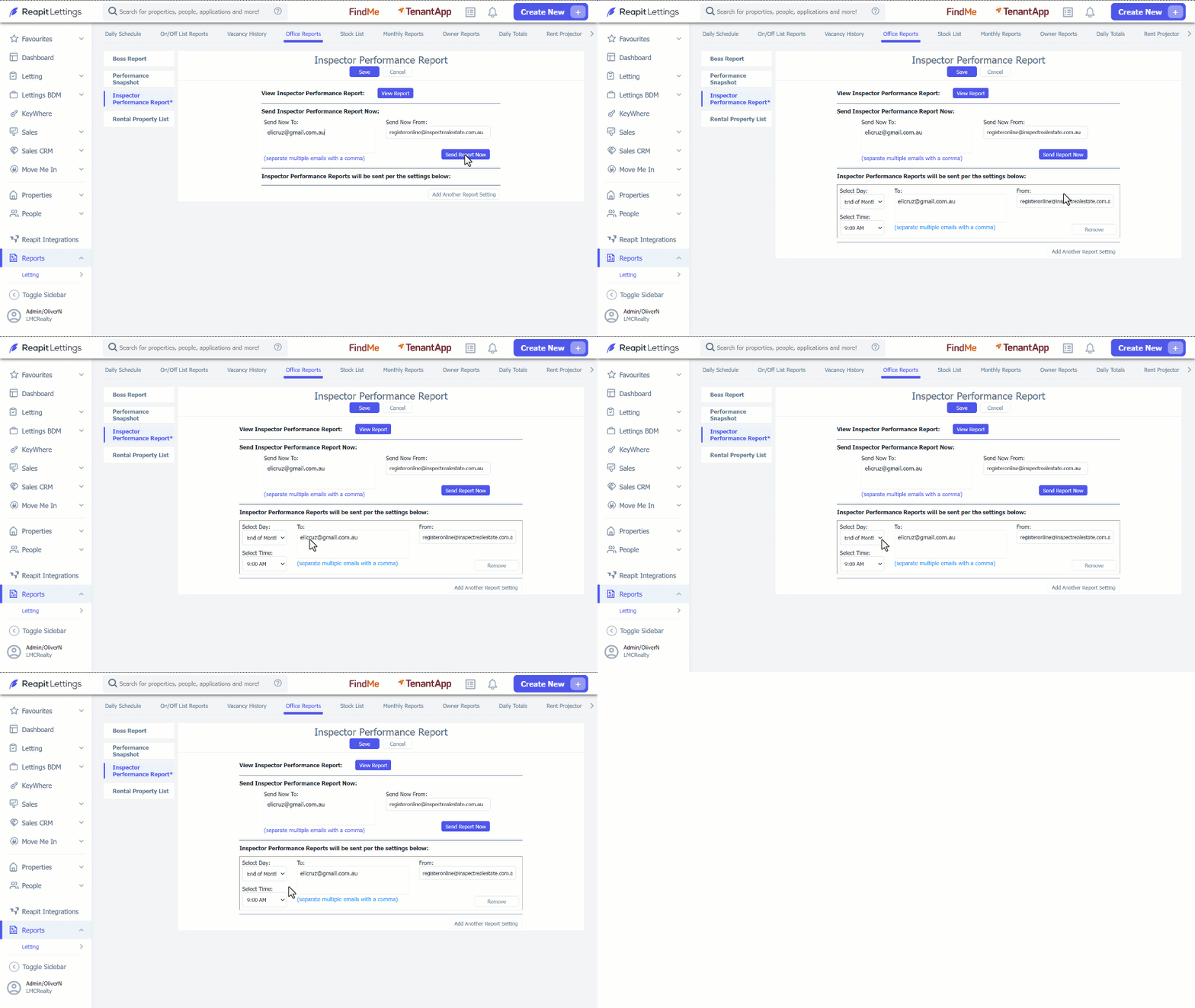
- Click on Reports. 2. Click on Letting. 3. Click on Office Reports. 4. Navigate to Inspector Performance Report. 5. Click on View Report. Alternatively, you may receive a copy of the report by adding the email address in the Sent Now To section and click Send Report Now.
6. To receive this report automatically, click on Add Another Report Setting. 7. Enter in the Email Address, Day and Time you would like the report to go to. 8. Click on Save.