'%20d='M0%208a8%208%200%200%201%208-8h24a8%208%200%200%201%208%208v24a8%208%200%200%201-8%208H8a8%208%200%200%201-8-8V8Z'/%3e%3cpath%20fill='%23fff'%20d='M32.576%206C12.293%206%208.776%2025.887%207.424%2034H9.1c.45-2.977%203.493-14.748%2010.899-20.287%200%200-5.633%206.976-6.572%2015.051%203.426-.652%2013.845-3.372%2016.056-12.927l-3.84-.61c1.352-1.351%204.909-5.17%206.931-9.226V6Z'/%3e%3cdefs%3e%3clinearGradient%20id='reapit-lettings__a'%20x1='20.702'%20x2='20.702'%20y1='.351'%20y2='31.228'%20gradientUnits='userSpaceOnUse'%3e%3cstop%20stop-color='%235573FD'/%3e%3cstop%20offset='.575'%20stop-color='%234E56EA'/%3e%3c/linearGradient%3e%3c/defs%3e%3c/svg%3e)
What is the Performance Snapshot?
This article will run through how the performance snapshot provides a comprehensive overview of the events transpiring within your office in Reapit Lettings. Breaking down key statistics into two primary categories: the preceding seven days and the last thirty days
What is the Performance Snapshot?
This article will run through how the performance snapshot provides a comprehensive overview of the events transpiring within your office in Reapit Lettings. Breaking down key statistics into two primary categories: the preceding seven days and the last thirty days.
The report encompasses a wide array of pertinent information, including:
- Enquiry Levels
- Scheduled Inspections
- Sources of Enquiries
- Vacancy Rate
- Applications Received
- Properties Leased
It is important to note that this report is interactive; thus, you have the capability to click on specific numbers to unveil additional details, facilitating a more thorough understanding of the presented data.
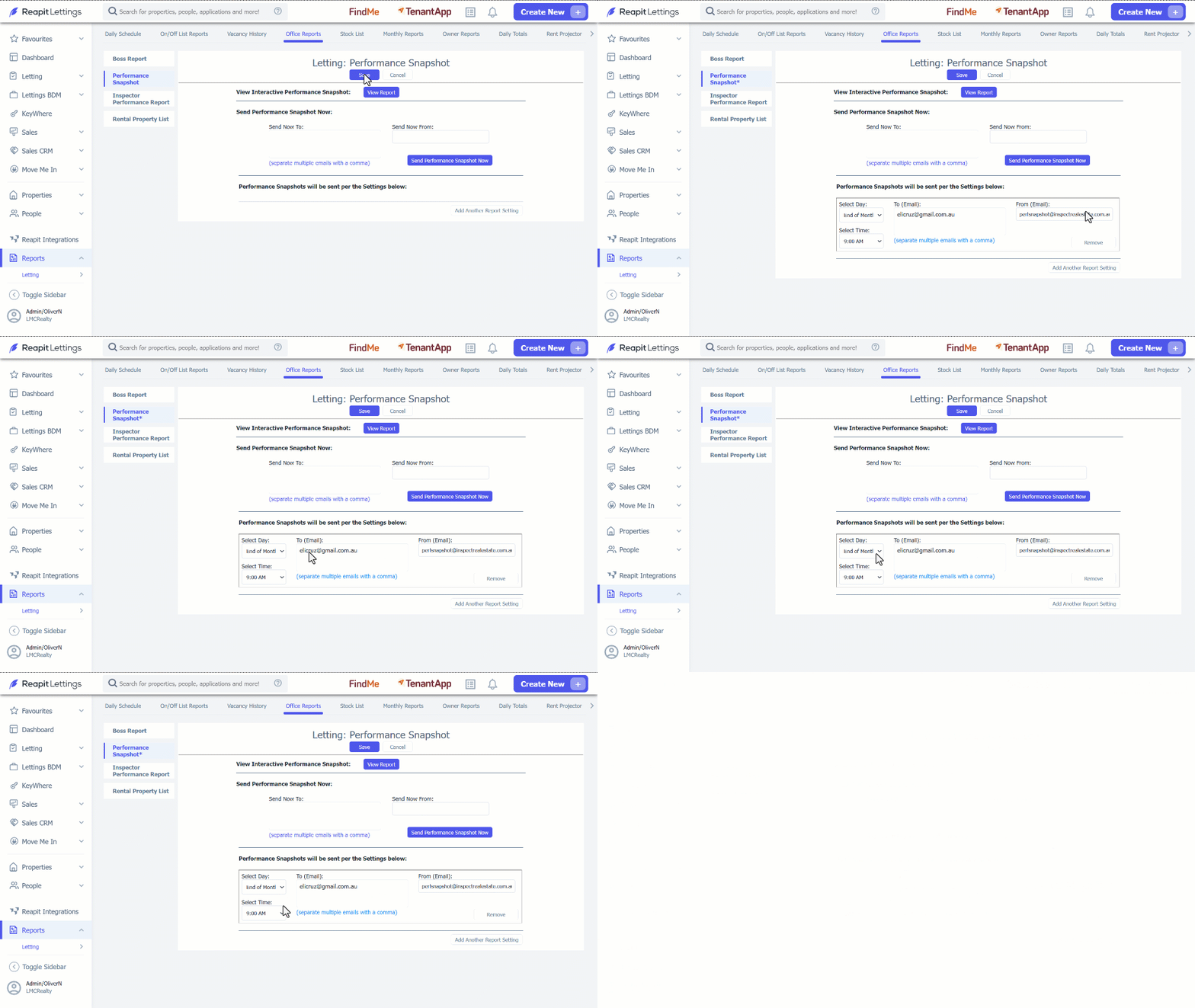
- Click on Reports. 2. Click on Letting. 3. Click on Office Reports. 4. Navigate to Performance Snapshot. 5. Click on View Report. Select the value adjacent to each description to access a detailed data breakdown. Ensure to click Close when finished.
Alternatively, you may receive a copy of the report by adding the email address in the Sent Now To section, then click Send Performance Snapshot Now.
6. To receive this report automatically, click on Add Another Report Setting. 7. Enter in the Email Address, Day and Time you would like the report to go to. 8. Click on Save.