'%20d='M0%208a8%208%200%200%201%208-8h24a8%208%200%200%201%208%208v24a8%208%200%200%201-8%208H8a8%208%200%200%201-8-8V8Z'/%3e%3cpath%20fill='%23fff'%20d='M32.576%206C12.293%206%208.776%2025.887%207.424%2034H9.1c.45-2.977%203.493-14.748%2010.899-20.287%200%200-5.633%206.976-6.572%2015.051%203.426-.652%2013.845-3.372%2016.056-12.927l-3.84-.61c1.352-1.351%204.909-5.17%206.931-9.226V6Z'/%3e%3cdefs%3e%3clinearGradient%20id='reapit-lettings__a'%20x1='20.702'%20x2='20.702'%20y1='.351'%20y2='31.228'%20gradientUnits='userSpaceOnUse'%3e%3cstop%20stop-color='%235573FD'/%3e%3cstop%20offset='.575'%20stop-color='%234E56EA'/%3e%3c/linearGradient%3e%3c/defs%3e%3c/svg%3e)
How to Utilise Self-Selection Categories as a Trigger for Campaigns
This article will run through how to use the self-selection categories as a trigger for your campaigns in Reapit Lettings. Note: You don't need to enable this again if you already did so in ROL Sales or Lettings BDM.
How to Utilise Self-Selection Categories as a Trigger for Campaigns
This article will run through how to use the self-selection categories as a trigger for your campaigns in Reapit Lettings.
Note: You don't need to enable this again if you already did so in ROL Sales or Lettings BDM.
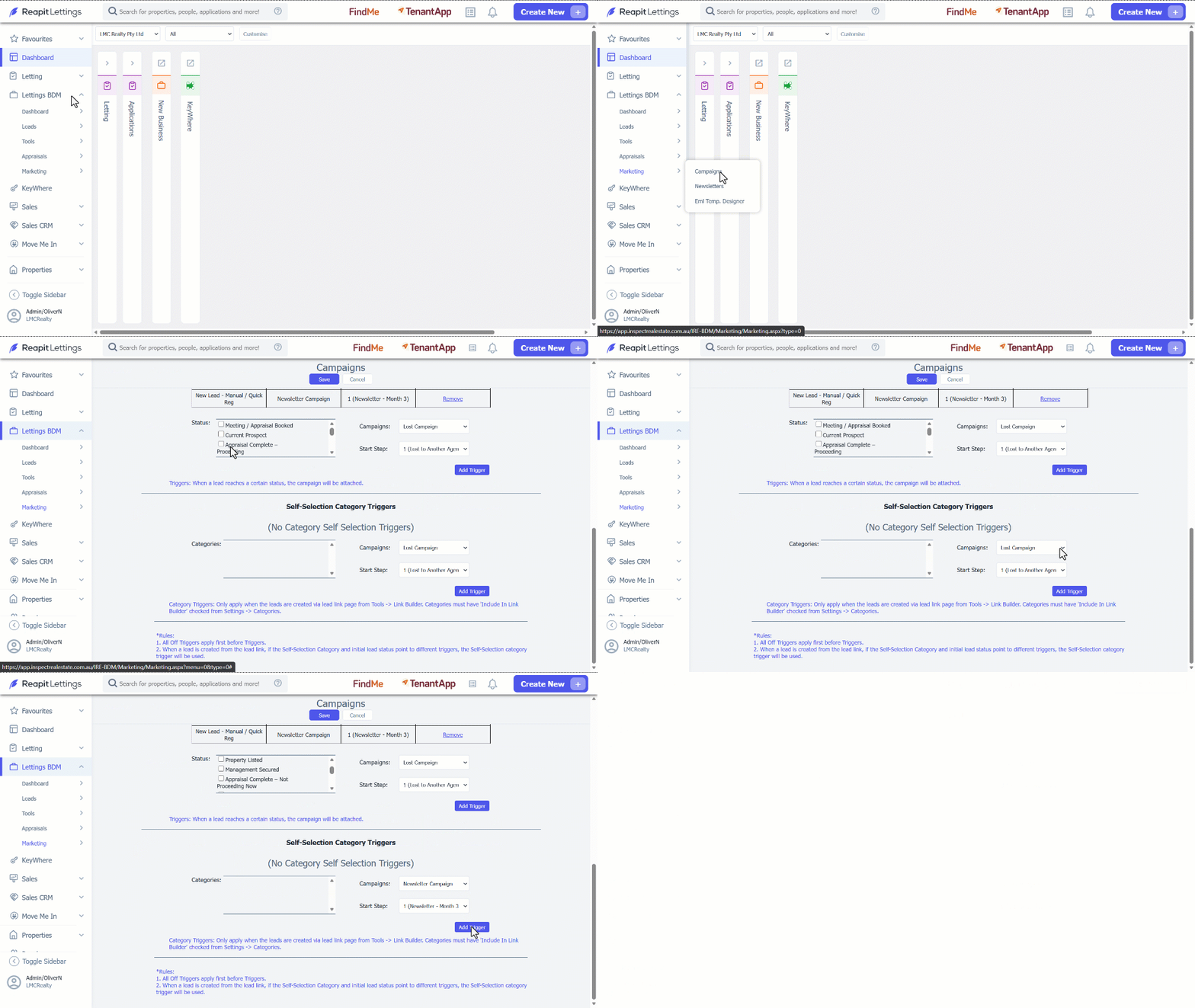
To set this up, you need to follow the steps below from within your Realestate.com.au Agent Admin. 1. Click on Lettings BDM. 2. Click on Marketing. 3. Select Campaigns. 4. Navigate to Triggers. 5. Navigate to Self-Selection Category Triggers. 6. Select the Category. 7. Select the Campaign. 8. Select the Start Step. 9. Click on Add Trigger. 10. Click on Save.
Note:
- Category Triggers: Only apply when the leads are created via lead link page from Tools -> Link Builder. Categories must have 'Include In Link Builder' checked from Settings -> Categories.
- All Off Triggers apply first before Triggers. When a lead is created from the lead link, if the Self-Selection Category and initial lead status point to different triggers, the Self-Selection category trigger will be used.