'%20d='M0%208a8%208%200%200%201%208-8h24a8%208%200%200%201%208%208v24a8%208%200%200%201-8%208H8a8%208%200%200%201-8-8V8Z'/%3e%3cpath%20fill='%23fff'%20d='M32.576%206C12.293%206%208.776%2025.887%207.424%2034H9.1c.45-2.977%203.493-14.748%2010.899-20.287%200%200-5.633%206.976-6.572%2015.051%203.426-.652%2013.845-3.372%2016.056-12.927l-3.84-.61c1.352-1.351%204.909-5.17%206.931-9.226V6Z'/%3e%3cdefs%3e%3clinearGradient%20id='reapit-lettings__a'%20x1='20.702'%20x2='20.702'%20y1='.351'%20y2='31.228'%20gradientUnits='userSpaceOnUse'%3e%3cstop%20stop-color='%235573FD'/%3e%3cstop%20offset='.575'%20stop-color='%234E56EA'/%3e%3c/linearGradient%3e%3c/defs%3e%3c/svg%3e)
What is the Rental Property List?
This article will provide you with an overview of what the rental property list is and how to access within your account
What is the Rental Property List?
This article will provide you with an overview of what the rental property list is and how to access within your account in Reapit Lettings.
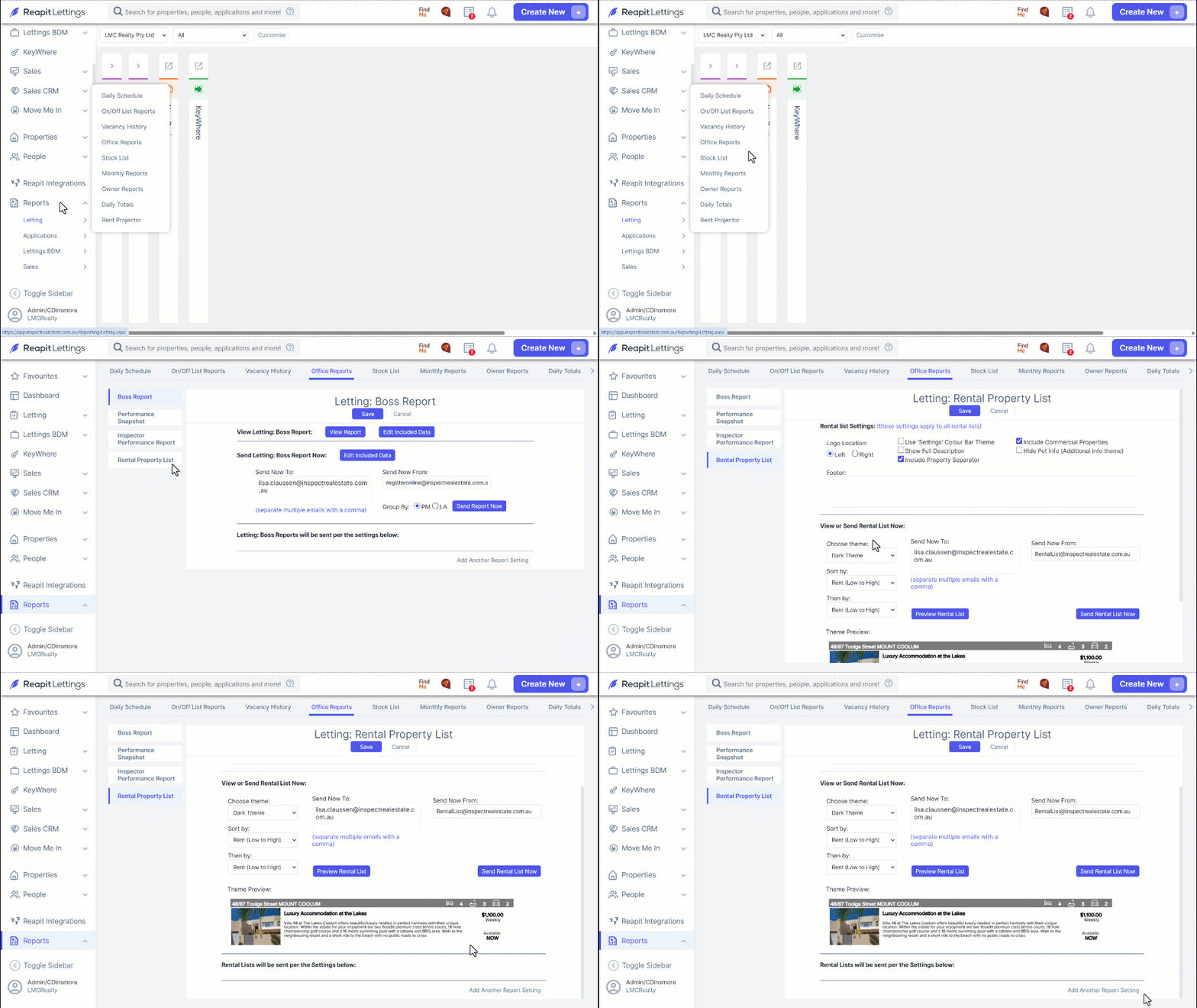
The Lettings Rental List comprises all properties available for rent across Reapit Lettings and serves as a valuable resource for in-office reference. It offers the flexibility to be printed for physical use or configured to automatically dispatch to designated individuals within the office. Additionally, this list can be integrated into your Reapit Viewings Rentals Event Messages for streamlined communication.
- Navigate to Reports.
- Click Lettings.
- Click Office Reports.
- Click Rental Property List.
- The Rental List may be tailored through the Rental List Settings section.
After configuring and saving the settings, the Rental List may be previewed. It is also possible to send the list immediately.
Adjust the settings by adding the email addresses designated to receive the report, and click Save.
Finally, to schedule the dispatch of a Rental List, please select Add Another Report Setting.
Note: The Rental List is programmed to consistently send the latest listing of rental properties.