'%20d='M0%208a8%208%200%200%201%208-8h24a8%208%200%200%201%208%208v24a8%208%200%200%201-8%208H8a8%208%200%200%201-8-8V8Z'/%3e%3cpath%20fill='%23fff'%20d='M32.576%206C12.293%206%208.776%2025.887%207.424%2034H9.1c.45-2.977%203.493-14.748%2010.899-20.287%200%200-5.633%206.976-6.572%2015.051%203.426-.652%2013.845-3.372%2016.056-12.927l-3.84-.61c1.352-1.351%204.909-5.17%206.931-9.226V6Z'/%3e%3cdefs%3e%3clinearGradient%20id='reapit-lettings__a'%20x1='20.702'%20x2='20.702'%20y1='.351'%20y2='31.228'%20gradientUnits='userSpaceOnUse'%3e%3cstop%20stop-color='%235573FD'/%3e%3cstop%20offset='.575'%20stop-color='%234E56EA'/%3e%3c/linearGradient%3e%3c/defs%3e%3c/svg%3e)
Lettings BDM Leads Generated from Applications for Private Landlords
This article will run through how Lettings BDM leads generate from applications for private inspections in Reapit Lettings
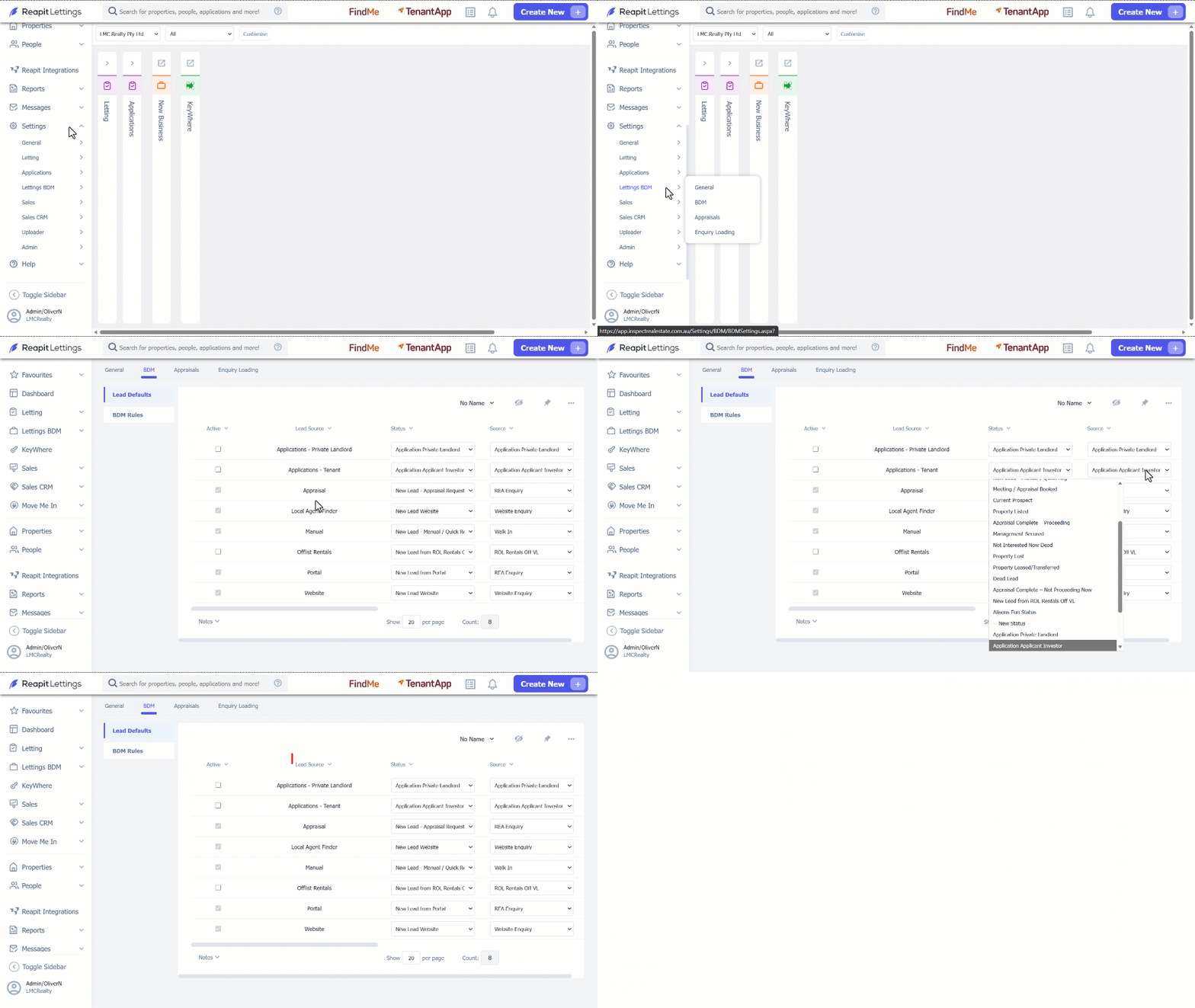
1. Click on Settings.
2. Click on Lettings BDM.
3. Select BDM.
4. Activate the Applications - Tenant message and set up a status and a source for this lead. It is recommended to use the Application Events for the Statuses and the Sources.
- The Application Lead Source sets the default source for leads generated from the application.
- The Application Lead Status sets the default status for leads generated from the application.
5. Once this is actioned, save the section to your account.
Note:
- When an applicant lists a private landlord (either current or previous) in the Residential History in 2Apply, the lead will display in Lettings BDM this will include the App ID and applicant names.
- The Contact/History will show a note that this lead was created by an application.