'%20d='M0%208a8%208%200%200%201%208-8h24a8%208%200%200%201%208%208v24a8%208%200%200%201-8%208H8a8%208%200%200%201-8-8V8Z'/%3e%3cpath%20fill='%23fff'%20d='M32.576%206C12.293%206%208.776%2025.887%207.424%2034H9.1c.45-2.977%203.493-14.748%2010.899-20.287%200%200-5.633%206.976-6.572%2015.051%203.426-.652%2013.845-3.372%2016.056-12.927l-3.84-.61c1.352-1.351%204.909-5.17%206.931-9.226V6Z'/%3e%3cdefs%3e%3clinearGradient%20id='reapit-lettings__a'%20x1='20.702'%20x2='20.702'%20y1='.351'%20y2='31.228'%20gradientUnits='userSpaceOnUse'%3e%3cstop%20stop-color='%235573FD'/%3e%3cstop%20offset='.575'%20stop-color='%234E56EA'/%3e%3c/linearGradient%3e%3c/defs%3e%3c/svg%3e)
How To Link To The Register Screen
This article will run through how to link to the register screen in Reapit Lettings.
How to Link to the Register Screen
This article will run through how to link to the register screen in Reapit Lettings.
The Register Screen is where potential tenants can see and book your inspection times. Each property has its own ‘Register Screen’.
- Navigate to Letting.
- Click Summary.
- Click Inspection Summary.
- Select the Property.
- Navigate to Marketing
- Click Links.
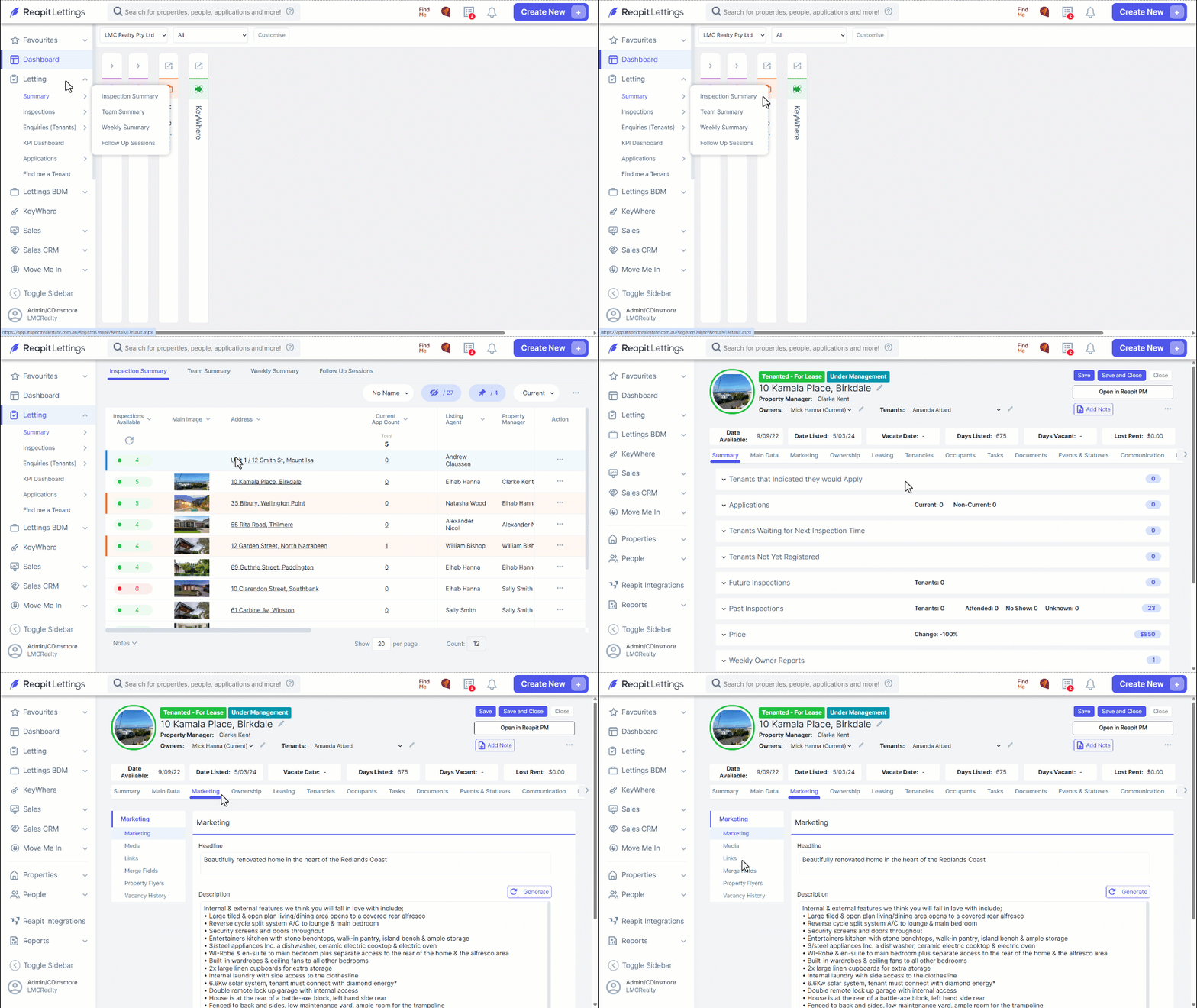
- Scroll down to the External Links Section. Here, you can add this link to your listing software to transform the virtual tour button on RealEstate.com.au and Domain.com.au into a direct link to the Register Screen.