'%20d='M0%208a8%208%200%200%201%208-8h24a8%208%200%200%201%208%208v24a8%208%200%200%201-8%208H8a8%208%200%200%201-8-8V8Z'/%3e%3cpath%20fill='%23fff'%20d='M32.576%206C12.293%206%208.776%2025.887%207.424%2034H9.1c.45-2.977%203.493-14.748%2010.899-20.287%200%200-5.633%206.976-6.572%2015.051%203.426-.652%2013.845-3.372%2016.056-12.927l-3.84-.61c1.352-1.351%204.909-5.17%206.931-9.226V6Z'/%3e%3cdefs%3e%3clinearGradient%20id='reapit-lettings__a'%20x1='20.702'%20x2='20.702'%20y1='.351'%20y2='31.228'%20gradientUnits='userSpaceOnUse'%3e%3cstop%20stop-color='%235573FD'/%3e%3cstop%20offset='.575'%20stop-color='%234E56EA'/%3e%3c/linearGradient%3e%3c/defs%3e%3c/svg%3e)
How to Add Key Details
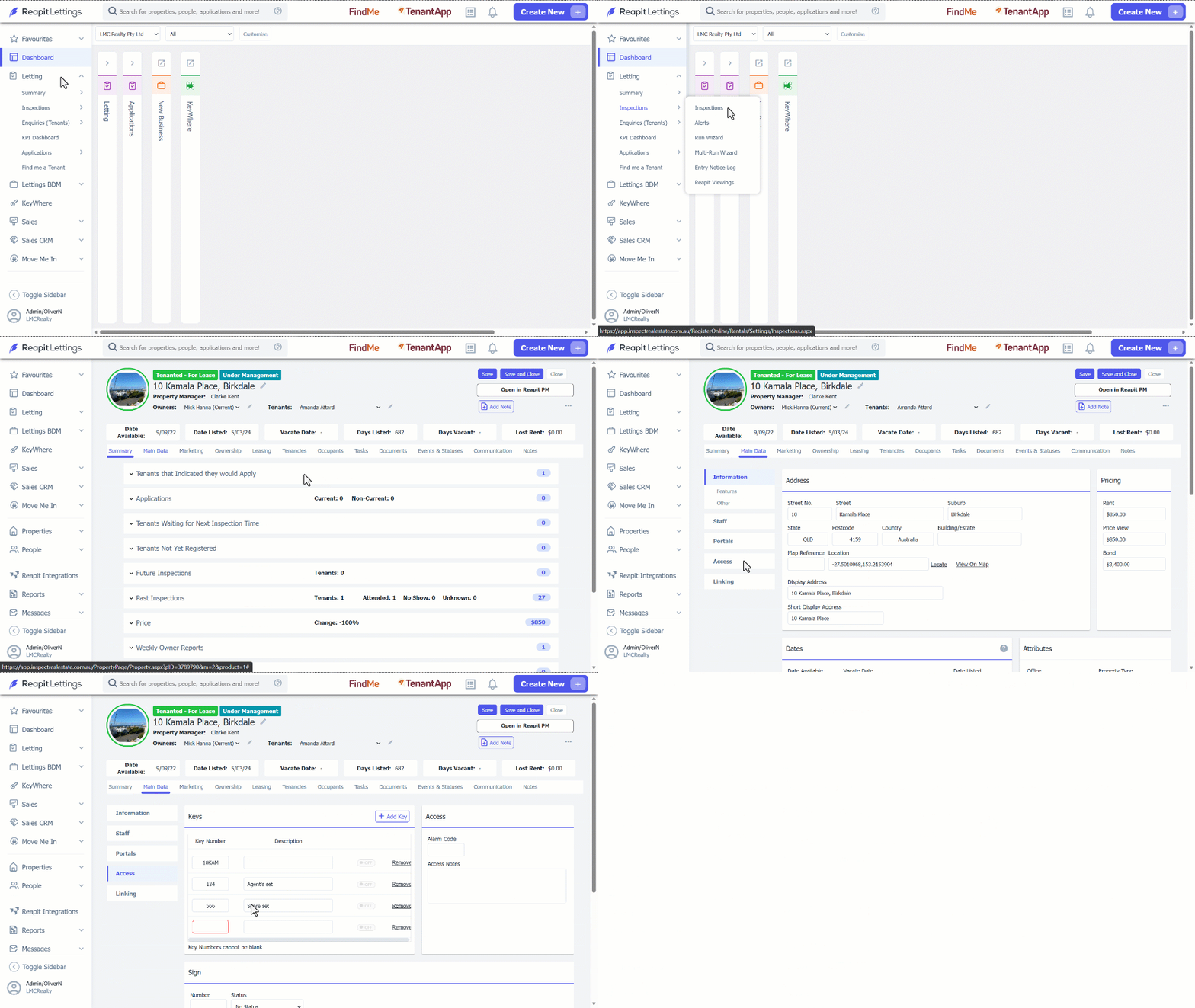
This article will run through how to add key details in Reapit Lettings.
How to Add Key Details
This article will run through how to add key details in Reapit Lettings.
- Click on Letting.
- Click on Summary.
- Click on Inspection Summary.
- Select the property from the Inspection Summary Page.
- Navigate to the Main Data tab.
- Click on Access.
- Click on Add Key within the Keys section.
- Add the key details.
- Click on Save.
Note: The key and access information you provide will be sent on the daily schedule email. This information will also be available in Reapit Viewings for the inspector. It is not provided for tenants.