'%20d='M0%208a8%208%200%200%201%208-8h24a8%208%200%200%201%208%208v24a8%208%200%200%201-8%208H8a8%208%200%200%201-8-8V8Z'/%3e%3cpath%20fill='%23fff'%20d='M32.576%206C12.293%206%208.776%2025.887%207.424%2034H9.1c.45-2.977%203.493-14.748%2010.899-20.287%200%200-5.633%206.976-6.572%2015.051%203.426-.652%2013.845-3.372%2016.056-12.927l-3.84-.61c1.352-1.351%204.909-5.17%206.931-9.226V6Z'/%3e%3cdefs%3e%3clinearGradient%20id='reapit-lettings__a'%20x1='20.702'%20x2='20.702'%20y1='.351'%20y2='31.228'%20gradientUnits='userSpaceOnUse'%3e%3cstop%20stop-color='%235573FD'/%3e%3cstop%20offset='.575'%20stop-color='%234E56EA'/%3e%3c/linearGradient%3e%3c/defs%3e%3c/svg%3e)
What To Do If An Owner Has Multiple Emails
This article will run through how to store multiple owner emails within your account
What to Do if an Owner Has Multiple Emails
This article will run through how to store multiple owner emails within your account.
Note: The system has been designed to ensure that only one email address can be associated with a single owner profile. To introduce a secondary email address, you will need to create a second owner profile.
- Navigate to People.
- Click Owners (Rentals).
- Click the three dots.
- Click New Owner.
- Enter the required information for the owner.
- Enter the property address for the owner, and click Add.
- Click Save.
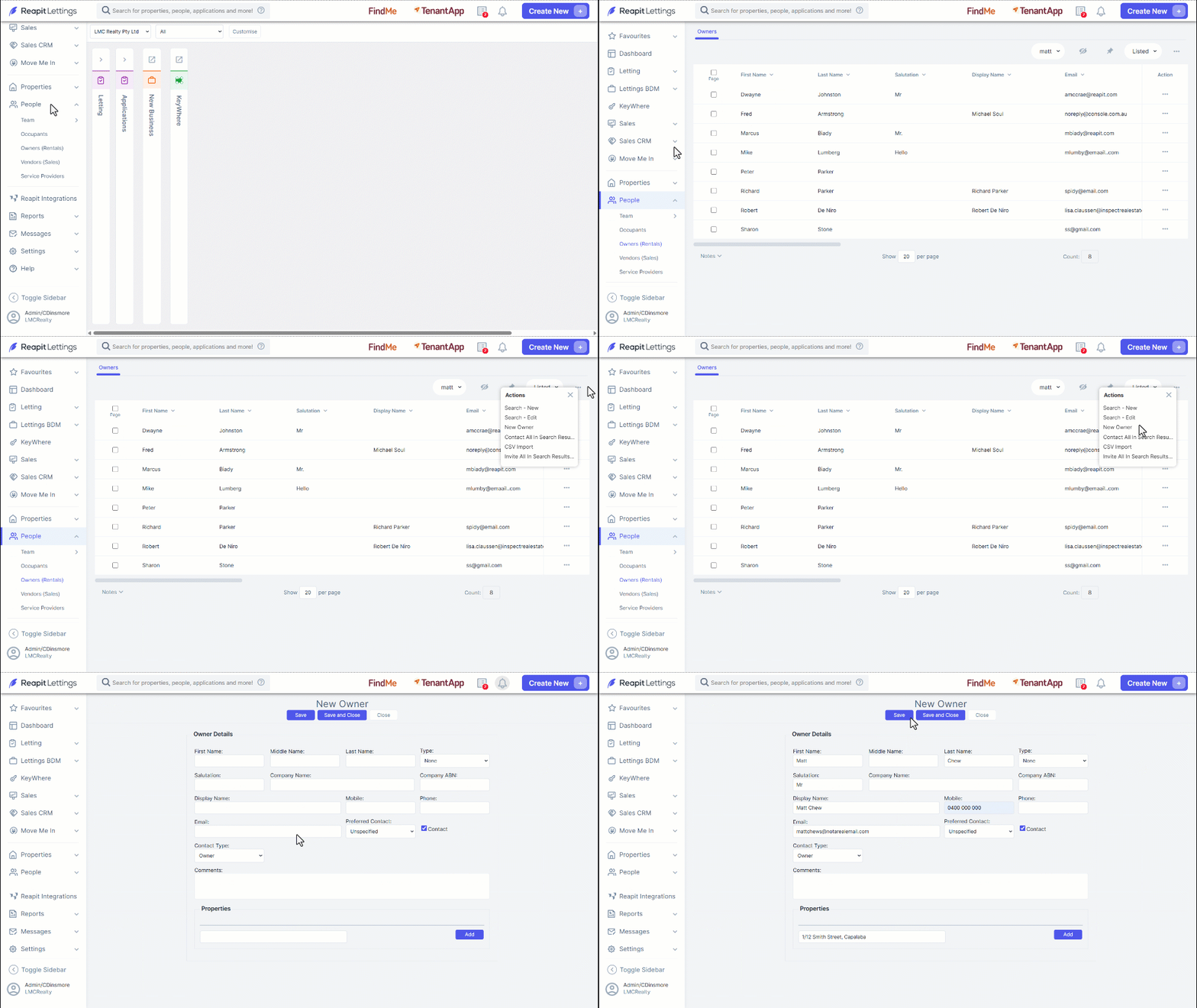
- Proceed with the new owner steps above for the second email address.