'%20d='M0%208a8%208%200%200%201%208-8h24a8%208%200%200%201%208%208v24a8%208%200%200%201-8%208H8a8%208%200%200%201-8-8V8Z'/%3e%3cpath%20fill='%23fff'%20d='M32.576%206C12.293%206%208.776%2025.887%207.424%2034H9.1c.45-2.977%203.493-14.748%2010.899-20.287%200%200-5.633%206.976-6.572%2015.051%203.426-.652%2013.845-3.372%2016.056-12.927l-3.84-.61c1.352-1.351%204.909-5.17%206.931-9.226V6Z'/%3e%3cdefs%3e%3clinearGradient%20id='reapit-lettings__a'%20x1='20.702'%20x2='20.702'%20y1='.351'%20y2='31.228'%20gradientUnits='userSpaceOnUse'%3e%3cstop%20stop-color='%235573FD'/%3e%3cstop%20offset='.575'%20stop-color='%234E56EA'/%3e%3c/linearGradient%3e%3c/defs%3e%3c/svg%3e)
User Permissions (Roles) In Lettings BDM
This article will run through the user permissions in Lettings BDM within Reapit Lettings
There are currently four levels of access in Reapit Lettings for your user accounts:
- Diamond (administration use)
- Gold (normal use)
- Silver (restricted use)
- Bronze (restricted use)
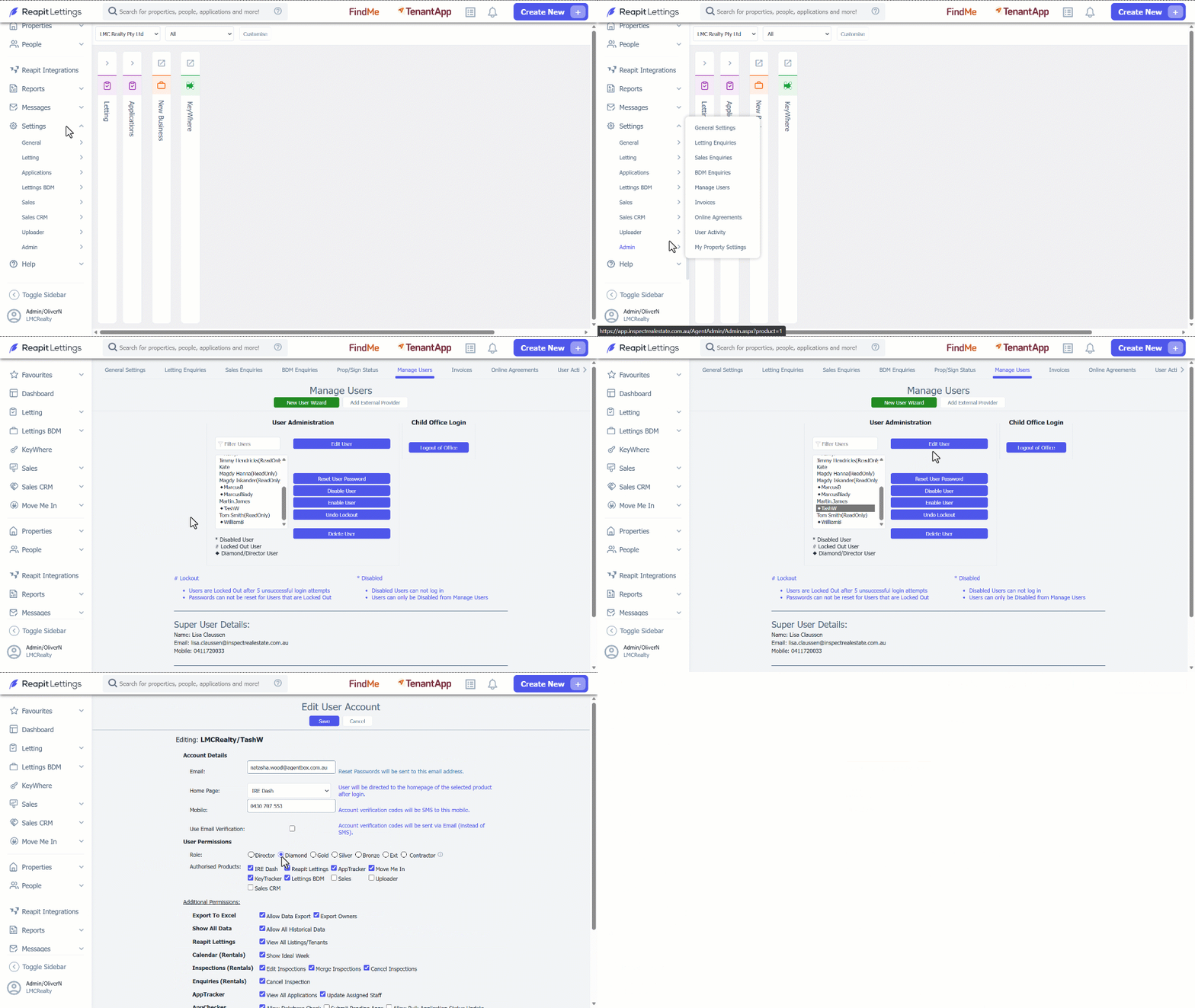
How to Edit a User Role/Permission:
1. Click on Settings.
2. Click on Admin.
3. Select Manage Users.
4. Select the user you wish to edit.
5. Click on Edit User button.
6. Select the role/level of permission you want to assign for that user.
7. Click on Save.
Please see the below access restrictions for each type of an account.
- A Diamond User can access all areas of your account.
- A Gold User cannot access the following menus: Admin, Lettings BDM Settings, Status Editor
- A Silver or Bronze User cannot access the following menus: Admin, Lettings BDM Settings, Status Editor, Settings, Reports