'%20d='M0%208a8%208%200%200%201%208-8h24a8%208%200%200%201%208%208v24a8%208%200%200%201-8%208H8a8%208%200%200%201-8-8V8Z'/%3e%3cpath%20fill='%23fff'%20d='M32.576%206C12.293%206%208.776%2025.887%207.424%2034H9.1c.45-2.977%203.493-14.748%2010.899-20.287%200%200-5.633%206.976-6.572%2015.051%203.426-.652%2013.845-3.372%2016.056-12.927l-3.84-.61c1.352-1.351%204.909-5.17%206.931-9.226V6Z'/%3e%3cdefs%3e%3clinearGradient%20id='reapit-lettings__a'%20x1='20.702'%20x2='20.702'%20y1='.351'%20y2='31.228'%20gradientUnits='userSpaceOnUse'%3e%3cstop%20stop-color='%235573FD'/%3e%3cstop%20offset='.575'%20stop-color='%234E56EA'/%3e%3c/linearGradient%3e%3c/defs%3e%3c/svg%3e)
Required Fields on Register Page Settings
This article will run through how to enable required settings for prospective tenants when registering interest within your account in Reapit Lettings
Required Fields on Register Page Settings
This article will run through how to enable required settings for prospective tenants when registering interest within your account in Reapit Lettings.
- Click on Settings. 2. Click on Letting. 3. Select General. 4. Navigate to Register Page tab. 5. Check the required Fields on Visible/Required Fields on Register Page checkboxes. 6. Click on Save.
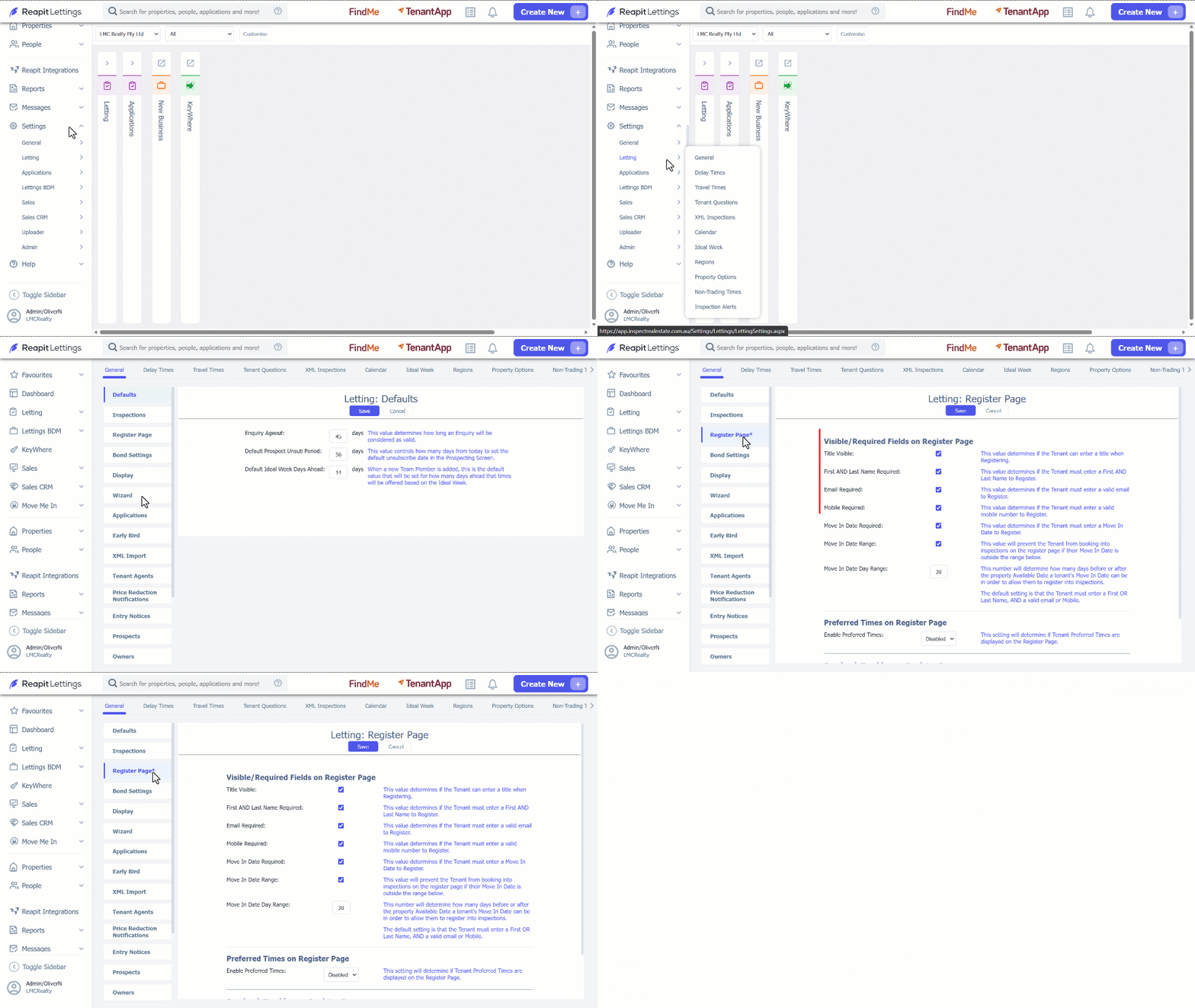
Note: The tenant is required to provide either a first or last name, in addition to a valid email address or mobile number, as per the default setting.