'%20d='M0%208a8%208%200%200%201%208-8h24a8%208%200%200%201%208%208v24a8%208%200%200%201-8%208H8a8%208%200%200%201-8-8V8Z'/%3e%3cpath%20fill='%23fff'%20d='M32.576%206C12.293%206%208.776%2025.887%207.424%2034H9.1c.45-2.977%203.493-14.748%2010.899-20.287%200%200-5.633%206.976-6.572%2015.051%203.426-.652%2013.845-3.372%2016.056-12.927l-3.84-.61c1.352-1.351%204.909-5.17%206.931-9.226V6Z'/%3e%3cdefs%3e%3clinearGradient%20id='reapit-lettings__a'%20x1='20.702'%20x2='20.702'%20y1='.351'%20y2='31.228'%20gradientUnits='userSpaceOnUse'%3e%3cstop%20stop-color='%235573FD'/%3e%3cstop%20offset='.575'%20stop-color='%234E56EA'/%3e%3c/linearGradient%3e%3c/defs%3e%3c/svg%3e)
How to Delete an Application
This process shows how to delete an Application in Reapit Lettings. This process can also be used for 2Apply and Apptracker.
Overview
How to Delete an Application
This process shows how to delete an Application in Reapit Lettings. This process can also be used for 2Apply and Apptracker.
Note: Once an application is deleted, it can not be recovered.
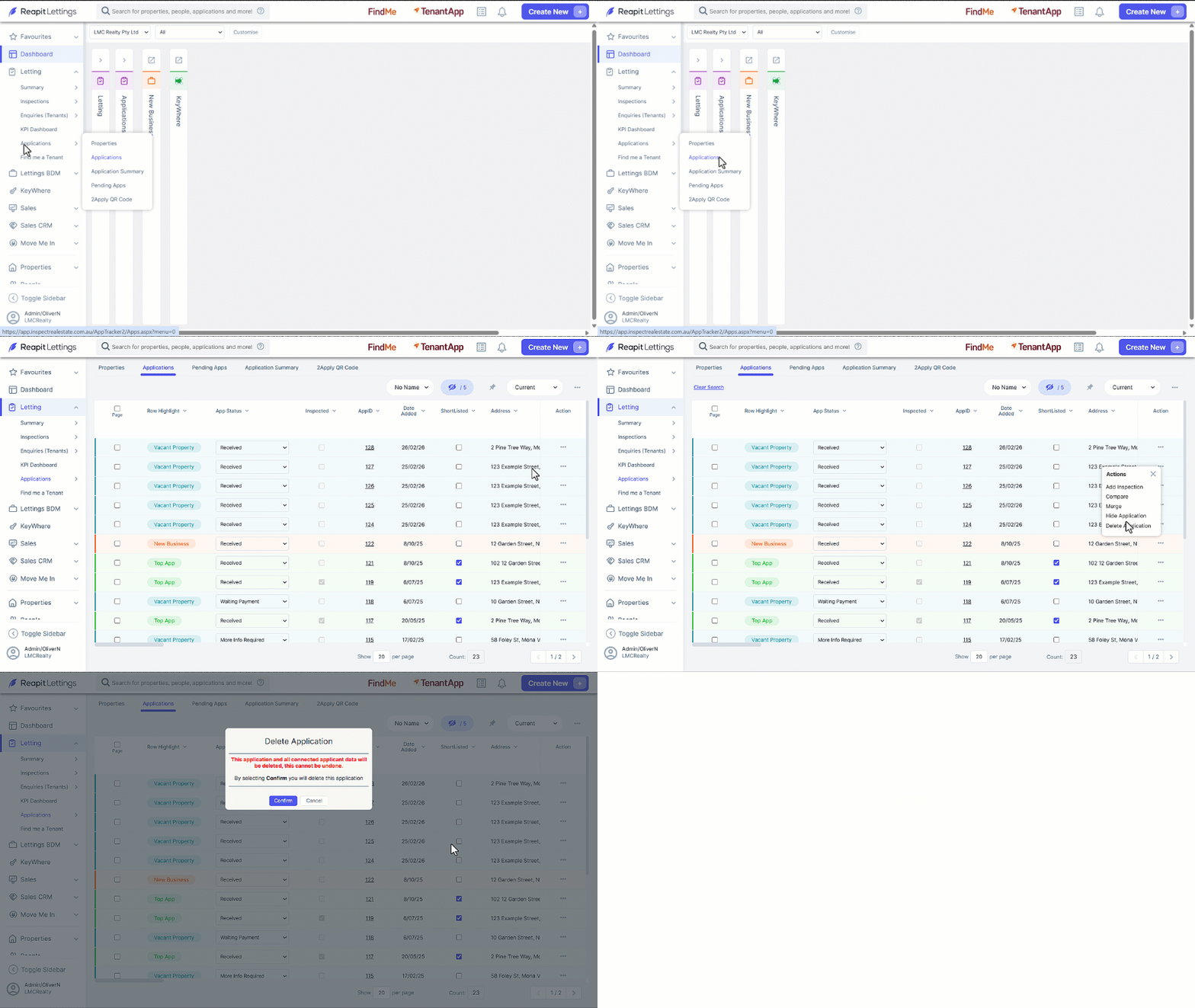
- Click on Letting.
- Click on Applications.
- Click on Applications.
- Search by selecting a column header, for example Address and enter search parameters.
- Locate the application to be deleted from the grid and click on the 3-dots then select Delete Application.
- Click on Confirm to delete the Application.