'%20d='M0%208a8%208%200%200%201%208-8h24a8%208%200%200%201%208%208v24a8%208%200%200%201-8%208H8a8%208%200%200%201-8-8V8Z'/%3e%3cpath%20fill='%23fff'%20d='M32.576%206C12.293%206%208.776%2025.887%207.424%2034H9.1c.45-2.977%203.493-14.748%2010.899-20.287%200%200-5.633%206.976-6.572%2015.051%203.426-.652%2013.845-3.372%2016.056-12.927l-3.84-.61c1.352-1.351%204.909-5.17%206.931-9.226V6Z'/%3e%3cdefs%3e%3clinearGradient%20id='reapit-lettings__a'%20x1='20.702'%20x2='20.702'%20y1='.351'%20y2='31.228'%20gradientUnits='userSpaceOnUse'%3e%3cstop%20stop-color='%235573FD'/%3e%3cstop%20offset='.575'%20stop-color='%234E56EA'/%3e%3c/linearGradient%3e%3c/defs%3e%3c/svg%3e)
Smart Checker
This article will run through how you can utilise the smart checker function within Reapit Lettings to verify the validity of a mobile number. Smart Checker provides users with a level of confidence on the likelihood of the mobile number being authentic based on the breakdown of usage with Reapit Lettings.
Smart Checker
This article will run through how you can utilise the smart checker function within Reapit Lettings to verify the validity of a mobile number.
Smart Checker provides users with a level of confidence on the likelihood of the mobile number being authentic based on the breakdown of usage with Reapit Lettings.
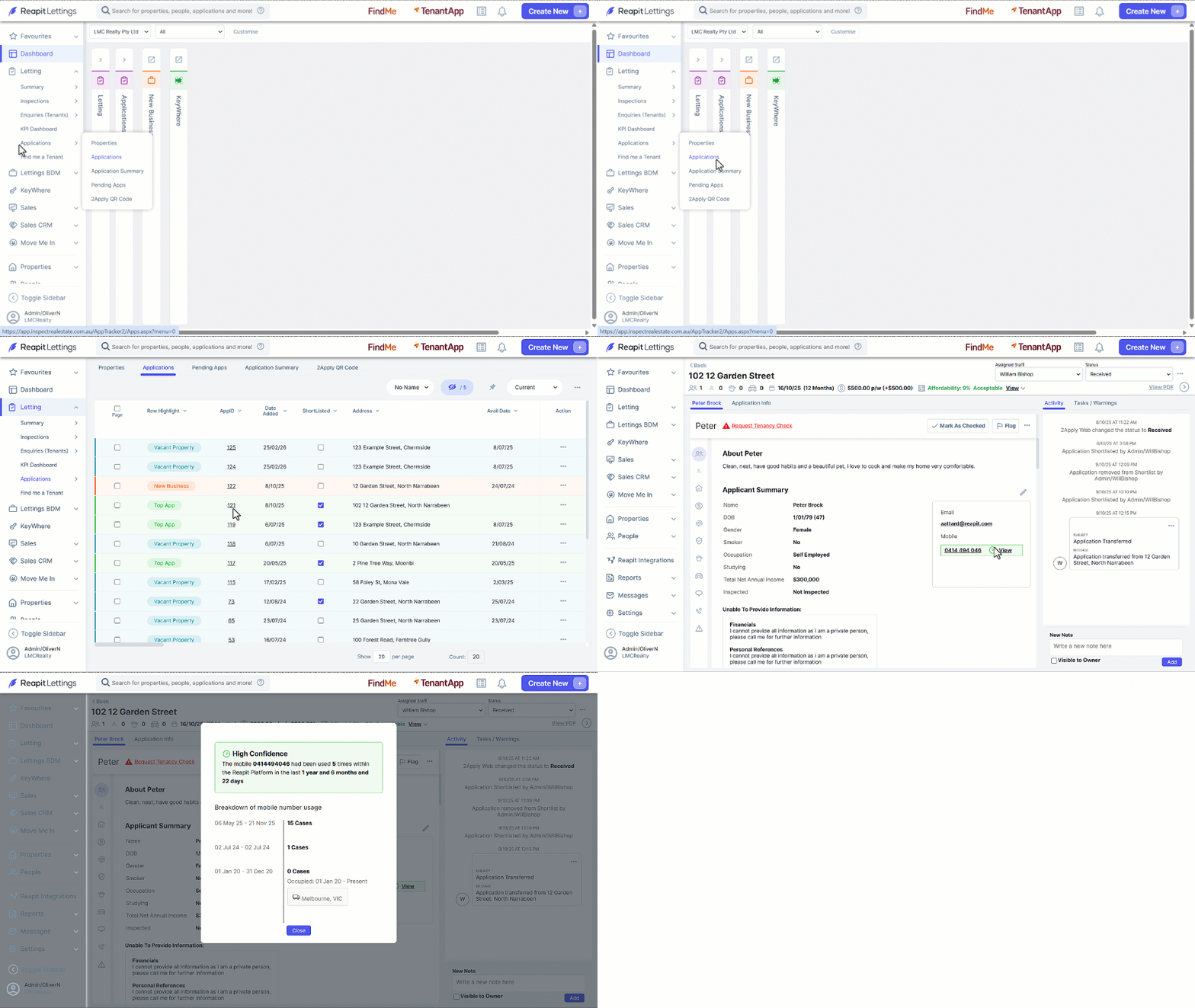
- Click on Letting.
- Click on ****Applications
- Click on Applications
- Select the appropriate AppID.
- The applicant’s mobile number will be highlighted, click on View to the right of the number.
Note: You can access a snapshot usage summary by hovering your cursor over the Gauge Icon. This feature is available for your convenience and review.