'%20d='M0%208a8%208%200%200%201%208-8h24a8%208%200%200%201%208%208v24a8%208%200%200%201-8%208H8a8%208%200%200%201-8-8V8Z'/%3e%3cpath%20fill='%23fff'%20d='M32.576%206C12.293%206%208.776%2025.887%207.424%2034H9.1c.45-2.977%203.493-14.748%2010.899-20.287%200%200-5.633%206.976-6.572%2015.051%203.426-.652%2013.845-3.372%2016.056-12.927l-3.84-.61c1.352-1.351%204.909-5.17%206.931-9.226V6Z'/%3e%3cdefs%3e%3clinearGradient%20id='reapit-lettings__a'%20x1='20.702'%20x2='20.702'%20y1='.351'%20y2='31.228'%20gradientUnits='userSpaceOnUse'%3e%3cstop%20stop-color='%235573FD'/%3e%3cstop%20offset='.575'%20stop-color='%234E56EA'/%3e%3c/linearGradient%3e%3c/defs%3e%3c/svg%3e)
How To View Application History In Letting
This article will run through how to view application history in letting
How to View Application History in Reapit Lettings
This article will run through how to view application history in Reapit lettings.
- Navigate to Create New.
- Click Rentals.
- Click Register for Inspection.
- Type in the prospect's contact details on the right-hand side and select Search.
- If they are in the database, their name will appear. From here, select Open.
- Go to Applications, located on the left-hand side. Here you will see all the details of what applications the prospect has submitted.
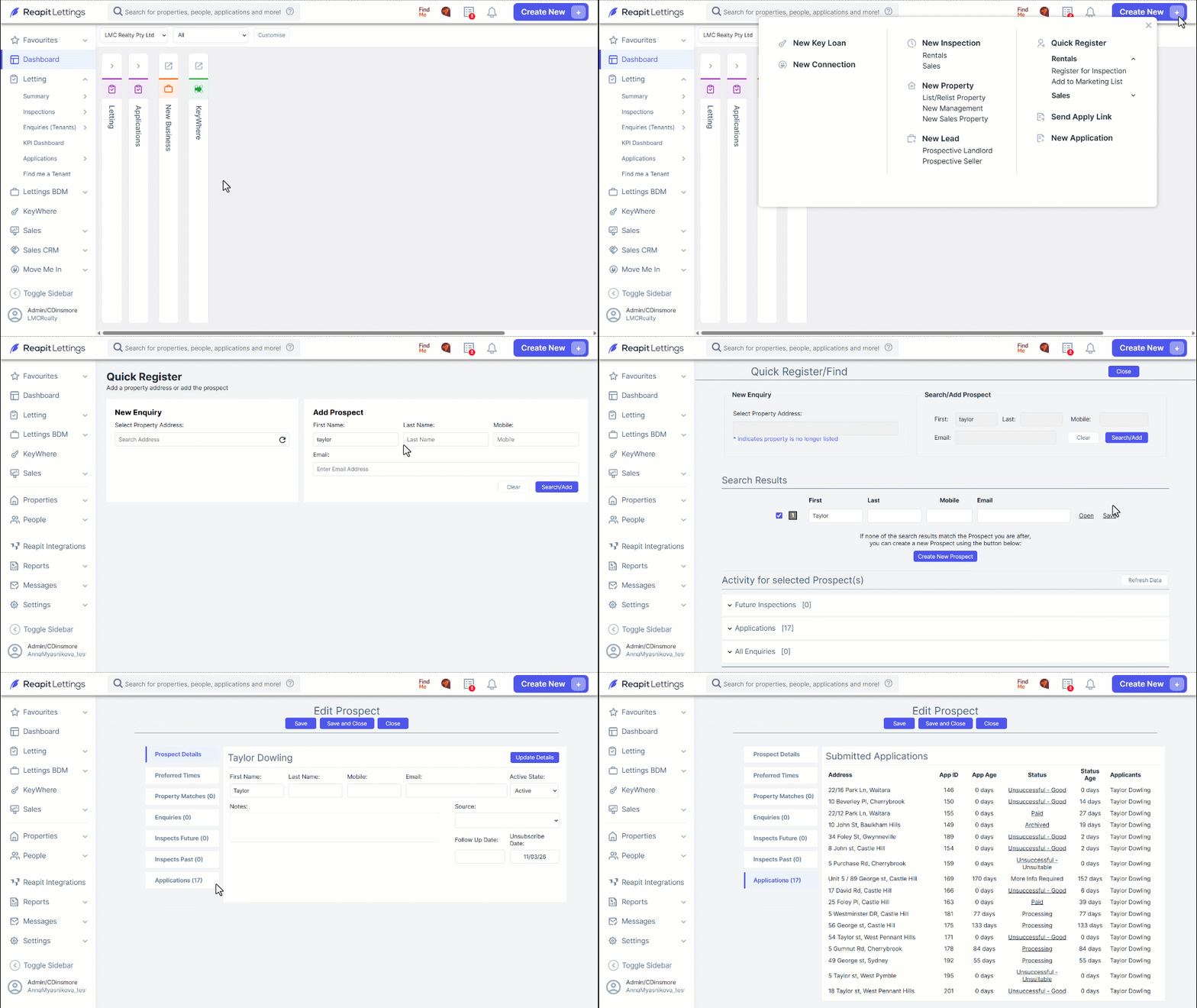
- By selecting the application status, a history report will appear, detailing times and dates when there were status changes.