'%20d='M0%208a8%208%200%200%201%208-8h24a8%208%200%200%201%208%208v24a8%208%200%200%201-8%208H8a8%208%200%200%201-8-8V8Z'/%3e%3cpath%20fill='%23fff'%20d='M32.576%206C12.293%206%208.776%2025.887%207.424%2034H9.1c.45-2.977%203.493-14.748%2010.899-20.287%200%200-5.633%206.976-6.572%2015.051%203.426-.652%2013.845-3.372%2016.056-12.927l-3.84-.61c1.352-1.351%204.909-5.17%206.931-9.226V6Z'/%3e%3cdefs%3e%3clinearGradient%20id='reapit-lettings__a'%20x1='20.702'%20x2='20.702'%20y1='.351'%20y2='31.228'%20gradientUnits='userSpaceOnUse'%3e%3cstop%20stop-color='%235573FD'/%3e%3cstop%20offset='.575'%20stop-color='%234E56EA'/%3e%3c/linearGradient%3e%3c/defs%3e%3c/svg%3e)
Hide the Applicant Activity Panel using the Toggle Activity Bar
This article will run through how enable the toggle activity bar to hide the activity panel within Reapit Lettings.
Overview
Hide the Applicant Activity Panel using the Toggle Activity Bar
This article will run through how enable the toggle activity bar to hide the activity panel within Reapit Lettings.
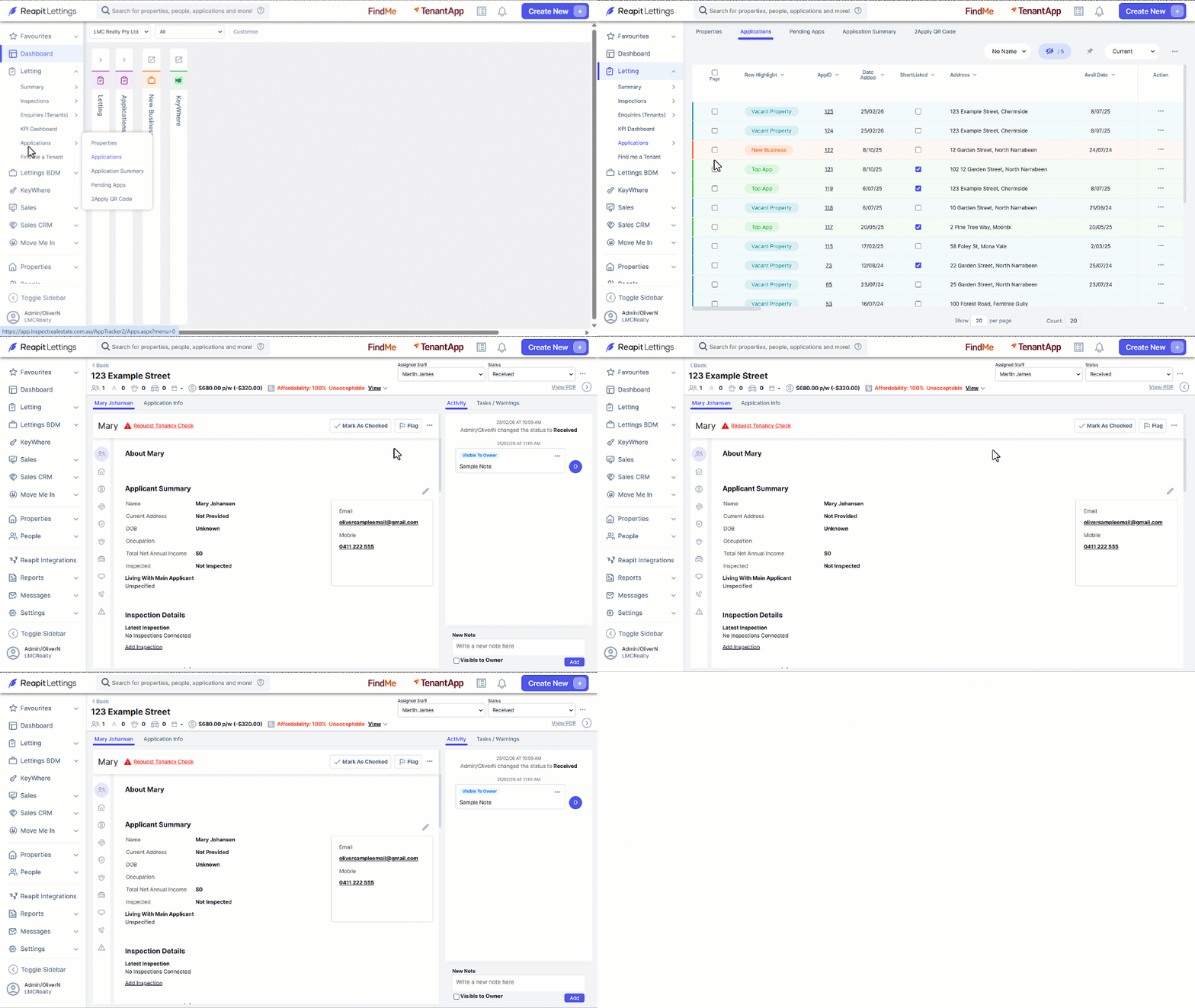
- Click on Letting.
- Click on Applications.
- Click on Applications.
- Select the property address.
- Navigate to the Applicant section, hide the activity panel by clicking the Activity Bar Arrow.
- To access the activity panel again, simply click the Activity Bar Arrow again.
Note: When re-entering the same or a different application set as default, the activity panel remains visible.