'%20d='M0%208a8%208%200%200%201%208-8h24a8%208%200%200%201%208%208v24a8%208%200%200%201-8%208H8a8%208%200%200%201-8-8V8Z'/%3e%3cpath%20fill='%23fff'%20d='M32.576%206C12.293%206%208.776%2025.887%207.424%2034H9.1c.45-2.977%203.493-14.748%2010.899-20.287%200%200-5.633%206.976-6.572%2015.051%203.426-.652%2013.845-3.372%2016.056-12.927l-3.84-.61c1.352-1.351%204.909-5.17%206.931-9.226V6Z'/%3e%3cdefs%3e%3clinearGradient%20id='reapit-lettings__a'%20x1='20.702'%20x2='20.702'%20y1='.351'%20y2='31.228'%20gradientUnits='userSpaceOnUse'%3e%3cstop%20stop-color='%235573FD'/%3e%3cstop%20offset='.575'%20stop-color='%234E56EA'/%3e%3c/linearGradient%3e%3c/defs%3e%3c/svg%3e)
How To Add Additional Applicants To An Existing Application
This article will run through how to add multiple applicants to an existing application within Reapit Lettings.
Overview
How to Add Additional Applicants to an Existing Application
This article will run through how to add multiple applicants to an existing application within Reapit Lettings.
- Click on Letting.
- Click on Applications.
- Click on Applications.
- Select the appropriate AppID.
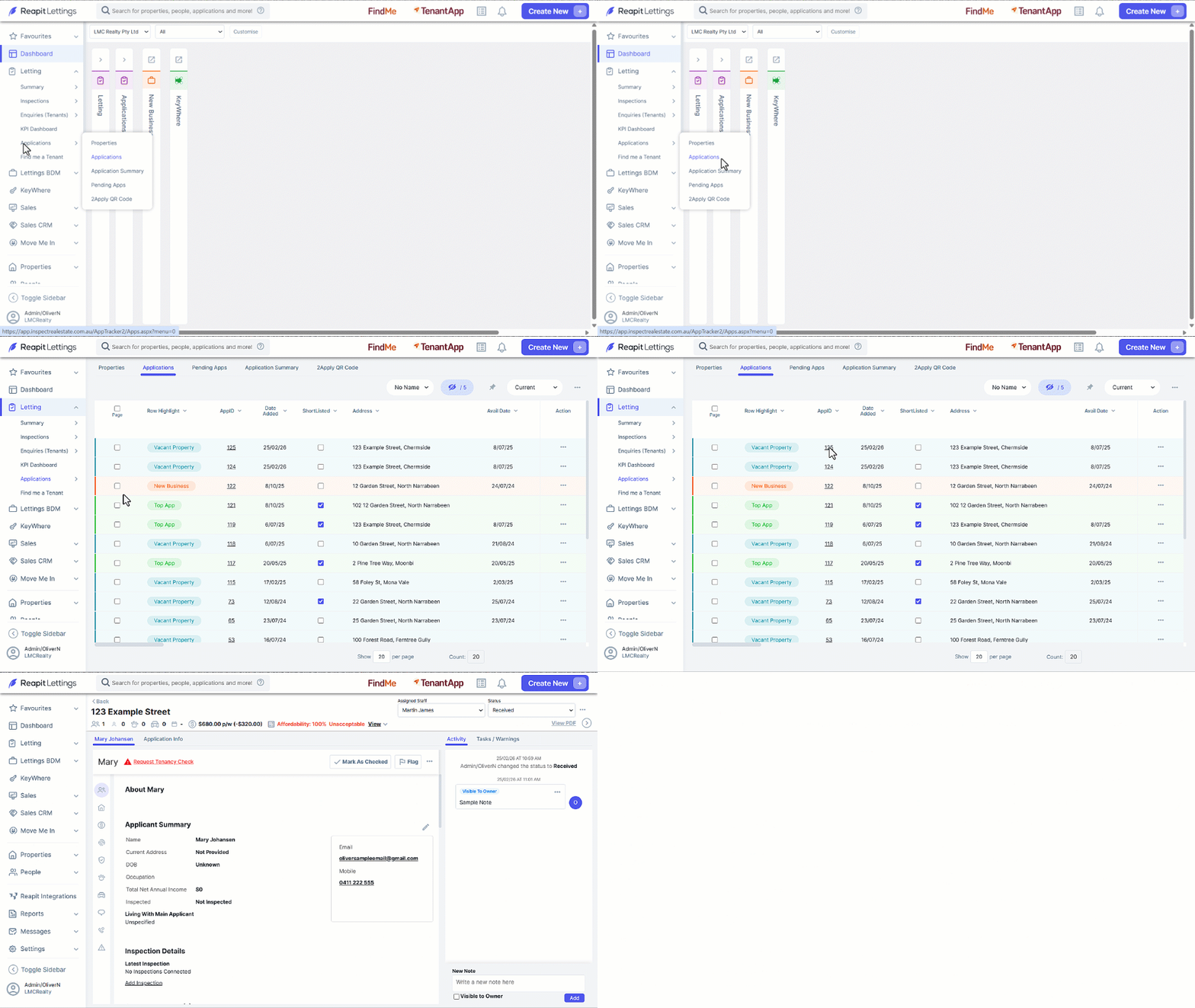
- Click the 3-Dots and select Add Applicant.
- Enter new applicants First Name, Last Name, email, and mobile number, click the Contact checkbox if saving them as a new contact in your account.
- Click on Save. ****
- Navigate to the new applicants Application screen, click on the 3-Dots and select Send Apply Link.