'%20d='M0%208a8%208%200%200%201%208-8h24a8%208%200%200%201%208%208v24a8%208%200%200%201-8%208H8a8%208%200%200%201-8-8V8Z'/%3e%3cpath%20fill='%23fff'%20d='M32.576%206C12.293%206%208.776%2025.887%207.424%2034H9.1c.45-2.977%203.493-14.748%2010.899-20.287%200%200-5.633%206.976-6.572%2015.051%203.426-.652%2013.845-3.372%2016.056-12.927l-3.84-.61c1.352-1.351%204.909-5.17%206.931-9.226V6Z'/%3e%3cdefs%3e%3clinearGradient%20id='reapit-lettings__a'%20x1='20.702'%20x2='20.702'%20y1='.351'%20y2='31.228'%20gradientUnits='userSpaceOnUse'%3e%3cstop%20stop-color='%235573FD'/%3e%3cstop%20offset='.575'%20stop-color='%234E56EA'/%3e%3c/linearGradient%3e%3c/defs%3e%3c/svg%3e)
BDM Settings
This article covers general BDM Settings it Reapit Lettings.
- Click on Settings.
- Click on Lettings BDM.
- Click on General.
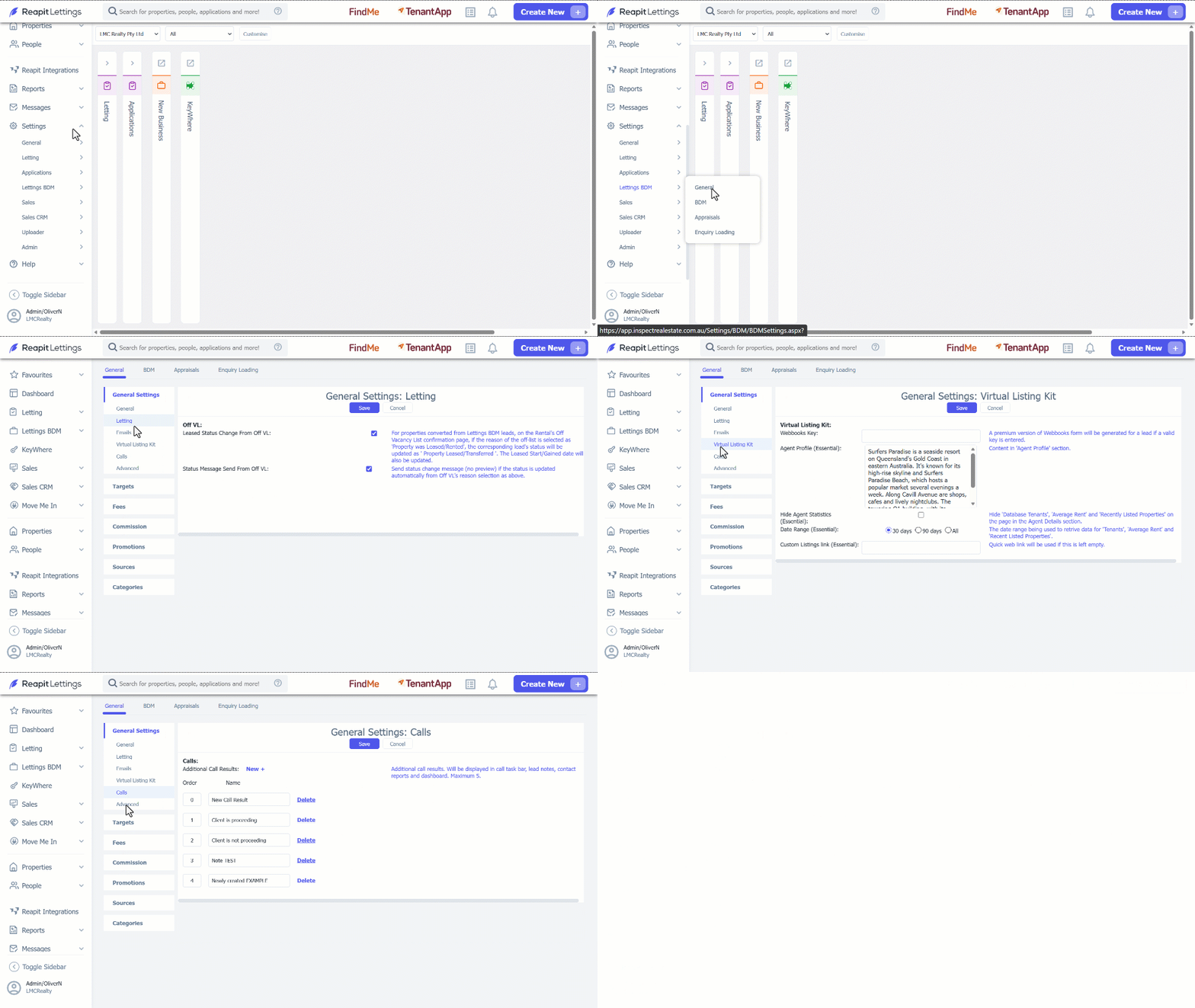
- Under the General Settings Tab, there are a range of setting that can be applied. The Table below breaks down each section.
| Setting | Explanation |
| General | |
| LeadID Prefix | This prefix will be added to the beginning of the LeadID (e.g. 'I-' will show LeadID as 'I-123'). |
| Source Required | Leads will require a source to be selected before saving. |
| Assign User as BDM | The logged-in user will be the default selected BDM for new manually-entered leads. |
| Sort Referrer by Source | In Edit Lead page or Tools page, if a source is selected, the referrers will be brought on top of dropdown selection if they belong to that source. |
| Financial Year Start Month | 'Year to Date' statistics will be based off this. |
| Only Current Leads To Follow Up From Dashboard | 'LEADS DUE FOR FOLLOW UP' action tile from dashboard will direct users to Leads page with All relevant leads, regardless of whether the leads are current or not. |
| Status for Financial Capture | If the lead status is changed to this status, the financial related information for the lead will be prompted to be completed via the Status Change Wizard |
| Include Letting Fee in Revenue Calculation | Letting Fee inclusion in the revenue calculation |
| Require Lead Financial details on Status change | Validates lead financial details when lead status is changed to the status set by the agent to capture financial details of the lead. |
| Handle Duplicate Contact Assignee: | If a new contact matches an existing contact when creating a lead manually a confirmation popup will be triggered if it's assigned to another team member. When created via the referrer link, the lead will be assigned to the BDM already assigned to the contact. |
| Letting | |
| Leased Status Change From Off VL: | For properties converted from Lettings BDM leads, on the Rental's Off Vacancy List confirmation page, if the reason of the off-list is selected as 'Property was Leased/Rented', the corresponding lead's status will be updated as ' Property Leased/Transferred '. The Leased Start/Gained date will also be updated. |
| Status Message Send From Off VL: | Send status change message (no preview) if the status is updated automatically from Off VL's reason selection as above. |
| Emails | |
| Automatically Set Referrer To: | When an email enquiry is loaded, the selected staff member will automatically be added as the referrer for the new lead. |
| Share designed email templates within the group: | Sharing the templates created from Email Template Designer to all agents within the same group. |
| Contact Cards to BDM in All Statuses: | When a prospect enquires, a email contact card with the prospect information will be contained in the notification email sent to the BDM. With the checkbox checked, setting will be applied to all lead statuses. |
| Virtual Listing Kit | |
| Webbooks Key: | A premium version of Webbooks form will be generated for a lead if a valid key is entered. |
| Agent Profile (Essential): | Content in 'Agent Profile' section. |
| Hide Agent Statistics (Essential): | Hide 'Database Tenants', 'Average Rent' and 'Recently Listed Properties' on the page in the Agent Details section. |
| Date Range (Essential): | The date range being used to retrive data for 'Tenants', 'Average Rent' and 'Recent Listed Properties'. |
| Custom Listings link (Essential): | Quick web link will be used if this is left empty. |
| Calls | |
| Additional Call Results: | Additional call results. Will be displayed in call task bar, lead notes, contact reports and dashboard. Maximum 5. |
| Advanced | |
| Facebook Pixel ID: | If this field has a value, Facebook Tracking will be enabled on your New Business Form and Tenant Calculator. |