'%20d='M0%208a8%208%200%200%201%208-8h24a8%208%200%200%201%208%208v24a8%208%200%200%201-8%208H8a8%208%200%200%201-8-8V8Z'/%3e%3cpath%20fill='%23fff'%20d='M32.576%206C12.293%206%208.776%2025.887%207.424%2034H9.1c.45-2.977%203.493-14.748%2010.899-20.287%200%200-5.633%206.976-6.572%2015.051%203.426-.652%2013.845-3.372%2016.056-12.927l-3.84-.61c1.352-1.351%204.909-5.17%206.931-9.226V6Z'/%3e%3cdefs%3e%3clinearGradient%20id='reapit-lettings__a'%20x1='20.702'%20x2='20.702'%20y1='.351'%20y2='31.228'%20gradientUnits='userSpaceOnUse'%3e%3cstop%20stop-color='%235573FD'/%3e%3cstop%20offset='.575'%20stop-color='%234E56EA'/%3e%3c/linearGradient%3e%3c/defs%3e%3c/svg%3e)
Capturing Enquiries From Domain (Domain API)
This article will run through how to capture enquiries from Domain by authorizing your Domain Agency ID in Reapit Lettings.
Capturing Enquiries From Domain (Domain API)
This article will run through how to capture enquiries from Domain by authorizing your Domain Agency ID in Reapit Lettings.
Note: You don't need to enable this again if you already did so in ROL Sales or IRE BDM.
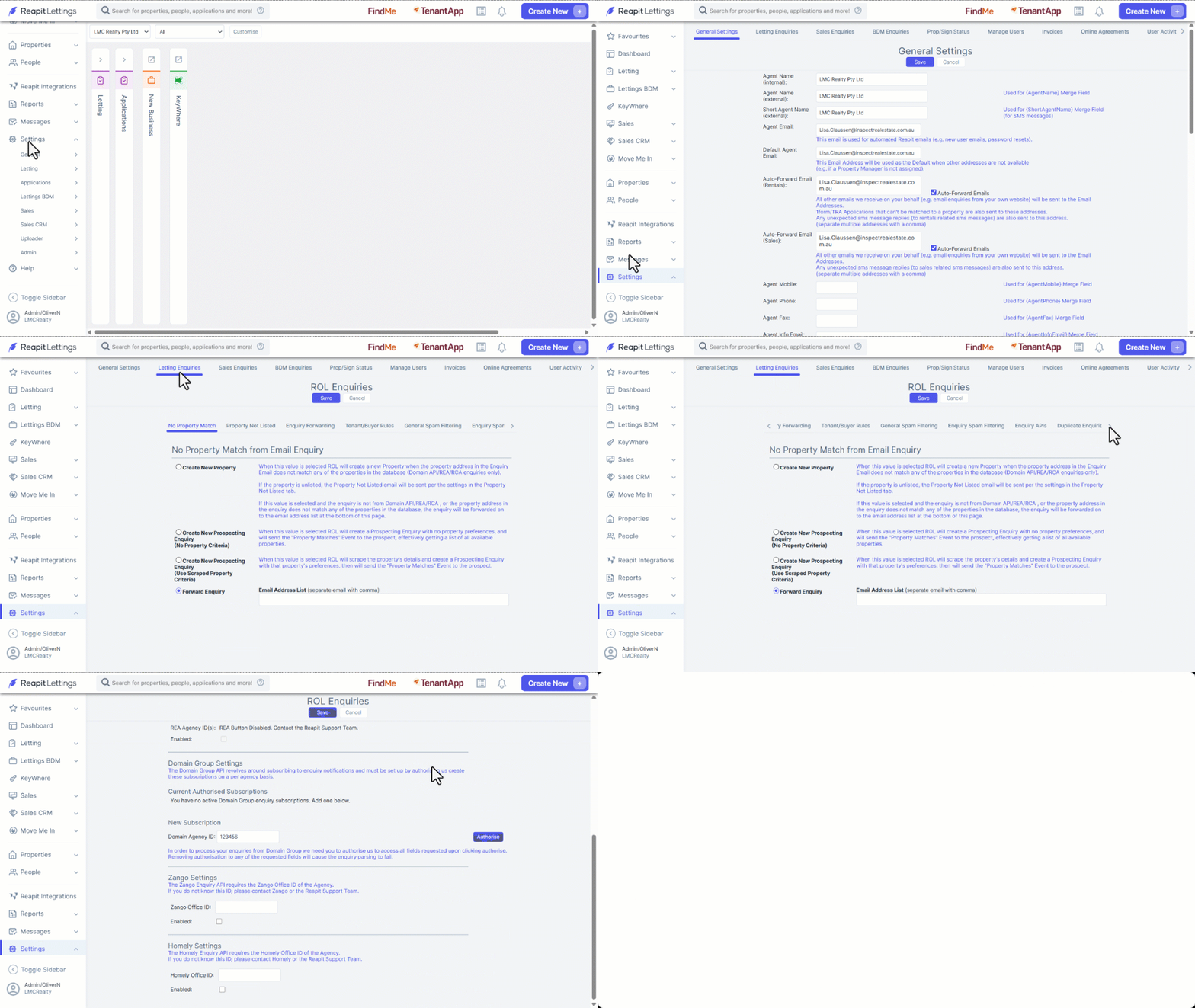
- Click on Settings.
- Click on Admin.
- Click on the Letting Enquiries tab.
- Scroll across and select the Enquiry APIs tab.
- Navigate to 'Domain Group Settings', and enter in your Domain Agency ID (e.g., 12345),
- Click on Authorise.
- You will then need to log in to your Domain account; tick all check boxes presented to you and accept.
Please Note: If you have more than one Domain profile then you will need another diamond user to log in and set up additional account. You can use the same Domain log in credentials, but each Domain profile needs to be set up by only one Reapit Lettings diamond user log in.
If you no longer want to receive the enquiries in your inbox, please take the steps from the short videos below to delete/ file them away:
Don't know what your Agency ID is?
You can find it by going to your agencies Domain page. Your ID will be the digits at the end of the URL.
- Log in to Domain with an admin-level account.
- Tick all checkboxes presented to you as shown below and click Accept. Domain enquiries should now load directly into your Reapit Lettings account.