'%20d='M0%208a8%208%200%200%201%208-8h24a8%208%200%200%201%208%208v24a8%208%200%200%201-8%208H8a8%208%200%200%201-8-8V8Z'/%3e%3cpath%20fill='%23fff'%20d='M32.576%206C12.293%206%208.776%2025.887%207.424%2034H9.1c.45-2.977%203.493-14.748%2010.899-20.287%200%200-5.633%206.976-6.572%2015.051%203.426-.652%2013.845-3.372%2016.056-12.927l-3.84-.61c1.352-1.351%204.909-5.17%206.931-9.226V6Z'/%3e%3cdefs%3e%3clinearGradient%20id='reapit-lettings__a'%20x1='20.702'%20x2='20.702'%20y1='.351'%20y2='31.228'%20gradientUnits='userSpaceOnUse'%3e%3cstop%20stop-color='%235573FD'/%3e%3cstop%20offset='.575'%20stop-color='%234E56EA'/%3e%3c/linearGradient%3e%3c/defs%3e%3c/svg%3e)
Set Auto Request for Disclosure Statement Sending (VIC)
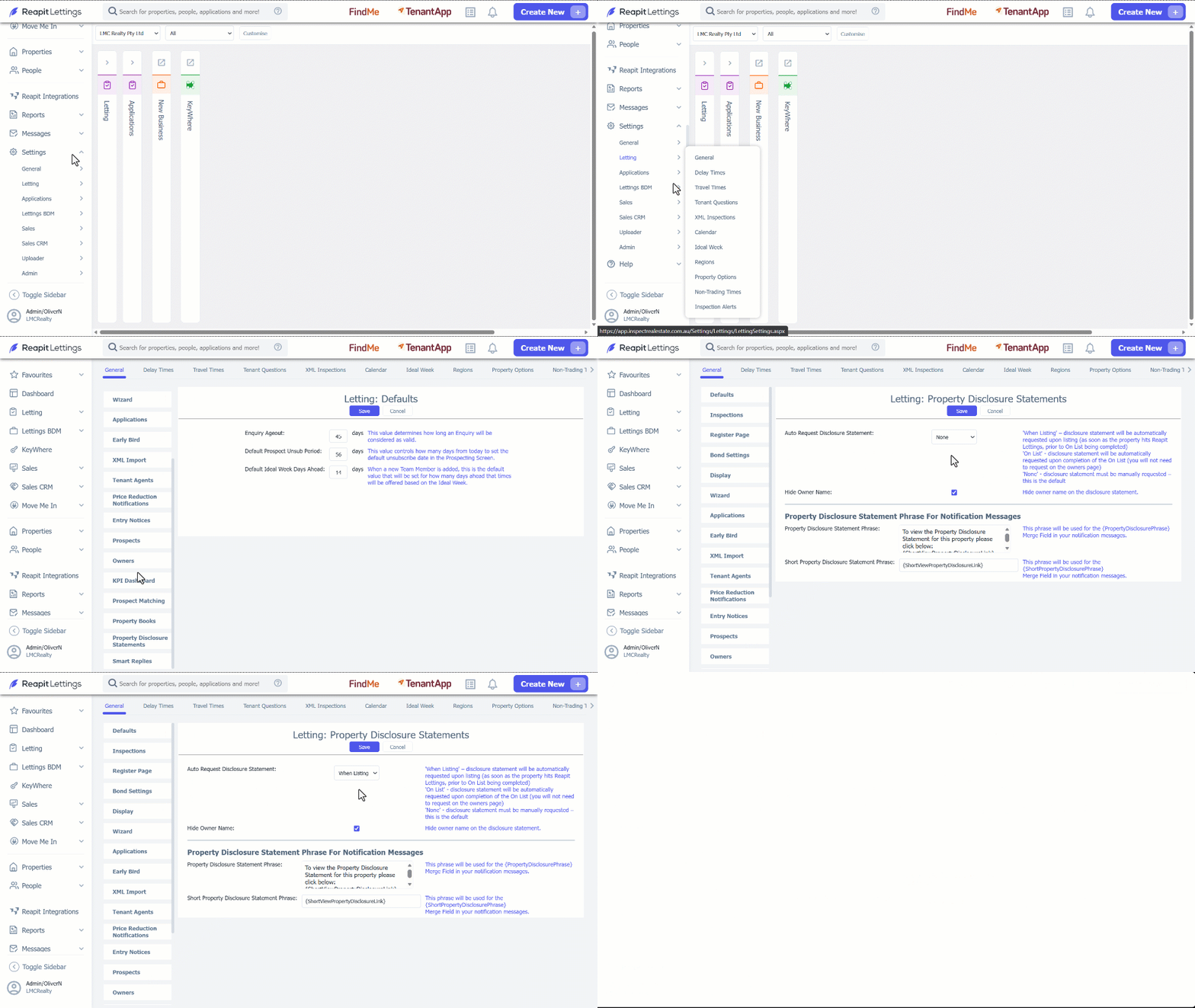
This article will run through how to set auto request disclosure statement sending in Reapit Lettings. This feature is available only for properties in Victoria.
Set Auto Request for Disclosure Statement Sending (VIC)
This article will run through how to set auto request disclosure statement sending in Reapit Lettings. This feature is available only for properties in Victoria.
You are able to set your default agency options around sending the disclosure statement request. The options for requesting the statement will be: When Listing- the disclosure statement will be automatically requested upon listing (as soon as the property hits Reapit Lettings, prior to On List being completed) On List - the disclosure statement will be automatically requested upon completion of the On List (you will not need to request on the owner’s page). None - the disclosure statement must be manually requested - this is the default. 1. Click on Settings. 2. Click on Letting. 3. Select General. 4. Navigate to Property Disclosure Statement tab and select the drop down next to Auto Request Disclosure statement. 5. Click on Save.