'%20d='M0%208a8%208%200%200%201%208-8h24a8%208%200%200%201%208%208v24a8%208%200%200%201-8%208H8a8%208%200%200%201-8-8V8Z'/%3e%3cpath%20fill='%23fff'%20d='M32.576%206C12.293%206%208.776%2025.887%207.424%2034H9.1c.45-2.977%203.493-14.748%2010.899-20.287%200%200-5.633%206.976-6.572%2015.051%203.426-.652%2013.845-3.372%2016.056-12.927l-3.84-.61c1.352-1.351%204.909-5.17%206.931-9.226V6Z'/%3e%3cdefs%3e%3clinearGradient%20id='reapit-lettings__a'%20x1='20.702'%20x2='20.702'%20y1='.351'%20y2='31.228'%20gradientUnits='userSpaceOnUse'%3e%3cstop%20stop-color='%235573FD'/%3e%3cstop%20offset='.575'%20stop-color='%234E56EA'/%3e%3c/linearGradient%3e%3c/defs%3e%3c/svg%3e)
Using and Generating QR Codes for Contactless Inspections
This article provides a comprehensive guide on generating and utilising QR codes for contactless inspections within your account
Using and Generating QR Codes for Contactless Inspections
This article provides a comprehensive guide on generating and utilising QR codes for contactless inspections for Reapit Lettings. The QR codes are designed to display inspection details specific to the assigned staff member.
To access an individual staff member's QR code for their inspections, follow these steps:
- Navigate to People.
- Click Team.
- Click Rentals.
- Click the three dots.
- Click QR code.
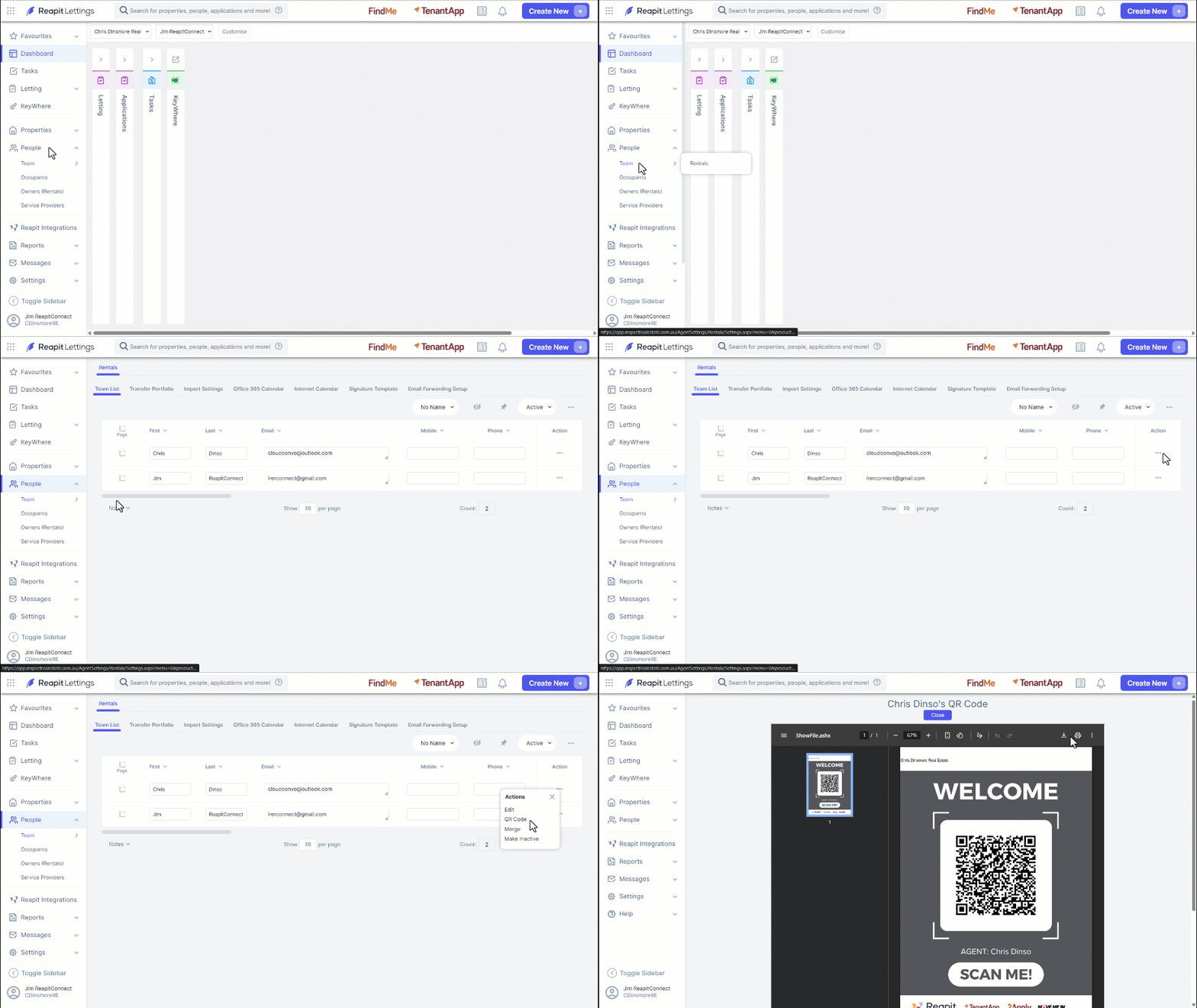
- You can download and print the QR Code if required.
Note: When the QR Code is scanned, only the upcoming inspection will be displayed for prospective clients to register their attendance.