'%20d='M0%208a8%208%200%200%201%208-8h24a8%208%200%200%201%208%208v24a8%208%200%200%201-8%208H8a8%208%200%200%201-8-8V8Z'/%3e%3cpath%20fill='%23fff'%20d='M32.576%206C12.293%206%208.776%2025.887%207.424%2034H9.1c.45-2.977%203.493-14.748%2010.899-20.287%200%200-5.633%206.976-6.572%2015.051%203.426-.652%2013.845-3.372%2016.056-12.927l-3.84-.61c1.352-1.351%204.909-5.17%206.931-9.226V6Z'/%3e%3cdefs%3e%3clinearGradient%20id='reapit-lettings__a'%20x1='20.702'%20x2='20.702'%20y1='.351'%20y2='31.228'%20gradientUnits='userSpaceOnUse'%3e%3cstop%20stop-color='%235573FD'/%3e%3cstop%20offset='.575'%20stop-color='%234E56EA'/%3e%3c/linearGradient%3e%3c/defs%3e%3c/svg%3e)
Accessing Old Application Data
This article will cover accessing previous application data in Reapit Lettings.
Overview
Accessing Old Application Data
This article will cover accessing previous application data in Reapit Lettings.
The processes in this article include:
- Accessing Old Applications
- Reapit Lettings Data Retention Policy
Accessing Old Applications
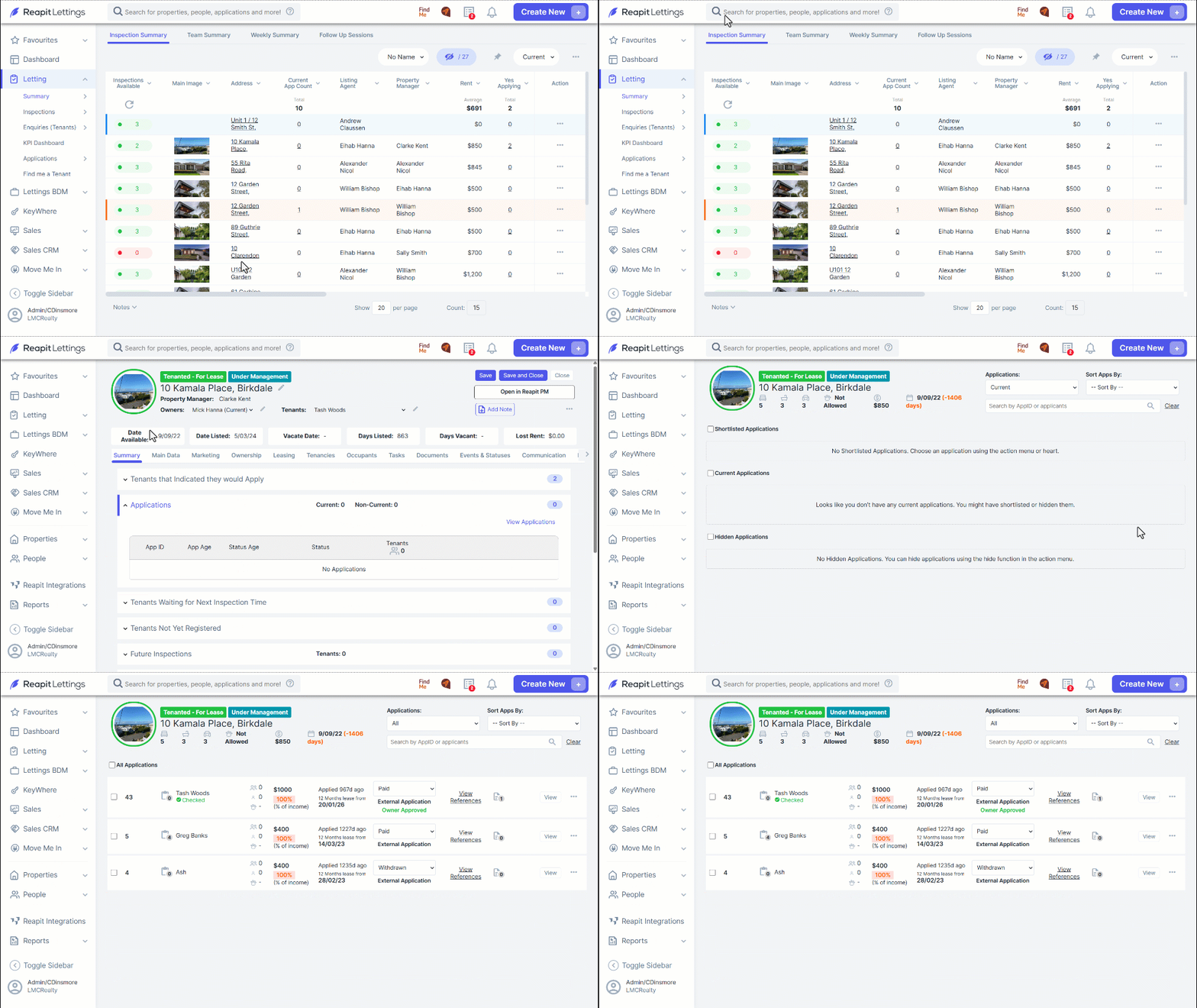
Navigate to the search bar at the top of the page
Enter the property address.
Click on the Applications drop-down.
From here, you will be able to view any current applications here.
Click View Applications.
To view applications in alignment with Reapit Lettings data retention, click the Applications drop-down.
Click All.
Reapit Lettings Data Retention Policy
Please refer to the key points below for Reapit Lettings Data Retention Policy:
Note: Blue text statuses are located under Messages > Applications.
Unsuccessful Applications: Data related to unsuccessful applications will be deleted 60 days after submission.
Successful Applications: Data related to successful applications will be deleted 3 years after submission.
Manual Data Deletion: Users can manually delete data directly in 2Apply to ensure compliance with retention requirements.
Reporting: Basic enquiry information will be retained for reporting purposes, but no personal data will be stored after the retention period expires.
Data Recovery: Once deleted, data cannot be recovered. Please ensure any necessary data is stored externally to prevent loss.
Save Applications Externally: For compliance and auditing purposes, we recommend saving approved applications in Trust Accounting software.
Important Notes:
- We are not able to recover old application data.
- Unsuccessful and Successful applications are determined by the External Statuses within 2Apply. These statuses must be set up correctly for the retention policy to work as expected.