'%20d='M0%208a8%208%200%200%201%208-8h24a8%208%200%200%201%208%208v24a8%208%200%200%201-8%208H8a8%208%200%200%201-8-8V8Z'/%3e%3cpath%20fill='%23fff'%20d='M32.576%206C12.293%206%208.776%2025.887%207.424%2034H9.1c.45-2.977%203.493-14.748%2010.899-20.287%200%200-5.633%206.976-6.572%2015.051%203.426-.652%2013.845-3.372%2016.056-12.927l-3.84-.61c1.352-1.351%204.909-5.17%206.931-9.226V6Z'/%3e%3cdefs%3e%3clinearGradient%20id='reapit-lettings__a'%20x1='20.702'%20x2='20.702'%20y1='.351'%20y2='31.228'%20gradientUnits='userSpaceOnUse'%3e%3cstop%20stop-color='%235573FD'/%3e%3cstop%20offset='.575'%20stop-color='%234E56EA'/%3e%3c/linearGradient%3e%3c/defs%3e%3c/svg%3e)
Application Report
This article will run through what the application report is and how to access and manage it
Application Report
This article will run through what the application report is and how to access and manage it.
The processes in this article include:
- What is the Application Report?
- How to access the report
What is the Application Report?
The report is a snapshot of your application activity.
You can be emailed a static version of this report and can access the interactive version online.
The report has two sections:
- Requires Follow Up
- Key Performance Indicators (KPIs)
How to access the report
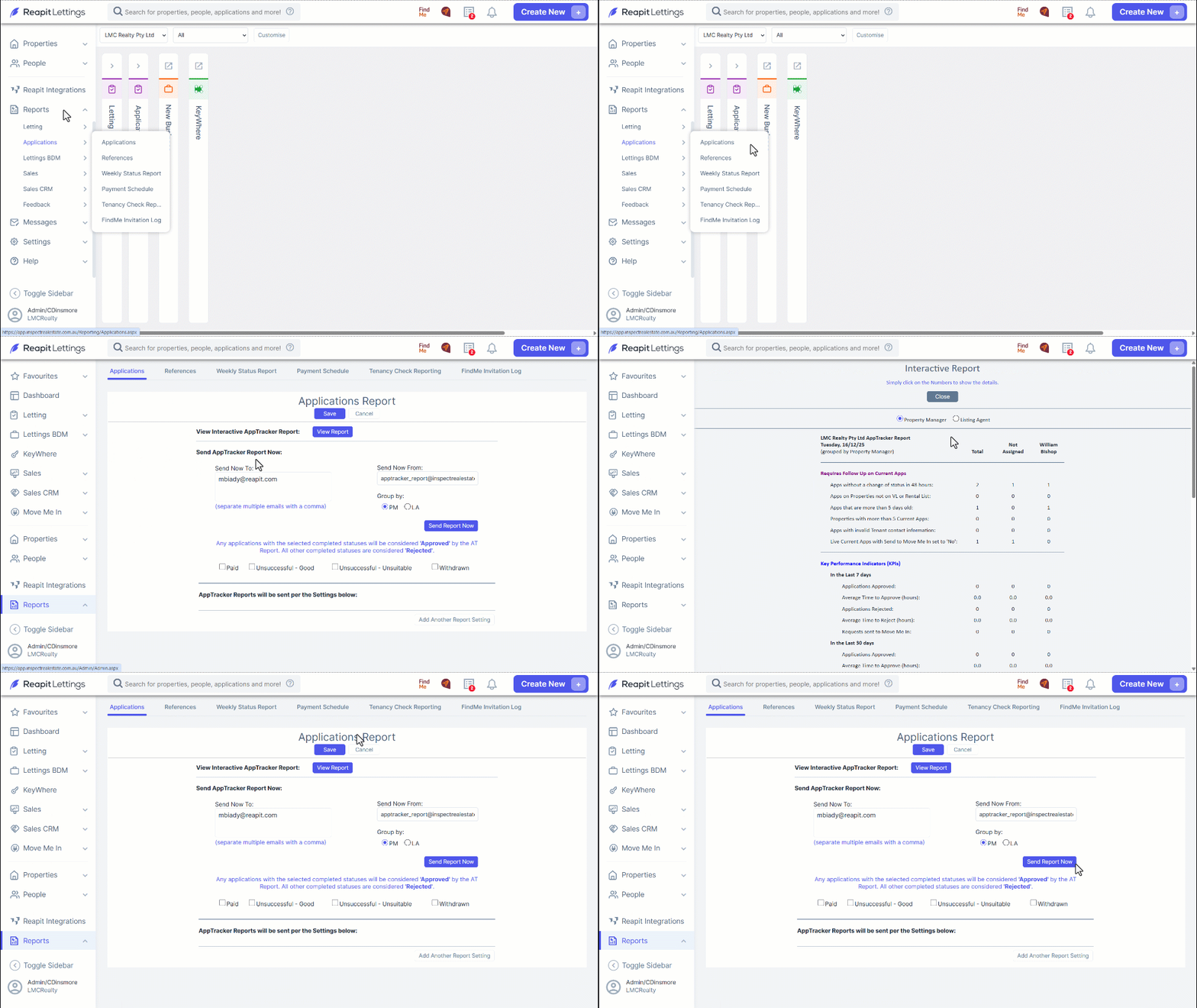
- Navigate to Reports.
- Click Applications.
- Click Applications.
- Click View Report to view the Interactive Report.
- Your report is ready to open. To access the relevant data, please click on the numbers located beneath the "Total" subheading. Click Close once completed.
- To send the Report, enter the relevant email addresses. (Separate multiple emails with a comma.)
- Click Send Report Now.