'%20d='M0%208a8%208%200%200%201%208-8h24a8%208%200%200%201%208%208v24a8%208%200%200%201-8%208H8a8%208%200%200%201-8-8V8Z'/%3e%3cpath%20fill='%23fff'%20d='M32.576%206C12.293%206%208.776%2025.887%207.424%2034H9.1c.45-2.977%203.493-14.748%2010.899-20.287%200%200-5.633%206.976-6.572%2015.051%203.426-.652%2013.845-3.372%2016.056-12.927l-3.84-.61c1.352-1.351%204.909-5.17%206.931-9.226V6Z'/%3e%3cdefs%3e%3clinearGradient%20id='reapit-lettings__a'%20x1='20.702'%20x2='20.702'%20y1='.351'%20y2='31.228'%20gradientUnits='userSpaceOnUse'%3e%3cstop%20stop-color='%235573FD'/%3e%3cstop%20offset='.575'%20stop-color='%234E56EA'/%3e%3c/linearGradient%3e%3c/defs%3e%3c/svg%3e)
FLK it over Integration
This article will run through how the FLK it over integration works and how to set it up
FLK it over Integration
This article will run through how to set up the FLK it over integration and how it works with Reapit Lettings.
How the Integration works
Currently, the FLK it over integration allows Reapit Lettings users to generate the initial lease agreement via AppTracker when approving an application.
To generate the lease, you will need to have an application in AppTracker. To generate the form, you can either change the status to "Paid" or go to the action dots located on the far right of the Applications grid and select FLKItOver Tenancy Agreement.
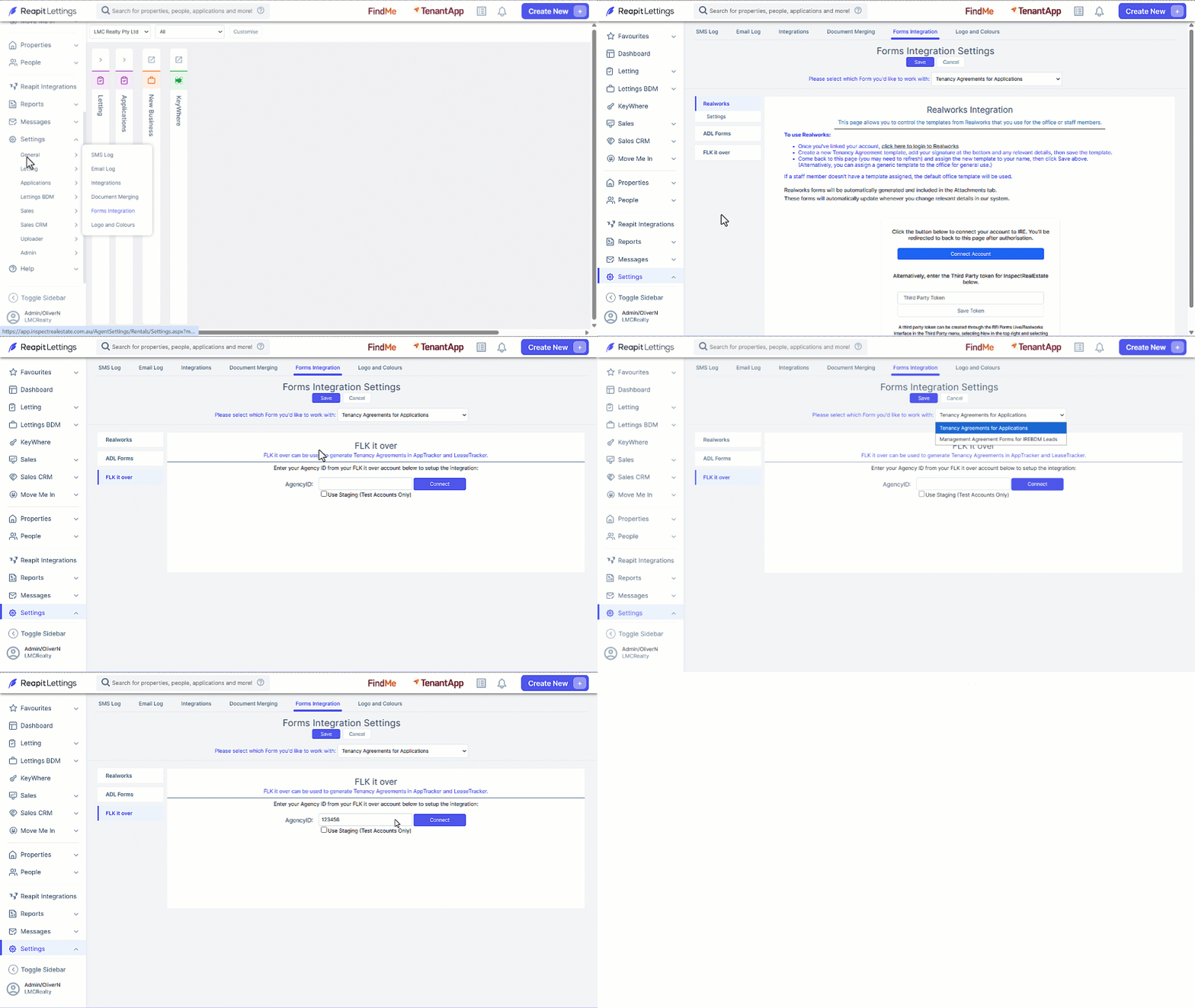
- Click on Settings.
- Click on ****General.
- Click on Forms Integration.
- Click on FLK it over.
- Select the form you would like to work with from the drop down selector.
- Enter in the AgencyID.
- Click on Connect.
Note: After successful connection, your agency ID will be displayed, accompanied by a disconnect button, confirming the completion of the integration setup.