'%20d='M0%208a8%208%200%200%201%208-8h24a8%208%200%200%201%208%208v24a8%208%200%200%201-8%208H8a8%208%200%200%201-8-8V8Z'/%3e%3cpath%20fill='%23fff'%20d='M32.576%206C12.293%206%208.776%2025.887%207.424%2034H9.1c.45-2.977%203.493-14.748%2010.899-20.287%200%200-5.633%206.976-6.572%2015.051%203.426-.652%2013.845-3.372%2016.056-12.927l-3.84-.61c1.352-1.351%204.909-5.17%206.931-9.226V6Z'/%3e%3cdefs%3e%3clinearGradient%20id='reapit-lettings__a'%20x1='20.702'%20x2='20.702'%20y1='.351'%20y2='31.228'%20gradientUnits='userSpaceOnUse'%3e%3cstop%20stop-color='%235573FD'/%3e%3cstop%20offset='.575'%20stop-color='%234E56EA'/%3e%3c/linearGradient%3e%3c/defs%3e%3c/svg%3e)
Creating and Managing Key Prefixes
This article will run through an overview of key prefixes and how to manage them effectively in KeyWhere.
Creating and Managing Key Prefixes
This article will run through an overview of key prefixes and panels in KeyWhere.
Ensuring efficient and secure access to properties is paramount. One of the challenges frequently encountered is managing multiple sets of keys for a single property—be it for tenants, realty offices, trades (maintenance) or property owners. Each of these stakeholders requires access at various times, under differing circumstances, necessitating a system to avoid key mismanagement.
To address this, we employ a systematic approach using key prefixes. This method involves assigning a unique prefix to each set of keys that corresponds to a specific stakeholder group.
For example:
- T for Tenant
- O for Owner
- R for Realty Office
- M for Maintenance/ Trades
This prefix not only identifies the primary user of the key set but also enhances security measures by allowing precise tracking and control of key distribution. By implementing key prefixes, we ensure that each key set can be uniquely identified and traced back to its respective holder.
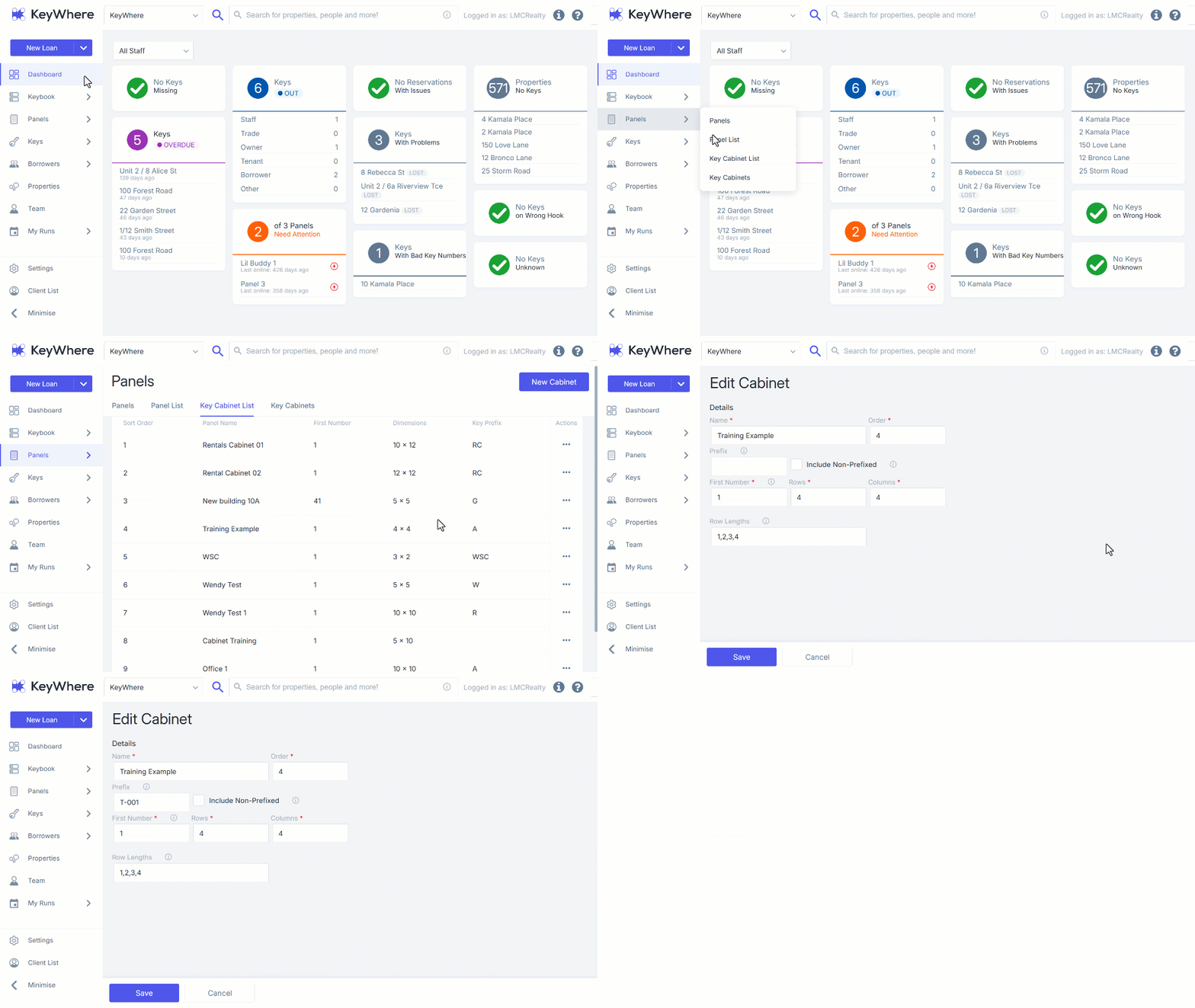
- To create or manage key prefixes, navigate to Panels, from within the ****KeyWhere web application and select Key Cabinets List.
- Click the 3 Dots and select the Pencil Icon to access the Edit Cabinet screen. Follow the same steps to initiate modifications.
- Enter the Prefix of your choice into the Prefix text field and then click Save.
Refer to Managing Keys in KeyWhere for instructions on how to add a prefix to a key.