'%20d='M0%208a8%208%200%200%201%208-8h24a8%208%200%200%201%208%208v24a8%208%200%200%201-8%208H8a8%208%200%200%201-8-8V8Z'/%3e%3cpath%20fill='%23fff'%20d='M32.576%206C12.293%206%208.776%2025.887%207.424%2034H9.1c.45-2.977%203.493-14.748%2010.899-20.287%200%200-5.633%206.976-6.572%2015.051%203.426-.652%2013.845-3.372%2016.056-12.927l-3.84-.61c1.352-1.351%204.909-5.17%206.931-9.226V6Z'/%3e%3cdefs%3e%3clinearGradient%20id='reapit-lettings__a'%20x1='20.702'%20x2='20.702'%20y1='.351'%20y2='31.228'%20gradientUnits='userSpaceOnUse'%3e%3cstop%20stop-color='%235573FD'/%3e%3cstop%20offset='.575'%20stop-color='%234E56EA'/%3e%3c/linearGradient%3e%3c/defs%3e%3c/svg%3e)
KeyWhere Colour Legend
This article will detail the Colour legend in KeyWhere.
KeyWhere Colour Legend
This article will detail the Colour legend in KeyWhere.
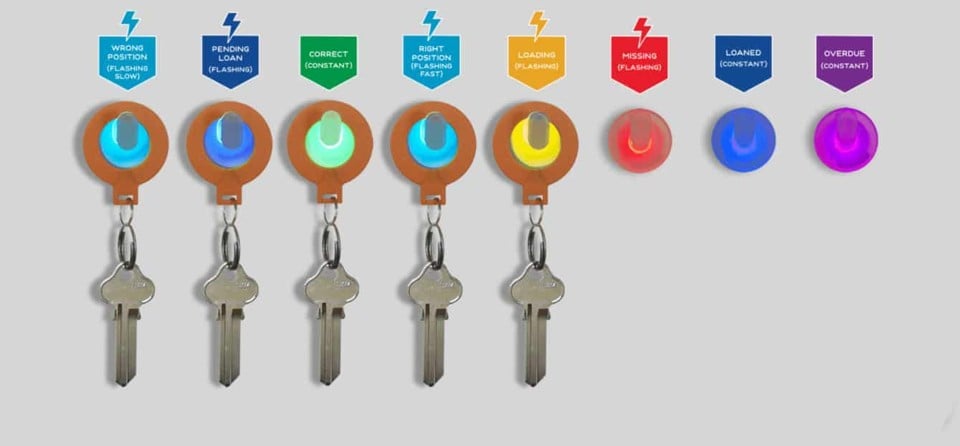
The legend below shows what the colours on the KeyWhere Panel mean.
Constant
A constant green light indicates that the key is hanging on the correct hook and no action is required.

A constant blue light indicates the the key is currently loaned out to a borrower.

A constant purple light indicates that the key is overdue to be returned to the office.

A constant red light indicates that a key is yet to be assigned to that position.

Flashing
A flashing red light indicates that the key as been removed from its hook without being loaned out to a borrower and has therefore been marked as missing.

A flashing blue light indicates a new loan has been created in the KeyWhere software and the key is ready to be removed from its hook.

A slow flash light blue light indicates that a key has been returned to the wrong hook on the panel.

A fast flashing light blue light indicates the correct hook for a key to be moved to after it's been placed on the wrong hook.

A flashing yellow light indicates that a change is loading for a key position. Once the change is done loading it will change to the relevant colour.