'%20d='M0%208a8%208%200%200%201%208-8h24a8%208%200%200%201%208%208v24a8%208%200%200%201-8%208H8a8%208%200%200%201-8-8V8Z'/%3e%3cpath%20fill='%23fff'%20d='M32.576%206C12.293%206%208.776%2025.887%207.424%2034H9.1c.45-2.977%203.493-14.748%2010.899-20.287%200%200-5.633%206.976-6.572%2015.051%203.426-.652%2013.845-3.372%2016.056-12.927l-3.84-.61c1.352-1.351%204.909-5.17%206.931-9.226V6Z'/%3e%3cdefs%3e%3clinearGradient%20id='reapit-lettings__a'%20x1='20.702'%20x2='20.702'%20y1='.351'%20y2='31.228'%20gradientUnits='userSpaceOnUse'%3e%3cstop%20stop-color='%235573FD'/%3e%3cstop%20offset='.575'%20stop-color='%234E56EA'/%3e%3c/linearGradient%3e%3c/defs%3e%3c/svg%3e)
Enabling the Editing of Automatic Reference Requests
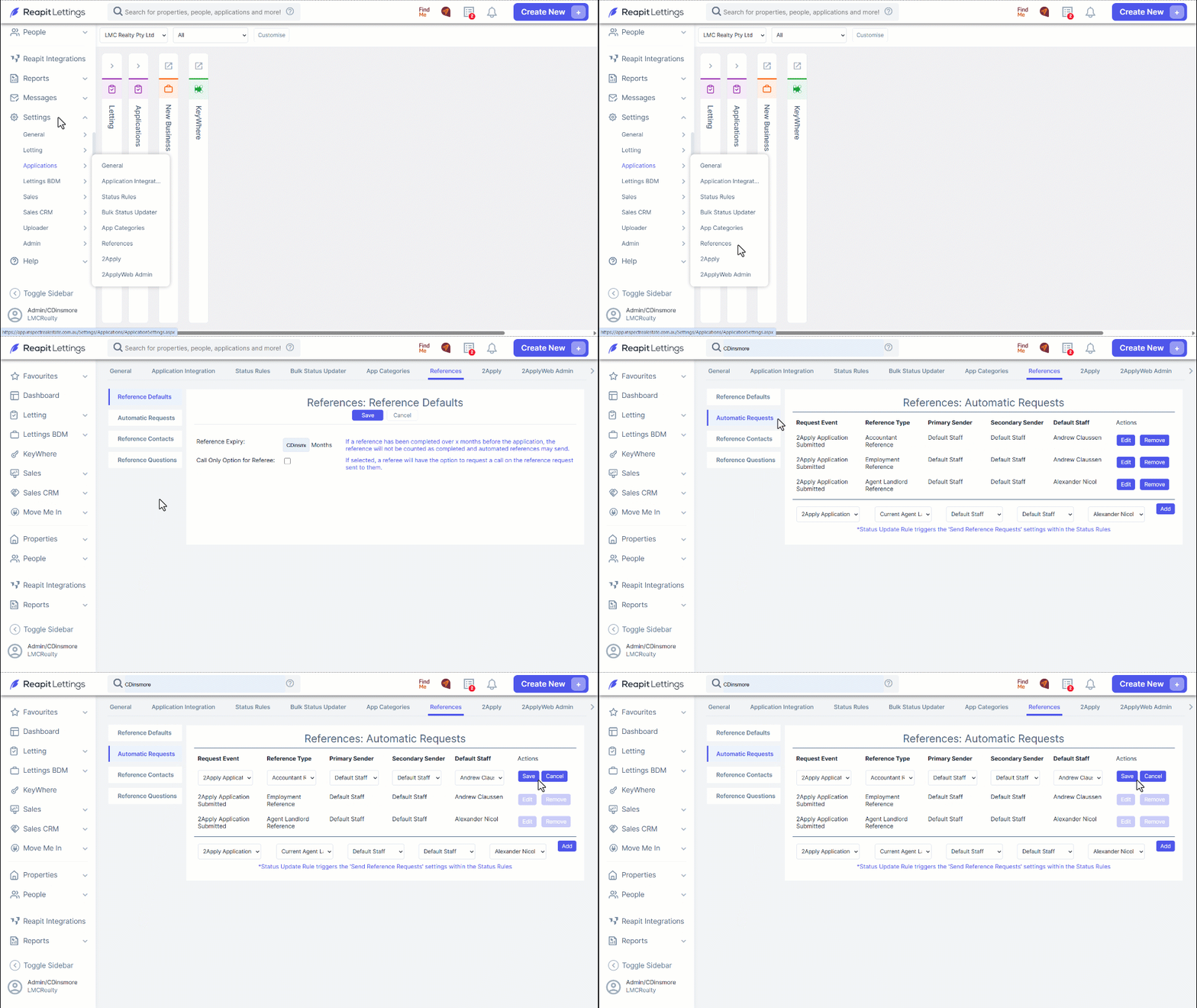
This article will run through how to enable the editing of automatic reference requests within your account in Reapit Lettings.
Enabling the Editing of Automatic Reference Requests
This article will run through how to enable the editing of automatic reference requests within your account in Reapit Lettings.
- Navigate to Settings.
- Click Applications.
- Click References.
- Click Automatic Requests.
- Click on the Edit button corresponding to the reference type that you intend to modify.
- Click Save once completed.