'%20d='M0%208a8%208%200%200%201%208-8h24a8%208%200%200%201%208%208v24a8%208%200%200%201-8%208H8a8%208%200%200%201-8-8V8Z'/%3e%3cpath%20fill='%23fff'%20d='M32.576%206C12.293%206%208.776%2025.887%207.424%2034H9.1c.45-2.977%203.493-14.748%2010.899-20.287%200%200-5.633%206.976-6.572%2015.051%203.426-.652%2013.845-3.372%2016.056-12.927l-3.84-.61c1.352-1.351%204.909-5.17%206.931-9.226V6Z'/%3e%3cdefs%3e%3clinearGradient%20id='reapit-lettings__a'%20x1='20.702'%20x2='20.702'%20y1='.351'%20y2='31.228'%20gradientUnits='userSpaceOnUse'%3e%3cstop%20stop-color='%235573FD'/%3e%3cstop%20offset='.575'%20stop-color='%234E56EA'/%3e%3c/linearGradient%3e%3c/defs%3e%3c/svg%3e)
Leads Virtual Listing Kit Tab
This Reapit Lettings article shows how to create a Virtual Listing Kit within a Lead. The process in this article include: How to Create a Virtual Listing Kit within a Lead
Leads Virtual Listing Kit Tab
This Reapit Lettings article shows how to create a Virtual Listing Kit within a Lead.
The process in this article include:
- How to Create a Virtual Listing Kit within a Lead
The Virtual Listing Kit is a virtual brochure that promotes your agency's services to prospective landlords. The brochure is an external webpage that is accessed by including a unique link to any SMS or email communication you send out. The essentials version of the virtual listing kit is available for free with your BDM subscription. For more information on Virtual Listing Kits and how to set it up, please visit this article here.
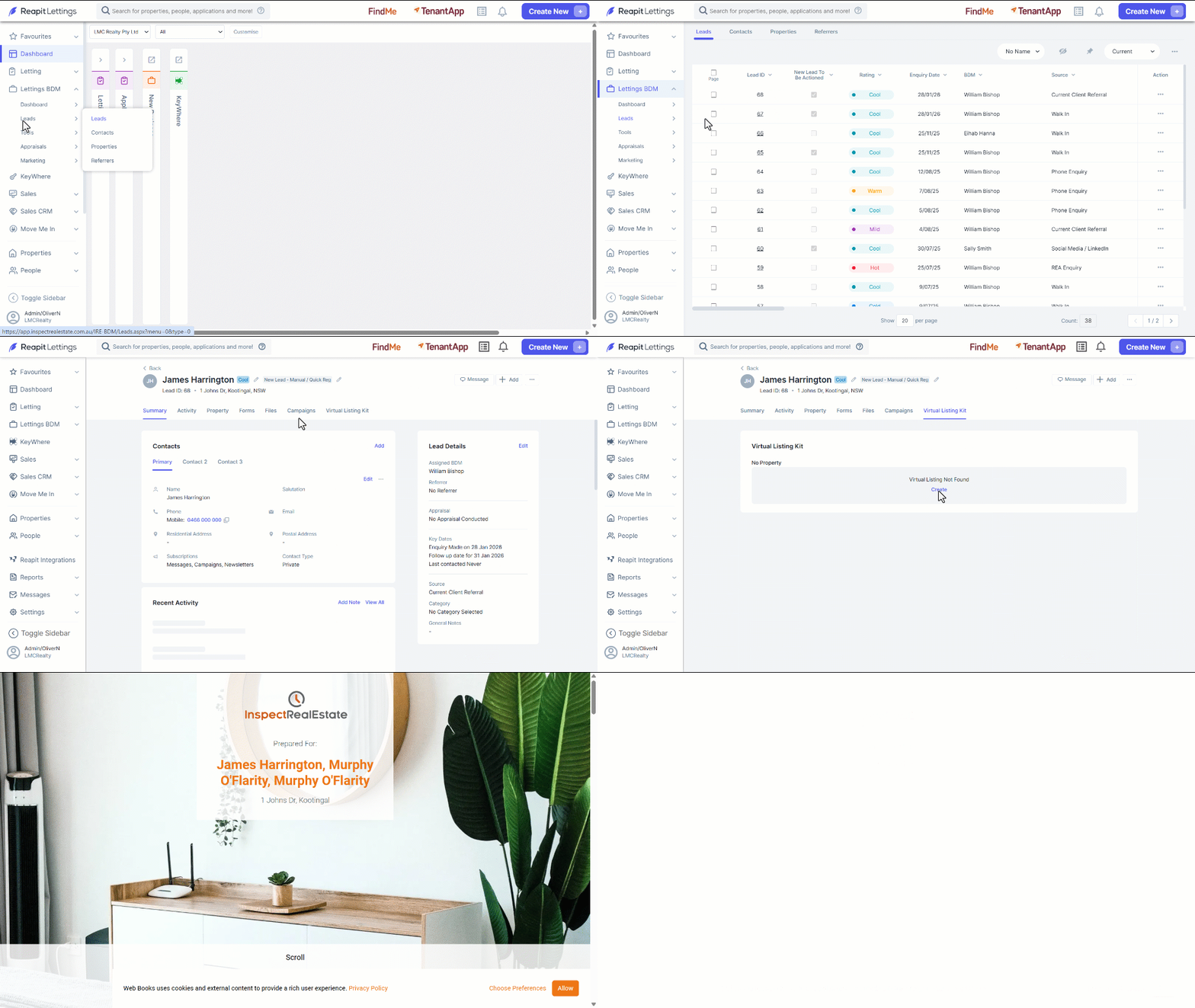
How to Create a Virtual Listing Kit within a Lead
- Click on Lettings BDM.
- Click on Leads.
- Click on Leads.
- Select the required lead by clicking on the Lead ID.
- Click on the Virtual Listing Kit Tab.
- Click on Create. A green message will appear to confirm the listing kit has been created.
- Click on the Pop-out icon to view the Listing Kit.