'%20d='M0%208a8%208%200%200%201%208-8h24a8%208%200%200%201%208%208v24a8%208%200%200%201-8%208H8a8%208%200%200%201-8-8V8Z'/%3e%3cpath%20fill='%23fff'%20d='M32.576%206C12.293%206%208.776%2025.887%207.424%2034H9.1c.45-2.977%203.493-14.748%2010.899-20.287%200%200-5.633%206.976-6.572%2015.051%203.426-.652%2013.845-3.372%2016.056-12.927l-3.84-.61c1.352-1.351%204.909-5.17%206.931-9.226V6Z'/%3e%3cdefs%3e%3clinearGradient%20id='reapit-lettings__a'%20x1='20.702'%20x2='20.702'%20y1='.351'%20y2='31.228'%20gradientUnits='userSpaceOnUse'%3e%3cstop%20stop-color='%235573FD'/%3e%3cstop%20offset='.575'%20stop-color='%234E56EA'/%3e%3c/linearGradient%3e%3c/defs%3e%3c/svg%3e)
Send an Application Comparison to an Owner for Multiple Applications
This article will run through how to send an application comparison to an Owner for a multiple applications
Send an Application Comparison to an Owner for Multiple Applications
This article will run through how to send an application comparison to an Owner for multiple applications.
Click Here to access the article on how to set the application comparison defaults.
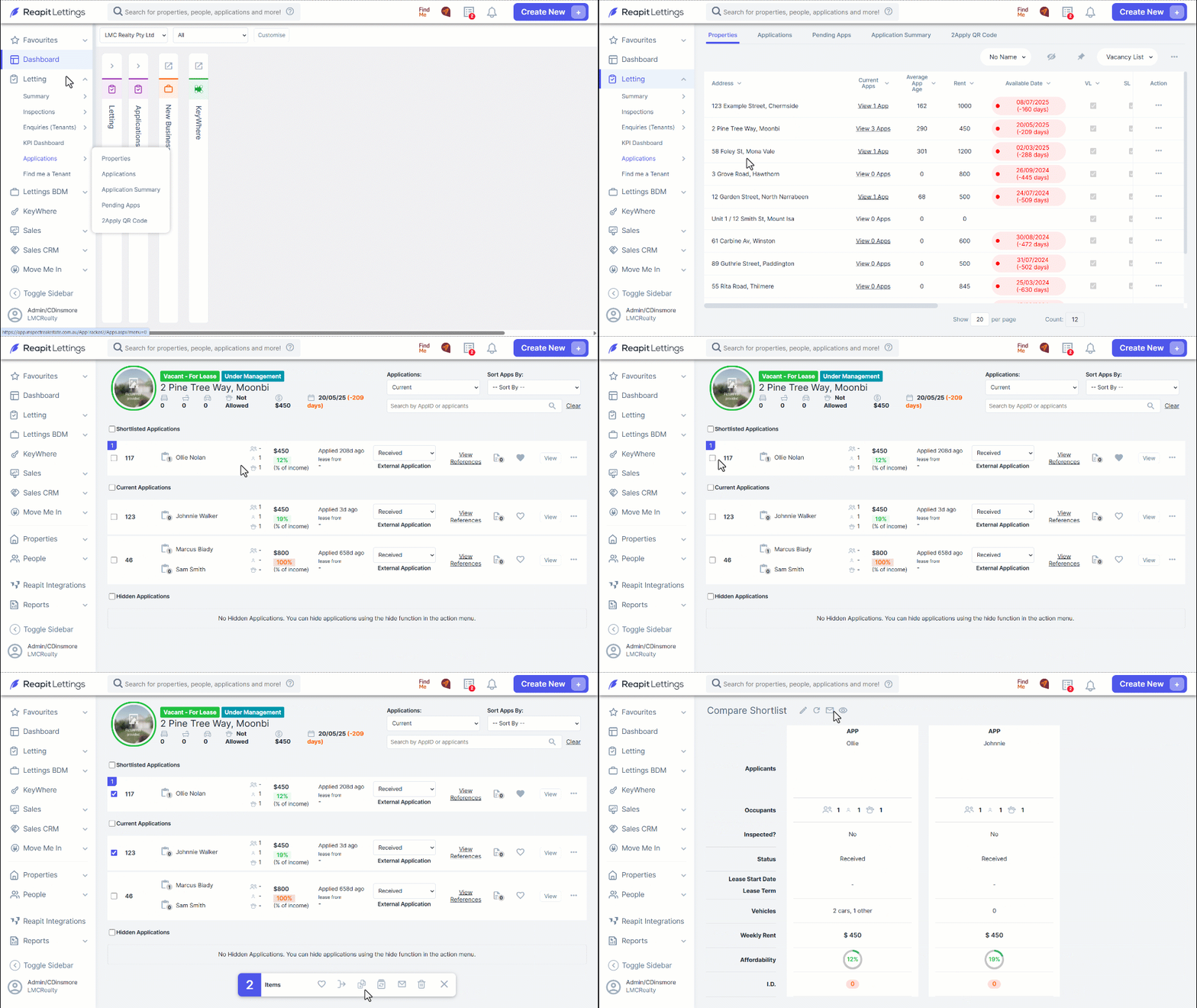
- Navigate to Letting.
- Click Applications.
- Click Properties.
- Find the property and click View apps.
- Select the applications you would like to include in the comparison.
- Click on the Compare icon.
- Select the Send External Link button or if you have the owner's details, you can send it directly to the owner from there.