'%20d='M0%208a8%208%200%200%201%208-8h24a8%208%200%200%201%208%208v24a8%208%200%200%201-8%208H8a8%208%200%200%201-8-8V8Z'/%3e%3cpath%20fill='%23fff'%20d='M32.576%206C12.293%206%208.776%2025.887%207.424%2034H9.1c.45-2.977%203.493-14.748%2010.899-20.287%200%200-5.633%206.976-6.572%2015.051%203.426-.652%2013.845-3.372%2016.056-12.927l-3.84-.61c1.352-1.351%204.909-5.17%206.931-9.226V6Z'/%3e%3cdefs%3e%3clinearGradient%20id='reapit-lettings__a'%20x1='20.702'%20x2='20.702'%20y1='.351'%20y2='31.228'%20gradientUnits='userSpaceOnUse'%3e%3cstop%20stop-color='%235573FD'/%3e%3cstop%20offset='.575'%20stop-color='%234E56EA'/%3e%3c/linearGradient%3e%3c/defs%3e%3c/svg%3e)
How to Check Who Cancelled an Inspection
This article will run through how to check who cancelled an inspection within Reapit Lettings.
How to Check Who Cancelled an Inspection
This article will run through how to check who cancelled an inspection within Reapit Lettings.
- Click on Letting.
- Click on Inspections.
- Click on Inspections.
- Navigate to select the Column Chooser icon.
- Select the checkboxes for Cancelled By and Cancellation Reason.
- Click on Save View.
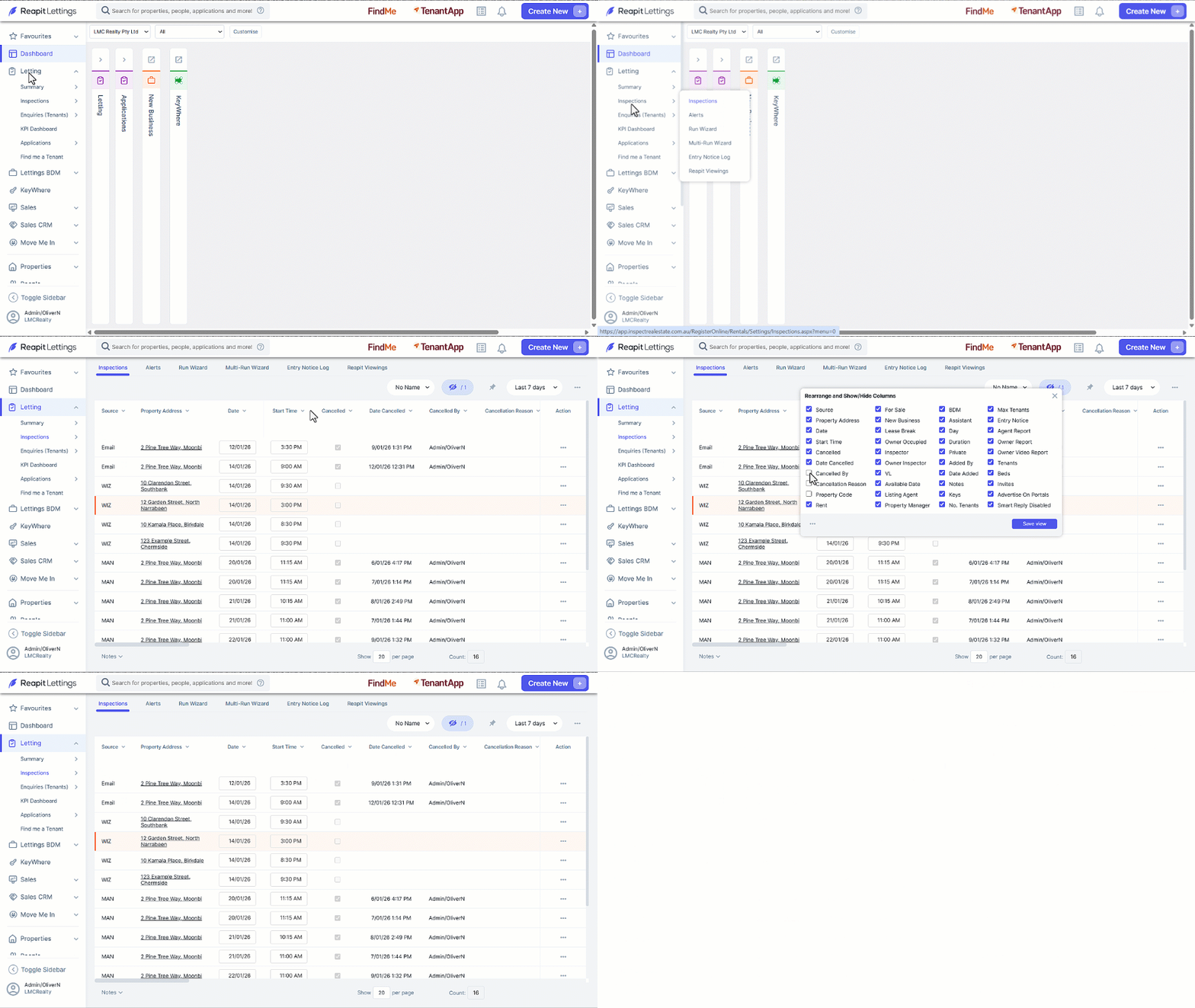
When a prospective tenant initiates a cancellation, the system will display relevant data within the grid to provide insights.
When an agent initiates a cancellation, Cancelled by will reflect the name of the staff member responsible, along with the date and time of the cancellation. In this instance, the reason for the cancellation will not be recorded in this scenario.