'%20d='M0%208a8%208%200%200%201%208-8h24a8%208%200%200%201%208%208v24a8%208%200%200%201-8%208H8a8%208%200%200%201-8-8V8Z'/%3e%3cpath%20fill='%23fff'%20d='M32.576%206C12.293%206%208.776%2025.887%207.424%2034H9.1c.45-2.977%203.493-14.748%2010.899-20.287%200%200-5.633%206.976-6.572%2015.051%203.426-.652%2013.845-3.372%2016.056-12.927l-3.84-.61c1.352-1.351%204.909-5.17%206.931-9.226V6Z'/%3e%3cdefs%3e%3clinearGradient%20id='reapit-lettings__a'%20x1='20.702'%20x2='20.702'%20y1='.351'%20y2='31.228'%20gradientUnits='userSpaceOnUse'%3e%3cstop%20stop-color='%235573FD'/%3e%3cstop%20offset='.575'%20stop-color='%234E56EA'/%3e%3c/linearGradient%3e%3c/defs%3e%3c/svg%3e)
How to setup Reminders for your Application References
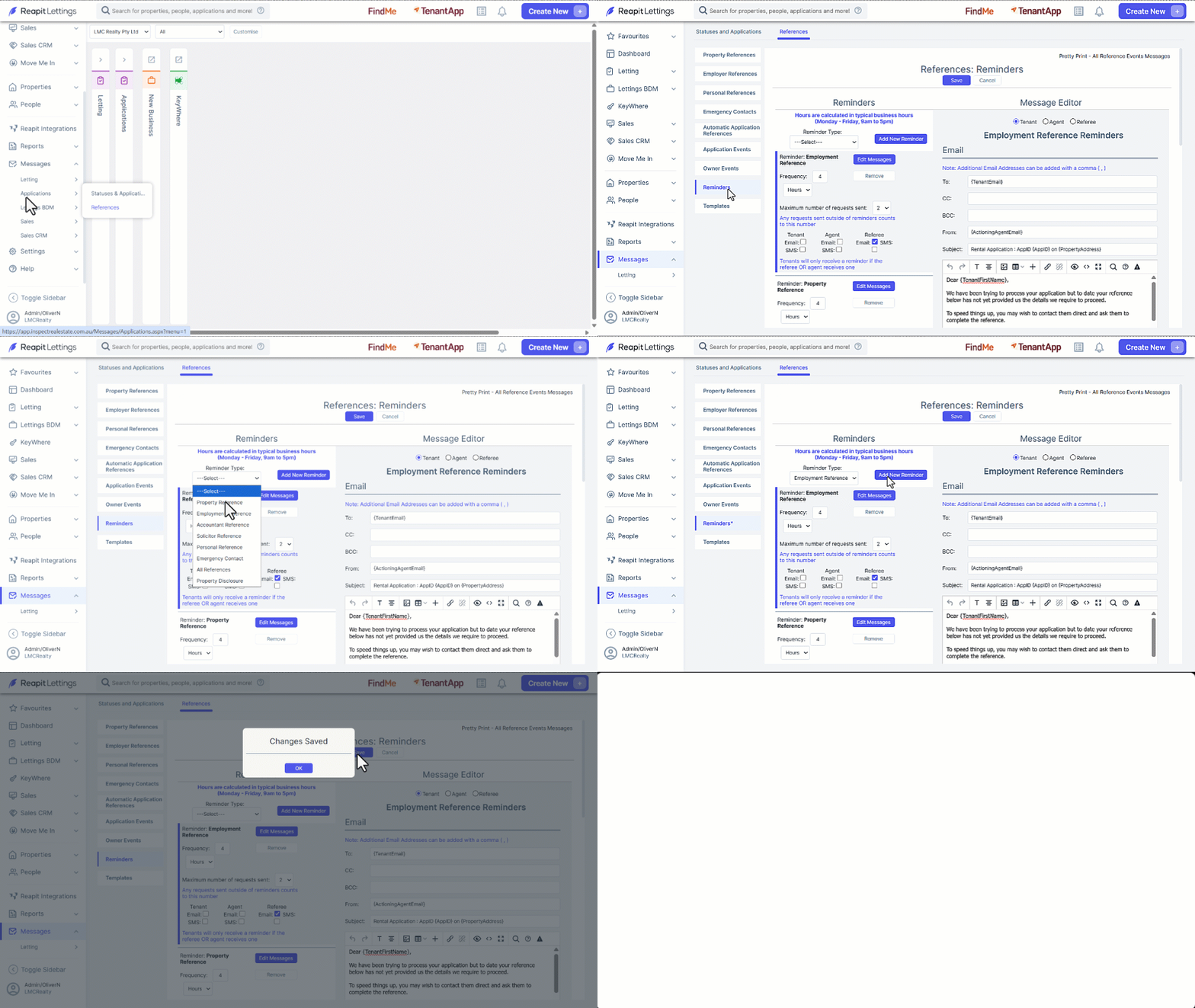
This article will run through how to set up reminders for your references in Applications in Reapit Lettings. Once you have sent a reference request to a referee, to save you having to manually follow up, you can set up automatic reminders
How to setup Reminders for your Application References
This article will run through how to set up reminders for your references in Applications in Reapit Lettings. Once you have sent a reference request to a referee, to save you having to manually follow up, you can set up automatic reminders.
- Click on Messages.
- Click on Applications
- Click on References.
- Select Reminders.
- Select the Reminder Type from the drop down
- Click on Add New Reminder.
- Enter the Frequency amount the select either Days or Hours. If Hours is selected, the frequency set will only occur between 9am-5pm.
- Select the Maximum number of requests. This includes the initial request, therefore if you choose 3 as your number it will send the initial reference request and then automatically send a reminder twice.
- Select the recipient, Tenant, Agent and Referee and contact method email and/or SMS.
- Make changes to the Message as required.
- Click on Save.