'%20d='M0%208a8%208%200%200%201%208-8h24a8%208%200%200%201%208%208v24a8%208%200%200%201-8%208H8a8%208%200%200%201-8-8V8Z'/%3e%3cpath%20fill='%23fff'%20d='M32.576%206C12.293%206%208.776%2025.887%207.424%2034H9.1c.45-2.977%203.493-14.748%2010.899-20.287%200%200-5.633%206.976-6.572%2015.051%203.426-.652%2013.845-3.372%2016.056-12.927l-3.84-.61c1.352-1.351%204.909-5.17%206.931-9.226V6Z'/%3e%3cdefs%3e%3clinearGradient%20id='reapit-lettings__a'%20x1='20.702'%20x2='20.702'%20y1='.351'%20y2='31.228'%20gradientUnits='userSpaceOnUse'%3e%3cstop%20stop-color='%235573FD'/%3e%3cstop%20offset='.575'%20stop-color='%234E56EA'/%3e%3c/linearGradient%3e%3c/defs%3e%3c/svg%3e)
Allow Duplicate Inquiries - Rentals
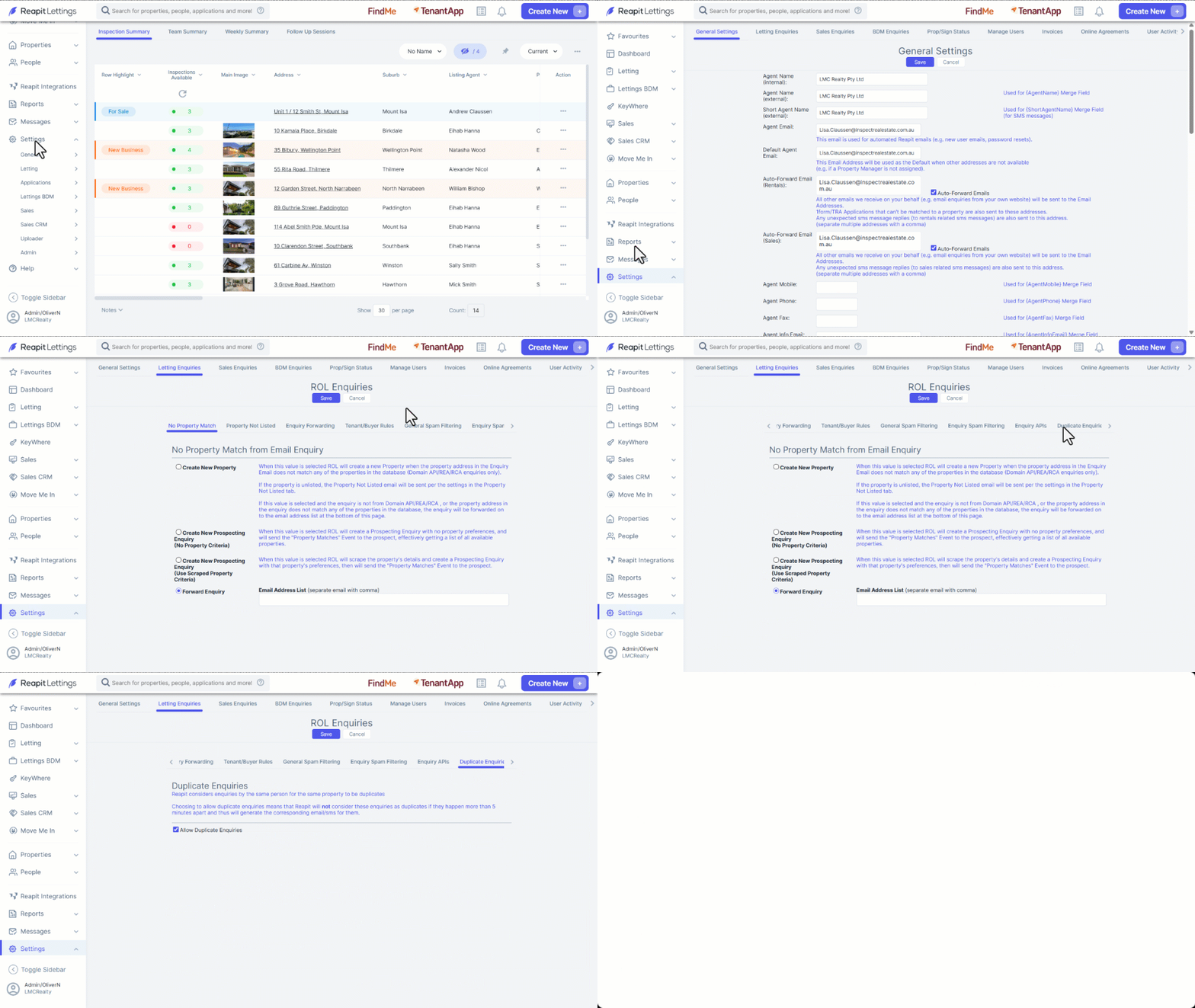
This article will run through how to allow duplicate enquiries for rentals within Reapit Lettings.
Allow Duplicate Inquiries - Rentals
This article will run through how to allow duplicate enquiries for rentals within Reapit Lettings.
Reapit Lettings considers enquiries by the same person for the same property to be duplicates.
Choosing to allow duplicate enquiries means that Lettings will not consider these enquiries as duplicates if they happen more than 5 minutes apart and thus will generate the corresponding email/SMS for them.
- Click on Settings.
- Click on Admin.
- Click on the Letting Enquiries tab.
- Scroll across and select the Duplicate Enquiries Tab.
- Select the tick box for Allow Duplicate Enquiries.