'%20d='M0%208a8%208%200%200%201%208-8h24a8%208%200%200%201%208%208v24a8%208%200%200%201-8%208H8a8%208%200%200%201-8-8V8Z'/%3e%3cpath%20fill='%23fff'%20d='M32.576%206C12.293%206%208.776%2025.887%207.424%2034H9.1c.45-2.977%203.493-14.748%2010.899-20.287%200%200-5.633%206.976-6.572%2015.051%203.426-.652%2013.845-3.372%2016.056-12.927l-3.84-.61c1.352-1.351%204.909-5.17%206.931-9.226V6Z'/%3e%3cdefs%3e%3clinearGradient%20id='reapit-lettings__a'%20x1='20.702'%20x2='20.702'%20y1='.351'%20y2='31.228'%20gradientUnits='userSpaceOnUse'%3e%3cstop%20stop-color='%235573FD'/%3e%3cstop%20offset='.575'%20stop-color='%234E56EA'/%3e%3c/linearGradient%3e%3c/defs%3e%3c/svg%3e)
Keep Property Addresses Private in Rental Listings using Uploader
This article will run through how to hide the address from portals using Reapit Lettings Uploader
Keep Property Addresses Private in Rental Listings using Uploader
This article will run through how to hide the address from portals using Reapit Lettings Uploader.
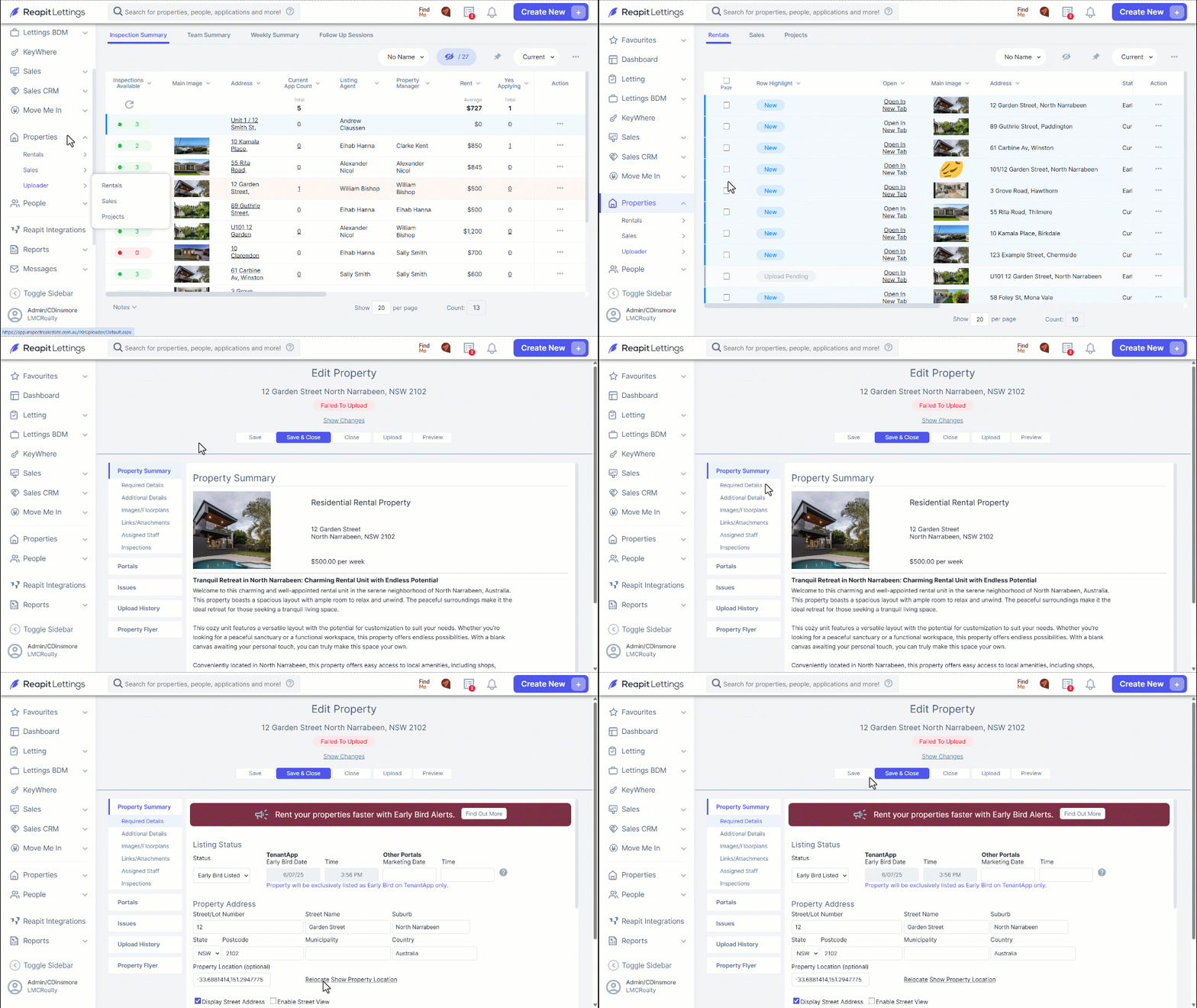
- Navigate to Properties.
- Click Uploader
- Click Rentals or Sales.
- Click on the property you wish to hide the address for.
- Navigate to Required Details and untick Display Street Address and input what you want to display.
- Click Show Property Location to update the latitude and longitude so that it doesn’t pin to the property’s location.
- Google Maps will open. Right-click on the nearest crossroad or where you would like the estimated location to pull from and copy the latitude and longitude from the URL.
- Paste the latitude and longitude in the Property Location box.
- Click Save.