'%20d='M0%208a8%208%200%200%201%208-8h24a8%208%200%200%201%208%208v24a8%208%200%200%201-8%208H8a8%208%200%200%201-8-8V8Z'/%3e%3cpath%20fill='%23fff'%20d='M32.576%206C12.293%206%208.776%2025.887%207.424%2034H9.1c.45-2.977%203.493-14.748%2010.899-20.287%200%200-5.633%206.976-6.572%2015.051%203.426-.652%2013.845-3.372%2016.056-12.927l-3.84-.61c1.352-1.351%204.909-5.17%206.931-9.226V6Z'/%3e%3cdefs%3e%3clinearGradient%20id='reapit-lettings__a'%20x1='20.702'%20x2='20.702'%20y1='.351'%20y2='31.228'%20gradientUnits='userSpaceOnUse'%3e%3cstop%20stop-color='%235573FD'/%3e%3cstop%20offset='.575'%20stop-color='%234E56EA'/%3e%3c/linearGradient%3e%3c/defs%3e%3c/svg%3e)
How to Disable the REA Button per Listing Agent
The REA ‘Request an inspection’ button appears on your realestate.com.au page and allows prospective tenants to book in for inspections that have already been created, or to enquire about the property in general. This button is usually enabled for all listings within your office, however, if a particular listing agent doesn't want this button on their listings, it can be deactivated. This article will run through how to disable the REA button per listing agent in Reapit Lettings.
How to Disable the REA Button per Listing Agent
The REA ‘Request an inspection’ button appears on your realestate.com.au page and allows prospective tenants to book in for inspections that have already been created, or to enquire about the property in general.
This button is usually enabled for all listings within your office, however, if a particular listing agent doesn't want this button on their listings, it can be deactivated.
This article will run through how to disable the REA button per listing agent in Reapit Lettings.
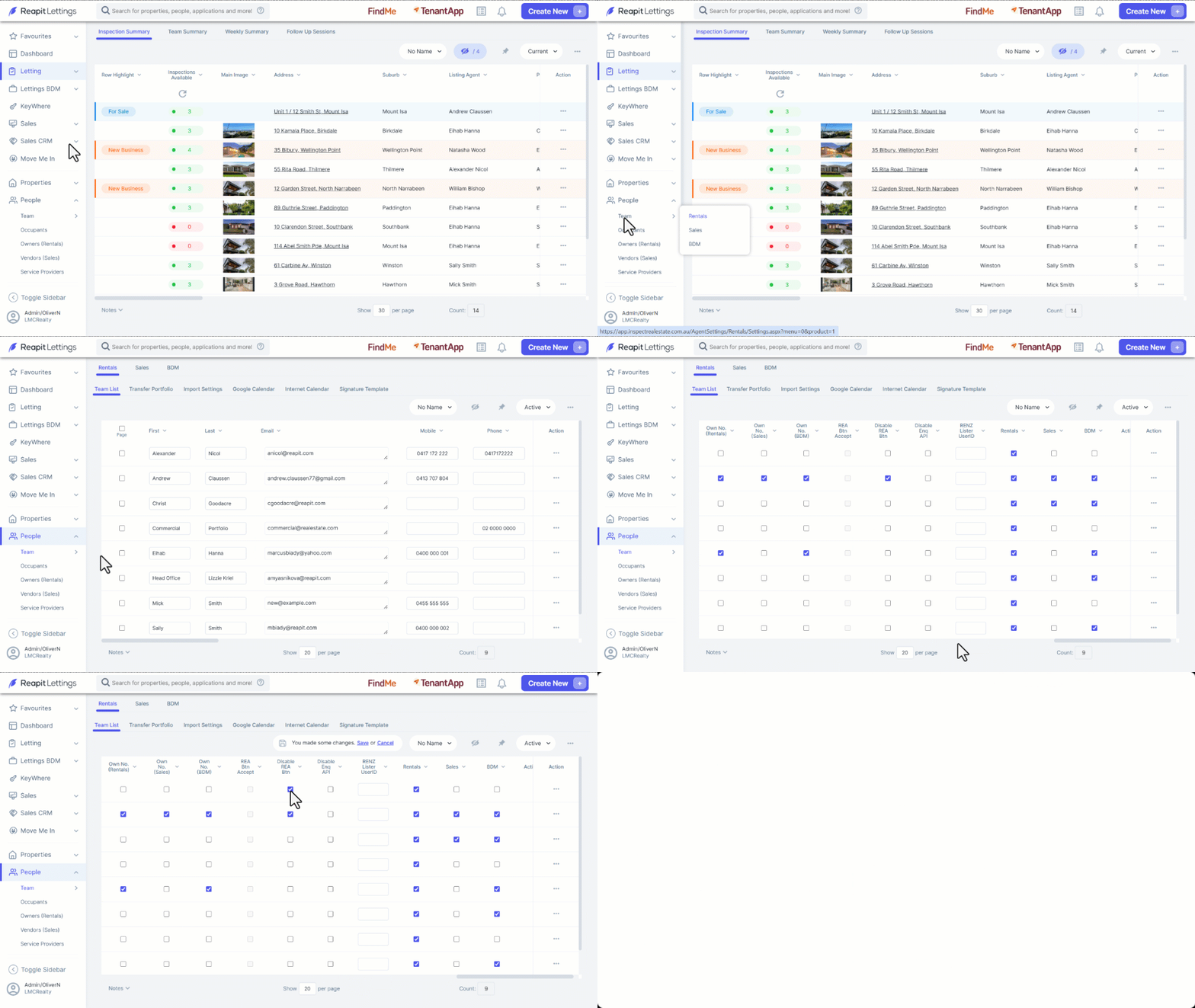
- Click on People.
- Click on Team.
- Click on Rentals.
- Scroll to the right and navigate to Disable REA Btn column.
- Click the tick box on the team member that wishes to disable the button.
- Click on Save.