'%20d='M0%208a8%208%200%200%201%208-8h24a8%208%200%200%201%208%208v24a8%208%200%200%201-8%208H8a8%208%200%200%201-8-8V8Z'/%3e%3cpath%20fill='%23fff'%20d='M32.576%206C12.293%206%208.776%2025.887%207.424%2034H9.1c.45-2.977%203.493-14.748%2010.899-20.287%200%200-5.633%206.976-6.572%2015.051%203.426-.652%2013.845-3.372%2016.056-12.927l-3.84-.61c1.352-1.351%204.909-5.17%206.931-9.226V6Z'/%3e%3cdefs%3e%3clinearGradient%20id='reapit-lettings__a'%20x1='20.702'%20x2='20.702'%20y1='.351'%20y2='31.228'%20gradientUnits='userSpaceOnUse'%3e%3cstop%20stop-color='%235573FD'/%3e%3cstop%20offset='.575'%20stop-color='%234E56EA'/%3e%3c/linearGradient%3e%3c/defs%3e%3c/svg%3e)
AirTable Integrations
In this guide we will show you how to set up the AirTable - Reapit Lettings integration.
Note: Director user level is required to enable the ‘Send Application Data to Airtable’ setting.
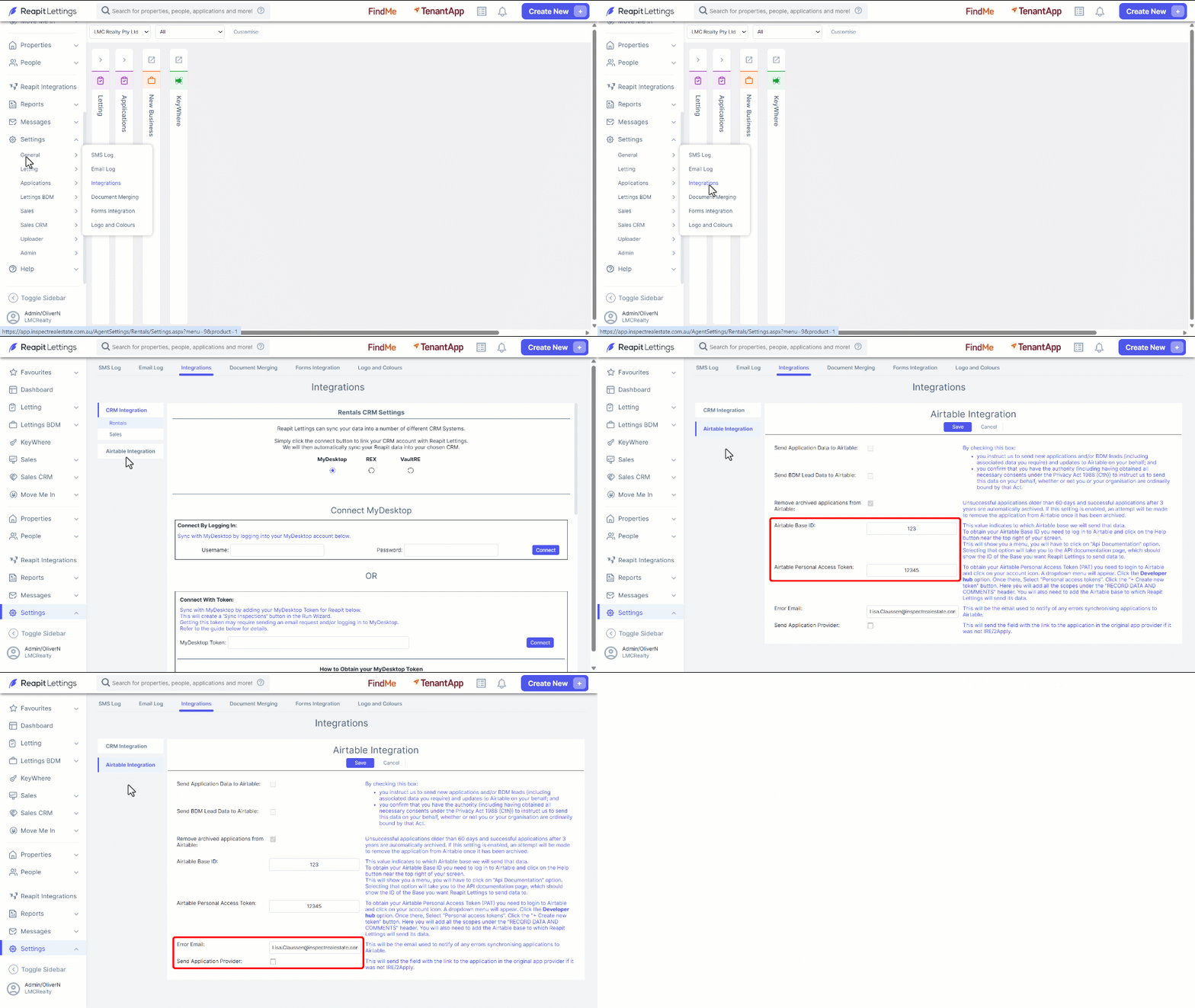
- Click on Settings.
- Click on General.
- Click on Integrations.
- Select the Airtable Integration tab.
- Enter your Airtable Base ID and Airtable Personal Access Token.
- Enter the Error email for alerts regarding any errors synchronising applications to Airtable.
- Enable the setting Send Application Data to Airtable.
- Click on Save.
If sending your BDM lead data to Airtable, select Send BDM Lead Data to Airtable checkbox instead of, Send Application Data to Airtable.
For assistance with Airtable integrations, please visit https://support.airtable.