'%20d='M0%208a8%208%200%200%201%208-8h24a8%208%200%200%201%208%208v24a8%208%200%200%201-8%208H8a8%208%200%200%201-8-8V8Z'/%3e%3cpath%20fill='%23fff'%20d='M32.576%206C12.293%206%208.776%2025.887%207.424%2034H9.1c.45-2.977%203.493-14.748%2010.899-20.287%200%200-5.633%206.976-6.572%2015.051%203.426-.652%2013.845-3.372%2016.056-12.927l-3.84-.61c1.352-1.351%204.909-5.17%206.931-9.226V6Z'/%3e%3cdefs%3e%3clinearGradient%20id='reapit-lettings__a'%20x1='20.702'%20x2='20.702'%20y1='.351'%20y2='31.228'%20gradientUnits='userSpaceOnUse'%3e%3cstop%20stop-color='%235573FD'/%3e%3cstop%20offset='.575'%20stop-color='%234E56EA'/%3e%3c/linearGradient%3e%3c/defs%3e%3c/svg%3e)
How to Enable Owner Report Email and SMS
This article will run through how to enable owner report email and SMS in Reapit Lettings
How to Enable Owner Report Email and SMS
This article will run through how to enable owner report emails and SMS in Reapit Lettings.
To send an inspection report directly to an owner by email from an inspection, the following must already be actioned:
- The owner needs to be setup in the system.
- The owner notification messages need to be enabled in the Event Editor.
- Onsite Owner Report needs to be enabled.
There are three inspection reports: Quick Report, Owner Report, Owner Weekly Report. The steps below will show how to enable the owner notification messages for reports in the Event Editor.
- Click on Messages.
- Click on Letting.
- Click on Inspected - Owners.
- You can enable or disable the email and/or SMS by ticking or un-ticking the Email or SMS checkbox for that report.
- Click on Save.
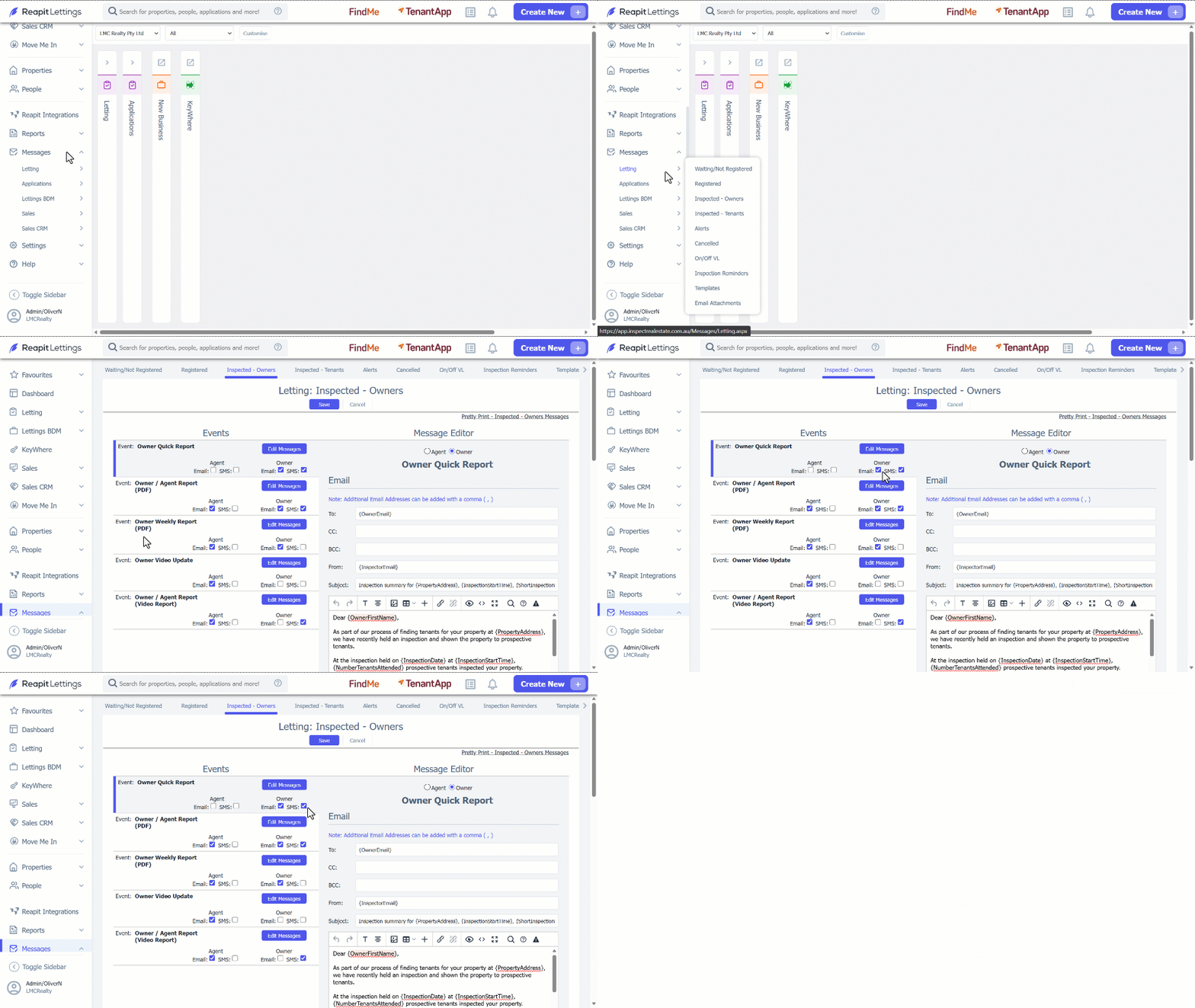
Note: In the shown example, the Email and SMS notifications are turned on for the Owner Quick Report.