'%20d='M0%208a8%208%200%200%201%208-8h24a8%208%200%200%201%208%208v24a8%208%200%200%201-8%208H8a8%208%200%200%201-8-8V8Z'/%3e%3cpath%20fill='%23fff'%20d='M32.576%206C12.293%206%208.776%2025.887%207.424%2034H9.1c.45-2.977%203.493-14.748%2010.899-20.287%200%200-5.633%206.976-6.572%2015.051%203.426-.652%2013.845-3.372%2016.056-12.927l-3.84-.61c1.352-1.351%204.909-5.17%206.931-9.226V6Z'/%3e%3cdefs%3e%3clinearGradient%20id='reapit-lettings__a'%20x1='20.702'%20x2='20.702'%20y1='.351'%20y2='31.228'%20gradientUnits='userSpaceOnUse'%3e%3cstop%20stop-color='%235573FD'/%3e%3cstop%20offset='.575'%20stop-color='%234E56EA'/%3e%3c/linearGradient%3e%3c/defs%3e%3c/svg%3e)
How to Set Up An Inspection Alert
This article will run through how to set up an inspection alert in your account in Reapit Lettings.
How to Set Up An Inspection Alert
This article will run through how to set up an inspection alert in your account in Reapit Lettings.
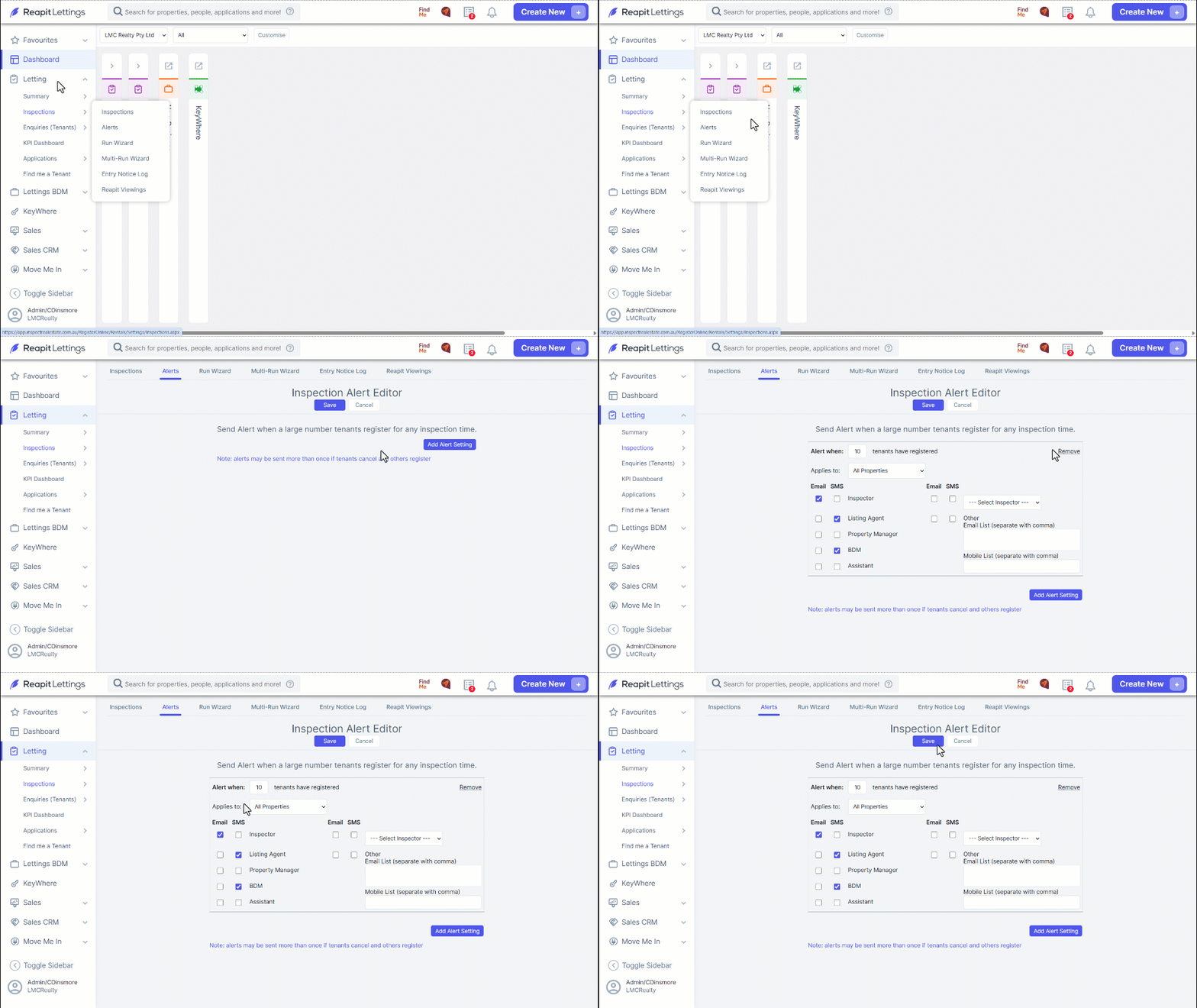
- Navigate to Letting.
- Click Inspections.
- Click Alerts.
- Click Add Alert Setting. In the Alert When textbox, input a value to indicate the volume of tenants that need to register for an inspection.
Click the All Properties dropdown selector, choose a property (or leave as All Properties), select/ deselect the Email/ SMS checkboxes against the roles that should receive this alert.
- Click Email/ SMS checkboxes – Other for another staff member role not listed, input their email addresses, and mobile (if multiple, separate with a comma).
- Click Save once completed.