'%20d='M0%208a8%208%200%200%201%208-8h24a8%208%200%200%201%208%208v24a8%208%200%200%201-8%208H8a8%208%200%200%201-8-8V8Z'/%3e%3cpath%20fill='%23fff'%20d='M32.576%206C12.293%206%208.776%2025.887%207.424%2034H9.1c.45-2.977%203.493-14.748%2010.899-20.287%200%200-5.633%206.976-6.572%2015.051%203.426-.652%2013.845-3.372%2016.056-12.927l-3.84-.61c1.352-1.351%204.909-5.17%206.931-9.226V6Z'/%3e%3cdefs%3e%3clinearGradient%20id='reapit-lettings__a'%20x1='20.702'%20x2='20.702'%20y1='.351'%20y2='31.228'%20gradientUnits='userSpaceOnUse'%3e%3cstop%20stop-color='%235573FD'/%3e%3cstop%20offset='.575'%20stop-color='%234E56EA'/%3e%3c/linearGradient%3e%3c/defs%3e%3c/svg%3e)
Call Reports
This article will run through Call Reports in Reapit Lettings.
1. To access the Call Reports, navigate to Reports.
2. Click Lettings BDM.
3. Click Contact Reports. These reports are generated from the results of Call Sessions.
4. To open the full report in a new tab, press View Report.
5. To send the report to team members, enter their email addresses, separated by a comma, in the "CC" box. You can also select the BDM button to have the report go straight to the BDM assigned.
6. To add another report setting, such as reoccurring reports, select Add Another Report Setting.
7. This will open an extra section, where reoccurring report settings can be managed.
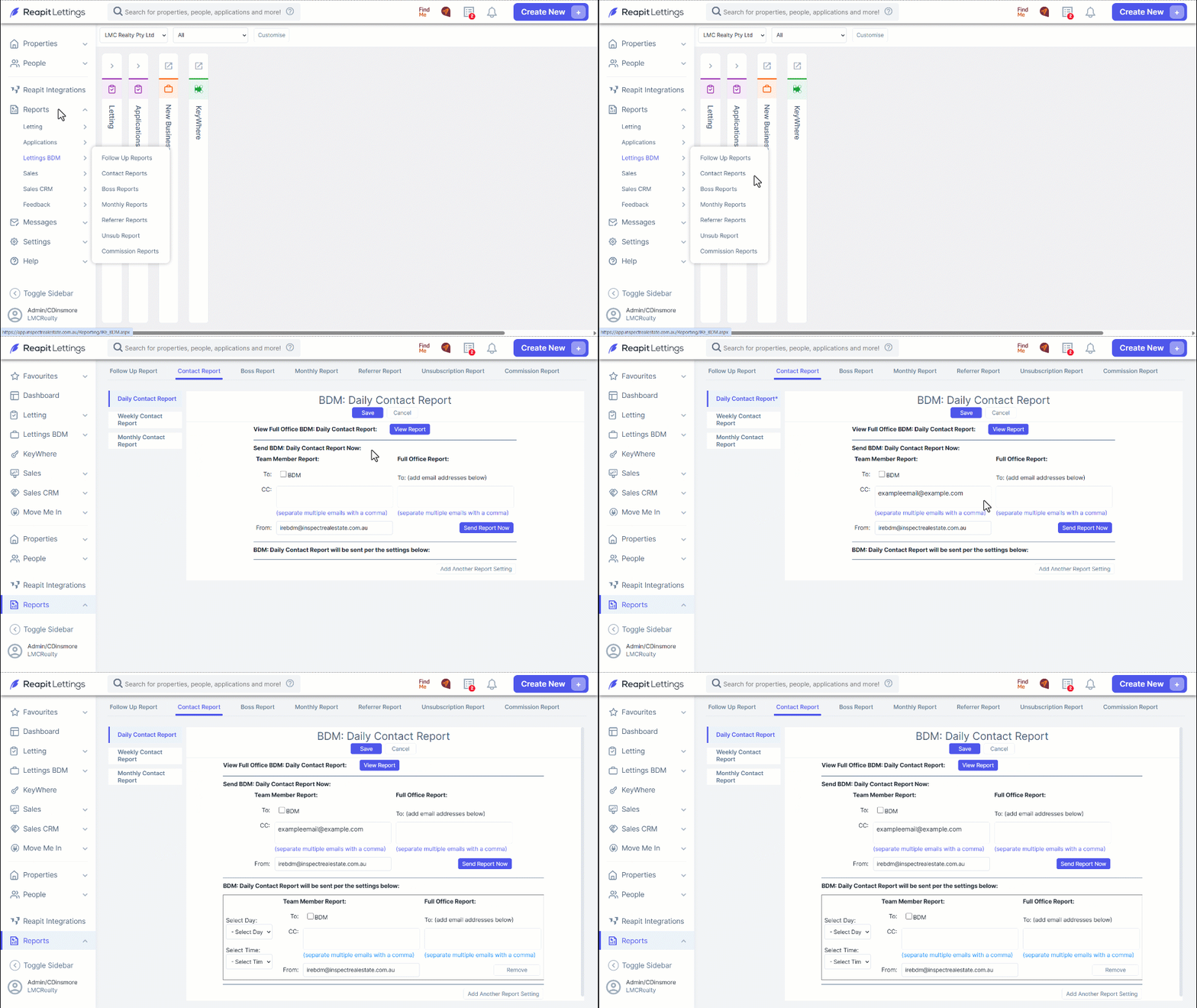
The reports can be set to send every day, any particular day, or the end of every month. The time they are populated can also be altered in the Select Time drop down menu.
1. Select Day – Select which day(s) of the week you would like the report sent
2. Select Time – Select the time of day you would like the report sent
3. To – Here you can enter the email addresses you would like to receive this report. You can separate multiple email addresses with a comma
4. From - Here you can enter the address you would like the report to come from
5. Save – When you are happy with these settings, click the Save button to confirm