'%20d='M0%208a8%208%200%200%201%208-8h24a8%208%200%200%201%208%208v24a8%208%200%200%201-8%208H8a8%208%200%200%201-8-8V8Z'/%3e%3cpath%20fill='%23fff'%20d='M32.576%206C12.293%206%208.776%2025.887%207.424%2034H9.1c.45-2.977%203.493-14.748%2010.899-20.287%200%200-5.633%206.976-6.572%2015.051%203.426-.652%2013.845-3.372%2016.056-12.927l-3.84-.61c1.352-1.351%204.909-5.17%206.931-9.226V6Z'/%3e%3cdefs%3e%3clinearGradient%20id='reapit-lettings__a'%20x1='20.702'%20x2='20.702'%20y1='.351'%20y2='31.228'%20gradientUnits='userSpaceOnUse'%3e%3cstop%20stop-color='%235573FD'/%3e%3cstop%20offset='.575'%20stop-color='%234E56EA'/%3e%3c/linearGradient%3e%3c/defs%3e%3c/svg%3e)
Adding New Sources
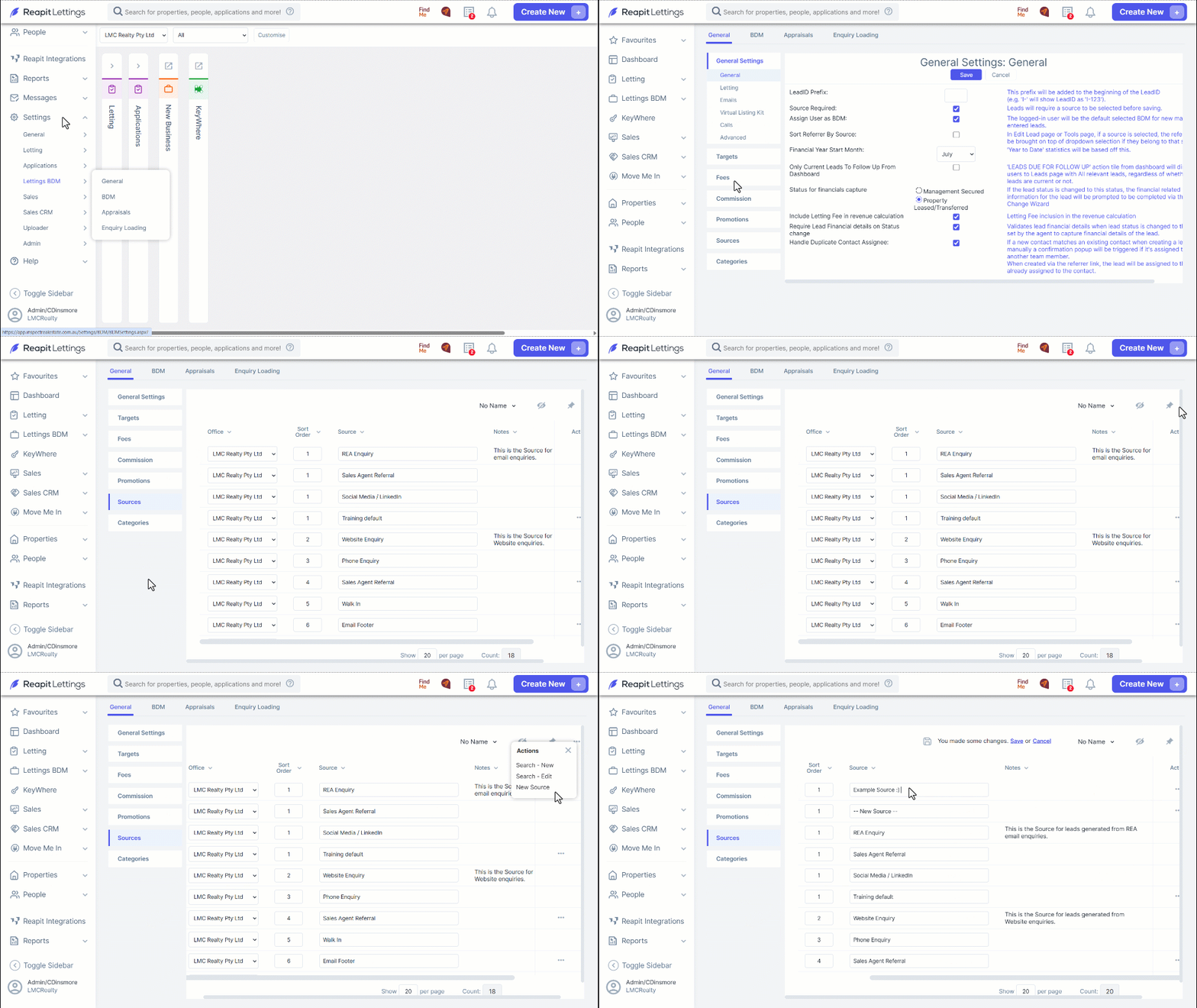
This article will run through how to add new sources within your account in Reapit Lettings.
1. Navigate to Settings.
2. Click Lettings BDM.
3. Click General.
4. In the Sources tab, the list of sources will be pre-populated with 15 standard options, all of which are editable and removable, with the exception of 'AgentApp', 'REA Enquiry', and 'Website Enquiry'.
- Click the 3 Action Dots and select New Source.
5. Input the name of your new source and click Save.
- If required, the new source can be removed by clicking the 3 Action Dots and selecting Delete.