'%20d='M0%208a8%208%200%200%201%208-8h24a8%208%200%200%201%208%208v24a8%208%200%200%201-8%208H8a8%208%200%200%201-8-8V8Z'/%3e%3cpath%20fill='%23fff'%20d='M32.576%206C12.293%206%208.776%2025.887%207.424%2034H9.1c.45-2.977%203.493-14.748%2010.899-20.287%200%200-5.633%206.976-6.572%2015.051%203.426-.652%2013.845-3.372%2016.056-12.927l-3.84-.61c1.352-1.351%204.909-5.17%206.931-9.226V6Z'/%3e%3cdefs%3e%3clinearGradient%20id='reapit-lettings__a'%20x1='20.702'%20x2='20.702'%20y1='.351'%20y2='31.228'%20gradientUnits='userSpaceOnUse'%3e%3cstop%20stop-color='%235573FD'/%3e%3cstop%20offset='.575'%20stop-color='%234E56EA'/%3e%3c/linearGradient%3e%3c/defs%3e%3c/svg%3e)
How to Enable the Price Reduction Notification
This article will run through how to enable the Price Reduction Notification in Reapit Lettings
How to Enable the Price Reduction Notification
This article will run through how to enable the Price Reduction Notification in Reapit Lettings.
ROL Rentals allows you to notify potential tenants when there has been a price reduction/price change on a property, please note that this is only sent where the drop is rent is $5 or greater.
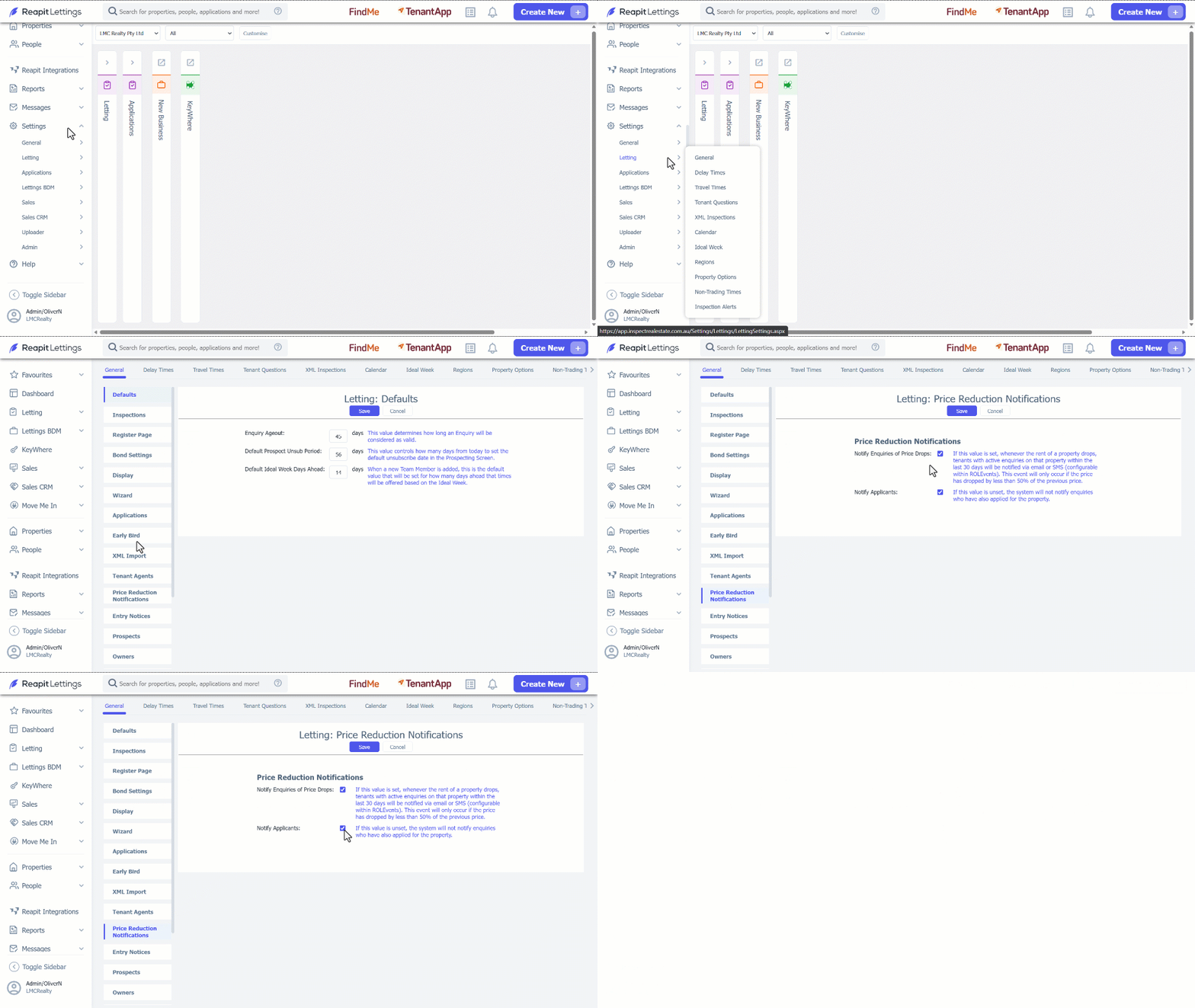
- Click on Settings.
- Click on Letting.
- Click on General.
- Navigate to the Price Reduction Notifications section
- Tick the Notify Enquiries of Price Drops box.
- Click on Save.
Note:
- By ticking Notify Applicants the value will notify enquires who have also applied for the property.
- Tenants with active enquiries will now be notified when you reduce the rent of a property.