'%20d='M0%208a8%208%200%200%201%208-8h24a8%208%200%200%201%208%208v24a8%208%200%200%201-8%208H8a8%208%200%200%201-8-8V8Z'/%3e%3cpath%20fill='%23fff'%20d='M32.576%206C12.293%206%208.776%2025.887%207.424%2034H9.1c.45-2.977%203.493-14.748%2010.899-20.287%200%200-5.633%206.976-6.572%2015.051%203.426-.652%2013.845-3.372%2016.056-12.927l-3.84-.61c1.352-1.351%204.909-5.17%206.931-9.226V6Z'/%3e%3cdefs%3e%3clinearGradient%20id='reapit-lettings__a'%20x1='20.702'%20x2='20.702'%20y1='.351'%20y2='31.228'%20gradientUnits='userSpaceOnUse'%3e%3cstop%20stop-color='%235573FD'/%3e%3cstop%20offset='.575'%20stop-color='%234E56EA'/%3e%3c/linearGradient%3e%3c/defs%3e%3c/svg%3e)
How to Merge Properties Together
This article will run through how to merge duplicate properties within your Reapit Lettings account.
How to Merge Properties Together
This article will run through how to merge duplicate properties within your Reapit Lettings account.
When identifying potential properties, it is crucial to conduct a comprehensive review to ensure alignment with your objectives. Various methods can aid in this assessment. Here are key considerations to facilitate your evaluation:
- Verify the source: If the source is listed as XML, it originated from your Uploader (e.g., VaultRE, Rex, etc.).
- Confirm its status: Check if the property is currently listed as vacant or available for rent.
- Validate key assignment: Ensure that a key number has been assigned to the property.
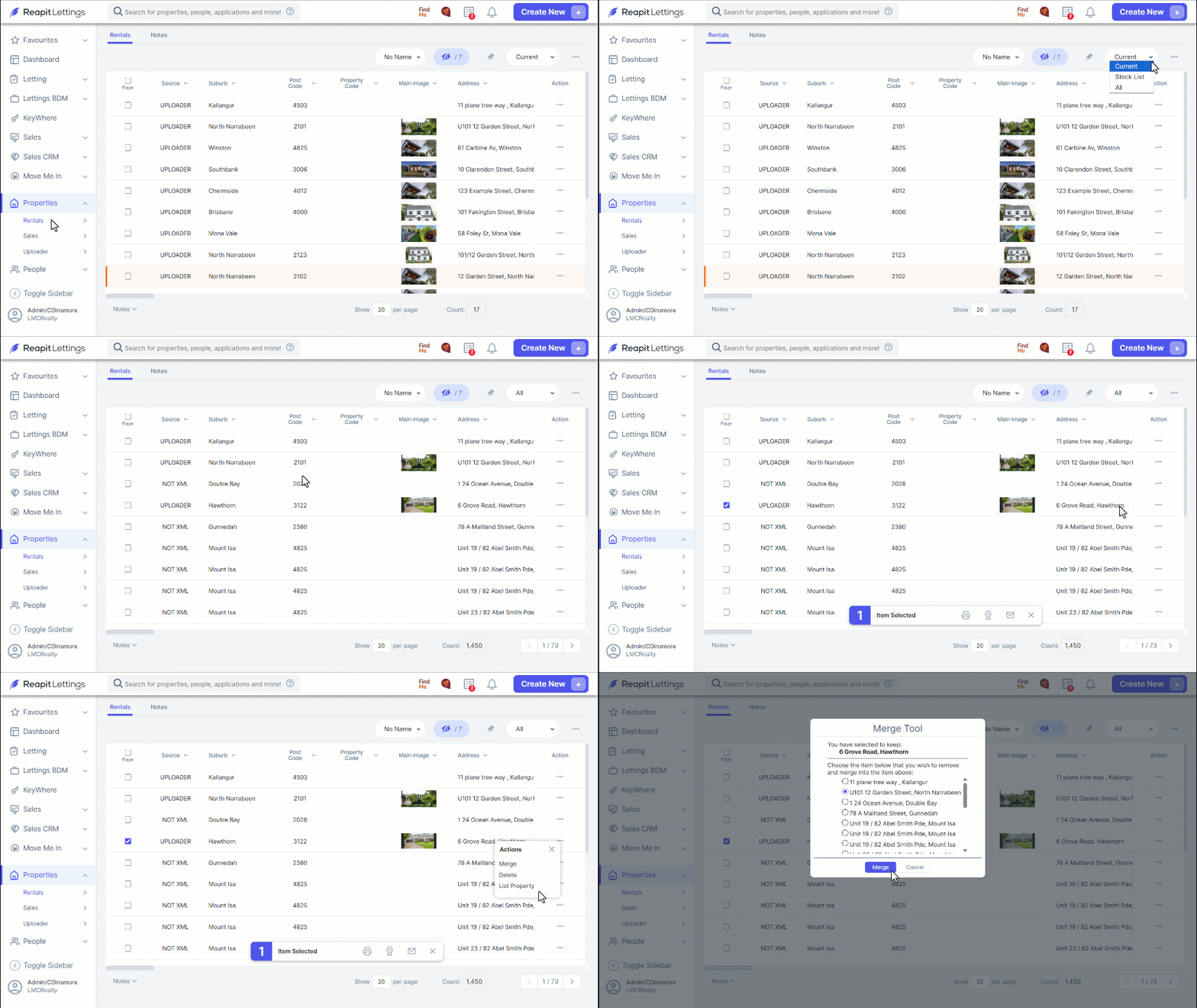
- Click on Properties.
- Select either Rentals or Sales.
- Update the filter from Current to All.
- Locate the property and select the Page selector checkbox located to the left.
- Click the 3 Dots.
- Click Merge.
- Choose the address within the Merge Tool where you intend to merge the selected property,
- Click Merge, then OK.