'%20d='M0%208a8%208%200%200%201%208-8h24a8%208%200%200%201%208%208v24a8%208%200%200%201-8%208H8a8%208%200%200%201-8-8V8Z'/%3e%3cpath%20fill='%23fff'%20d='M32.576%206C12.293%206%208.776%2025.887%207.424%2034H9.1c.45-2.977%203.493-14.748%2010.899-20.287%200%200-5.633%206.976-6.572%2015.051%203.426-.652%2013.845-3.372%2016.056-12.927l-3.84-.61c1.352-1.351%204.909-5.17%206.931-9.226V6Z'/%3e%3cdefs%3e%3clinearGradient%20id='reapit-lettings__a'%20x1='20.702'%20x2='20.702'%20y1='.351'%20y2='31.228'%20gradientUnits='userSpaceOnUse'%3e%3cstop%20stop-color='%235573FD'/%3e%3cstop%20offset='.575'%20stop-color='%234E56EA'/%3e%3c/linearGradient%3e%3c/defs%3e%3c/svg%3e)
2Apply New Application Notification to Agent
This article will provide you with an overview of the notifications generated upon the submission of rental applications by prospective tenants through the 2Apply platform. It will also provide guidance on the steps to access and activate these notifications within your account.
2Apply New Application Notification to Agent
This article will provide you with an overview of the notifications generated upon the submission of rental applications by prospective tenants through the 2Apply platform. It will also provide guidance on the steps to access and activate these notifications within your account.
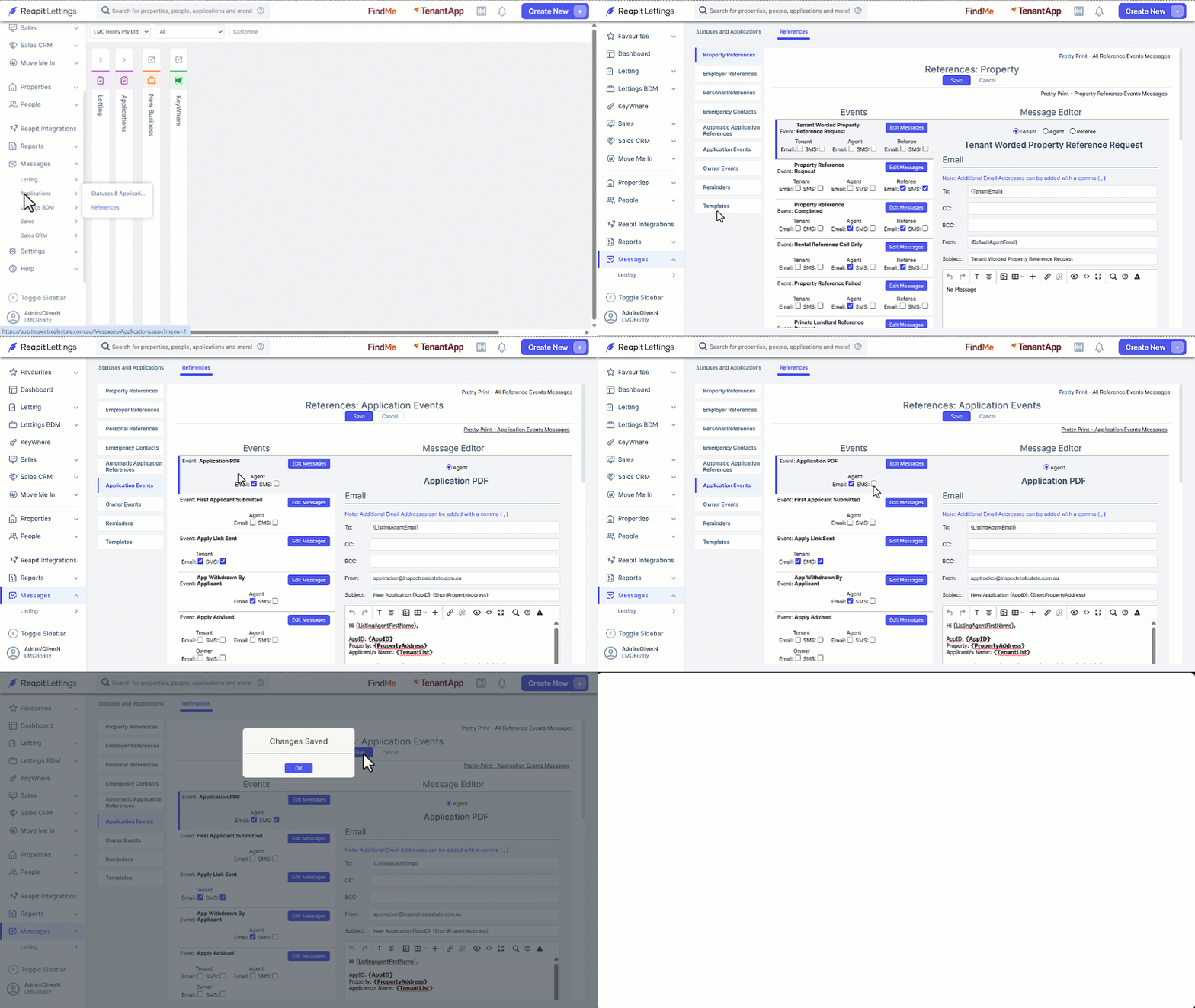
- Click on Messages.
- Click on Applications
- Click on References
- Select Application Events.
- Click Edit Messages to edit the message template.
- Enable the notification channels by selecting the Email and/or SMS checkboxes.
- Click on Save.