'%20d='M0%208a8%208%200%200%201%208-8h24a8%208%200%200%201%208%208v24a8%208%200%200%201-8%208H8a8%208%200%200%201-8-8V8Z'/%3e%3cpath%20fill='%23fff'%20d='M32.576%206C12.293%206%208.776%2025.887%207.424%2034H9.1c.45-2.977%203.493-14.748%2010.899-20.287%200%200-5.633%206.976-6.572%2015.051%203.426-.652%2013.845-3.372%2016.056-12.927l-3.84-.61c1.352-1.351%204.909-5.17%206.931-9.226V6Z'/%3e%3cdefs%3e%3clinearGradient%20id='reapit-lettings__a'%20x1='20.702'%20x2='20.702'%20y1='.351'%20y2='31.228'%20gradientUnits='userSpaceOnUse'%3e%3cstop%20stop-color='%235573FD'/%3e%3cstop%20offset='.575'%20stop-color='%234E56EA'/%3e%3c/linearGradient%3e%3c/defs%3e%3c/svg%3e)
Managing Off List Reports - Lettings
This article will run through an overview of your on list reports and how to manage them effectively
What is the Off List Report & How do you Enable/Disable Email Notifications
This article will run through an overview of your off list reports and how to manage them effectively in Reapit Lettings.
The processes in this article include:
- What is the Off List Report, & How do you Enable/Disable Email Notifications?
- Managing Off List Reports
What is the Off List Report & How do you Enable/Disable Email Notifications
The Off List Report allows you to quickly and easily notify waiting, unregistered and registered buyers when a property is no longer available.
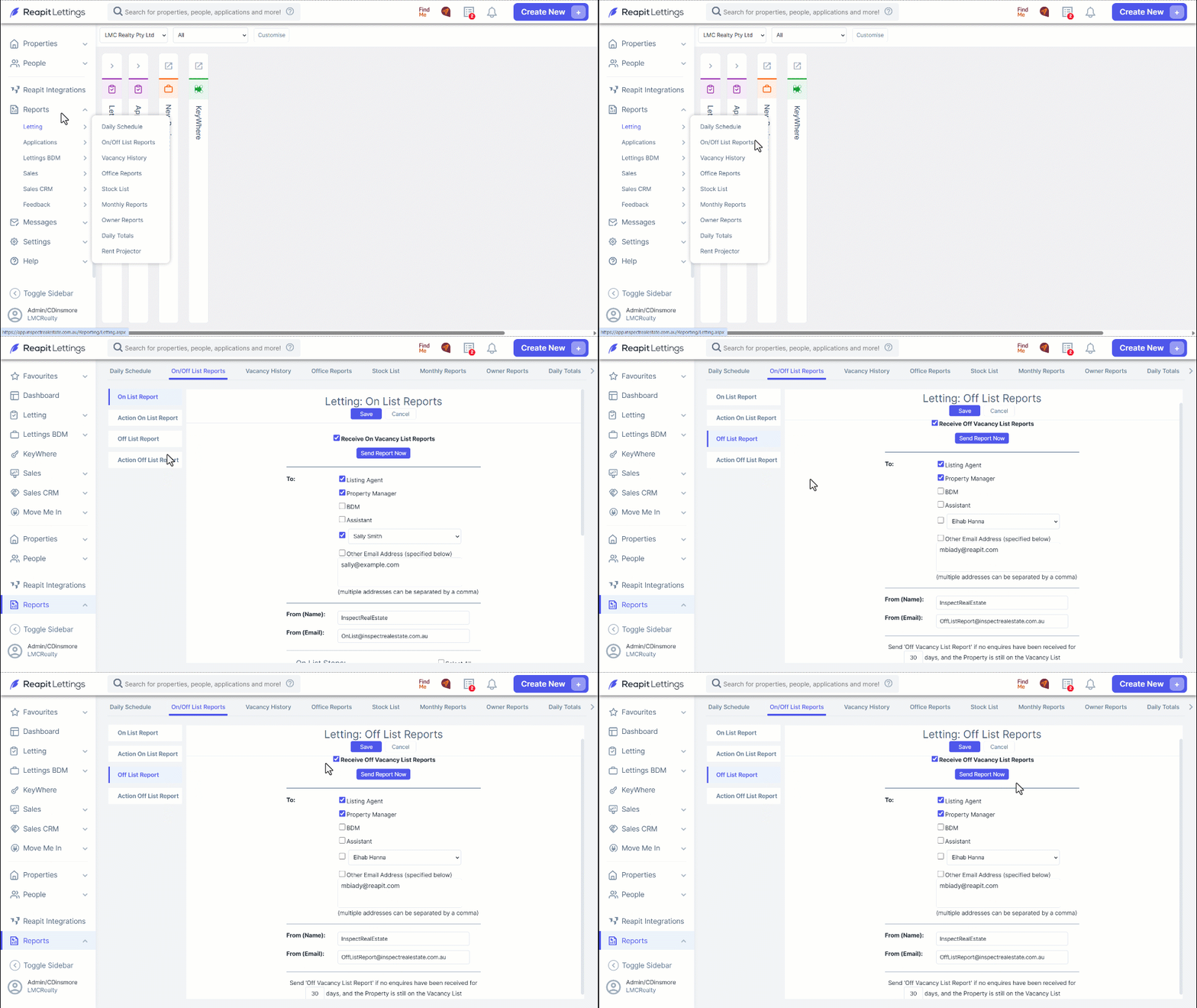
- Navigate to Reports.
- Click Letting.
- Click On/Off List Reports. In the Off List Report tab, select the Receive Off Vacancy List Reports checkbox to enable the function.
Either click Send Report Now, and Save for the report to be made available immediately, or
Input your name and email address where illustrated, input the number of days a property is vacant for a report to be provided automatically.
Note: the automated emails with this report will continue until you deselect the option.
Managing Off List Reports - Lettings
The Off List is crucial for accurate reporting and is designed to promptly finalise the vacancy in your Reapit Lettings account. This effectively notifies applicants when a property is withdrawn from the market. Activation of this report can occur automatically through an application status update, commonly upon the successful processing of an application via a Reapit Lettings account, or it can be manually initiated through your Reapit Lettings account
By leveraging this report, all interested parties, regardless of registration status, are consistently informed, promoting a transparent and effective communication process.
- Users with Diamond level access have the capability to make amendments by navigating to Reports.
- Click Letting.
- Click On/Off List Reports.
- Within the 'Off List Reports' tab, you should select the 'Receive Off Vacancy List Reports' checkbox and choose the appropriate stakeholder to receive the reports.
Specify the individual staff member from the drop-down menu and enter their email address in the provided field.
Input 30 (or the desired days) into the text field next to Days, and the property is still on the vacancy list. Remember to save the changes.
Note: Click the designated button to send the report immediately. Should you overlook selecting the 'Receive Off Vacancy List Reports' checkbox, you will be notified via email of any reports that fail to send.
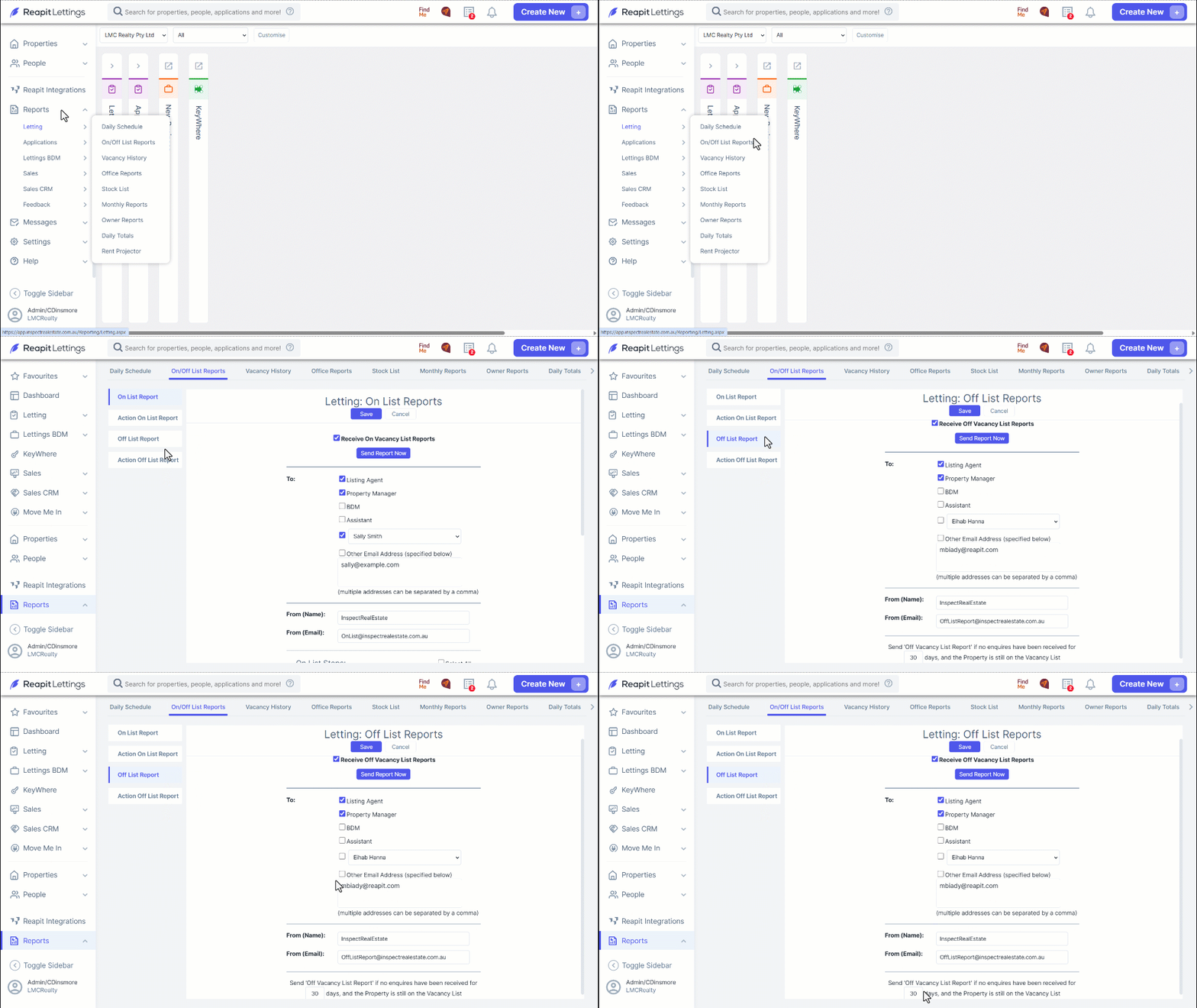
- Alternatively, if your business prefers to process the Off List Report manually, navigate to 'Action Off List Report' and click Action for the applicable properties.
- If the property needs to remain attached to the Off List Click the designated button, Close.
- To confirm a property is no longer on the Off List, click the designated button. ensure that you select the appropriate option indicating why the property is no longer listed. and then click Confirm Off List to complete the process.