'%20d='M0%208a8%208%200%200%201%208-8h24a8%208%200%200%201%208%208v24a8%208%200%200%201-8%208H8a8%208%200%200%201-8-8V8Z'/%3e%3cpath%20fill='%23fff'%20d='M8.375%2013v14L20.5%2034l12.124-7v-7.737l-1.687-.975-2.806-1.62-1.082-.624v4.83l-.002%204.83H13.95V16.07l3.275-1.89%202.192-1.265%201.082-.625%203.275%201.877%202.192%201.256%201.083.62V9.782L20.5%206%208.376%2013Z'/%3e%3cdefs%3e%3clinearGradient%20id='reapit-pm__a'%20x1='20.702'%20x2='20.702'%20y1='.351'%20y2='31.228'%20gradientUnits='userSpaceOnUse'%3e%3cstop%20stop-color='%235573FD'/%3e%3cstop%20offset='.575'%20stop-color='%234E56EA'/%3e%3c/linearGradient%3e%3c/defs%3e%3c/svg%3e)
Tenant Self Inspections
The Tenant Self Inspection feature in Reapit PM allows property managers to invite their tenants to conduct inspections on the property. The processes in this article include: How to Invite the Tenant to Carry Out a Self-Inspection How the Tenant Completes the Inspection
Overview
Tenant Self Inspections
The Tenant Self Inspection feature in Reapit PM allows property managers to invite their tenants to conduct inspections on the property.
The processes in this article include:
- How to Invite the Tenant to Carry Out a Self-Inspection
- How the Tenant Completes the Inspection
How to Invite the Tenant to Carry Out a Self-Inspection
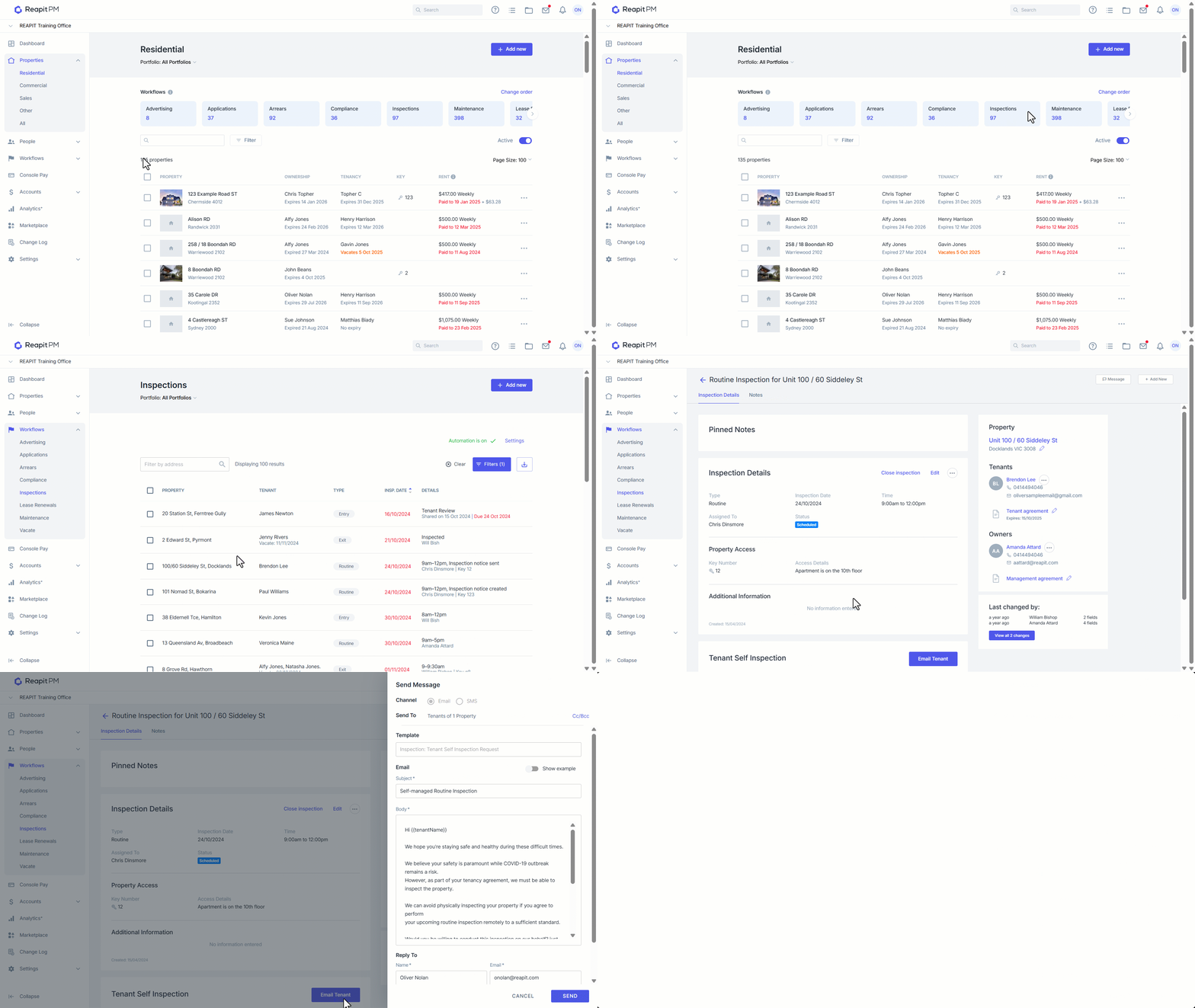
- Click on Properties.
- Click on Residential.
- Select the Inspections workflow.
- Select Add New or select one of your existing routine inspections that have not been started or completed.
- You will now see an option ‘Email Tenant’. Using this option will invite the tenant to conduct the inspection on your behalf. Click Email Tenant.
- Within the email, the tenant will receive an inspection link to conduct the inspection. Click Send. ****
N****ote: The email will be sent to the primary tenant’s email address.
How the Tenant Completes the Inspection
- Click on the link in the email to start the inspection.
- Once they have completed each section, the tenant will need to click Submit Inspection to lodge the report back to Reapit PM.
- They will receive a successful message once the report has been successfully sent.
- Once the tenant has completed and submitted, the inspection will then feed back into Reapit PM for you to review and send to the owner.