'%20d='M0%208a8%208%200%200%201%208-8h24a8%208%200%200%201%208%208v24a8%208%200%200%201-8%208H8a8%208%200%200%201-8-8V8Z'/%3e%3cpath%20fill='%23fff'%20d='M8.375%2013v14L20.5%2034l12.124-7v-7.737l-1.687-.975-2.806-1.62-1.082-.624v4.83l-.002%204.83H13.95V16.07l3.275-1.89%202.192-1.265%201.082-.625%203.275%201.877%202.192%201.256%201.083.62V9.782L20.5%206%208.376%2013Z'/%3e%3cdefs%3e%3clinearGradient%20id='reapit-pm__a'%20x1='20.702'%20x2='20.702'%20y1='.351'%20y2='31.228'%20gradientUnits='userSpaceOnUse'%3e%3cstop%20stop-color='%235573FD'/%3e%3cstop%20offset='.575'%20stop-color='%234E56EA'/%3e%3c/linearGradient%3e%3c/defs%3e%3c/svg%3e)
End of Financial Year Guide
This article will walk you through the things you need to do for the end of the financial year in Reapit PM. The process in this article include: Getting ready for End of Financial Year Conducting a Trial Print Run Sending / Resending Financial Year Statements
Overview
End of Financial Year Guide
This end-of-financial-year guide for Reapit PM has been developed to step you through successfully closing off the year to ensure your owners obtain their statements on time and with all the right information.
Please also be sure to check out the "related links" section below to get further training and assistance with EOFY.
The process in this article include:
- Getting ready for End of Financial Year
- Conducting a Trial Print Run
- Creating and Appying End of Financial Year Agency Fees
- Sending / Resending Financial Year Statements
- Reviewing End of Financial Year Statements / Owner Income and Expense Data
Getting ready for End of Financial Year
Ensure when completing End of Financial Year in PM you check the below items have been finalised prior to sending statements to your owners.
- Enter and Process all invoices, bills, and payments up to and including 30 June (AU) / 31 March (NZ).
- Ensure all rent and incoming funds have been receipted up to and including any applicable at 30 June (AU) / 31 March (NZ).
- Run your daily banking; to ensure all funds, including cash, cheque eftpos have been accounted for.
- Complete a reconciliation, making sure all figures balance.
- Complete your disbursement.
- On the 1st July, complete your June month close (the same as you did all previous months) note: The option to close the month will be available on the 1st.
- Check the statement delivery of your owners is set to their preferred delivery method (print or email).
- Trial print run your EOFY statements.
Conducting a Trial Print Run
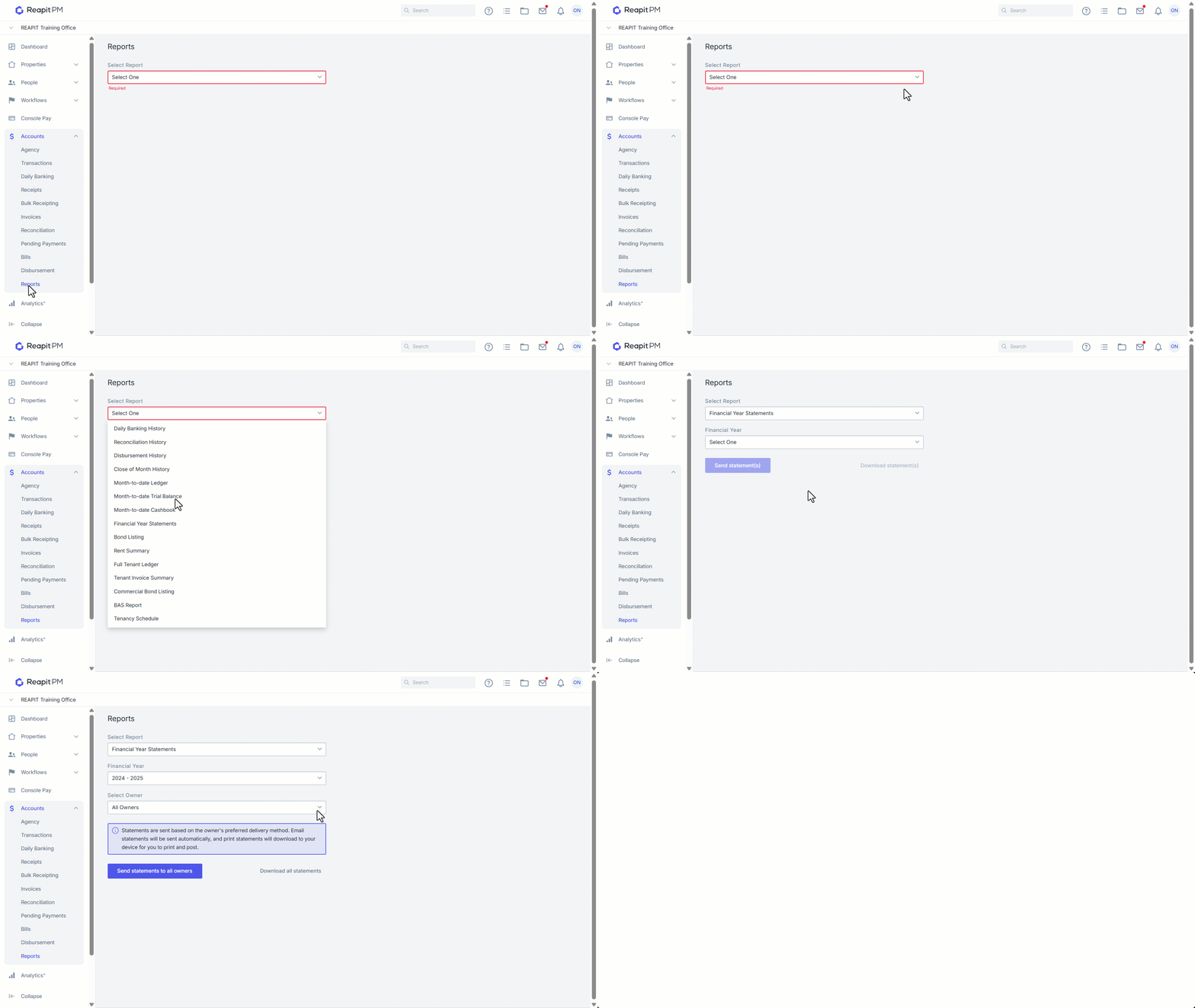
Financial Year Statements can be generated for a current, or past financial year and downloaded to print. All statements will download to your device, allowing you to review transactions prior to sending to Ownerships.
- Click on Accounts.
- Click on Reports.
- Select Financial Year Statements from the dropdown.
- Select the Financial Year, or apply a custom date range should specific owners require a custom (i.e. overseas owners).
- Select All Owners or Search for a specific owner.
- Select Send Method - Download all statements.
Conducting a Trial Print Run
Any fees you intend to charge for end of financial year, such as EOFY statement fees, must first be created as an Agency Fee. Once created, they can be applied to the relevant owners' management agreements, according to the fee configuration and when it will be incurred. For more information, please see - https://help.reapit.com.au/s/article/End-of-Financial-Year-Fees
Sending / Resending Financial Year Statements
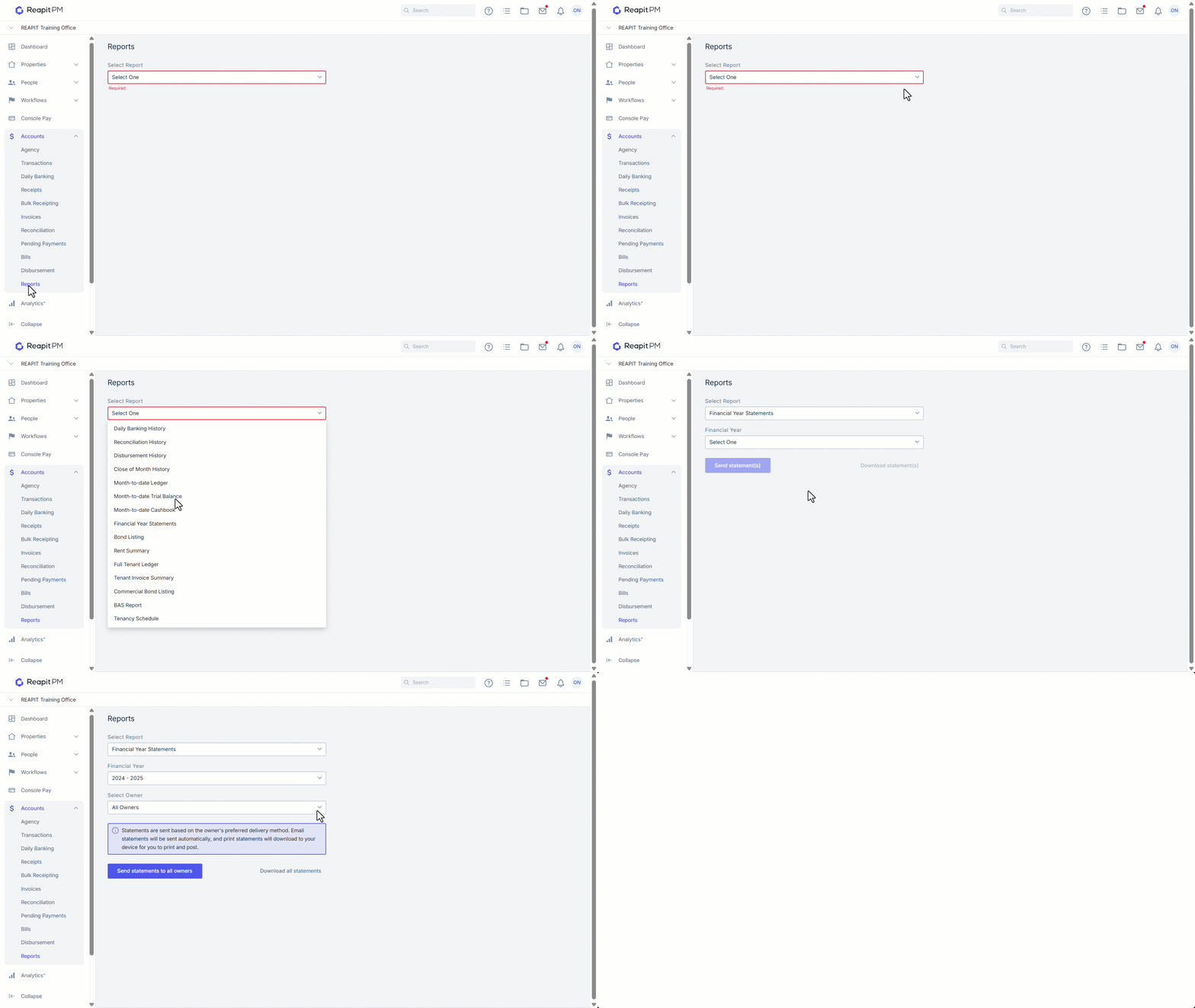
Follow the below steps to send your Financial Year Statements to a specific ownership, or to all ownerships. Statements can be sent out for the previously completed financial year, or for a current year, a ‘Year to Date’ statement can be created.
- Click on Accounts.
- Click on Reports.
- Select Financial Year Statements from the dropdown.
- Select the Financial Year, or apply a custom date range should specific owners require a custom (i.e. overseas owners).
- Select All Owners or Search for a specific owner.
- Select Send Method - Send statements to all owners. Statements will be sent based on the owners preferred delivery method, print statements or ownerships without emails will be automatically downloaded to your device.
- You will be able to Select Send again via the green box.
Reviewing End of Financial Year Statement / Owner Income and Expense Data
If a financial year summary is ever questioned due to a potential discrepancy, the Owner report in Analytics+ provides a detailed breakdown of income and expenses for the selected date range. This data can be exported as a IMG,PDF or CSV file to support deeper investigation and reconciliation. For more information, please see - https://help.reapit.com.au/s/article/Analytics-Owner-and-Income-Expense-Report
Frequently Asked Questions - EOFY in Reapit PM
| When will I be able to download my Financial Year statements? | You will be able to download and financial year statement at any time of the year, there are no restrictions. Please note that if you do send statements before closing June you might miss transactions and payments on your statements. |
| Will I be able to download Financial Year statements from the owner page? | No, the owner page will only show Owner statements. You will need to access these via the Accounts > reports > Financial year statements. |
| Will I have to close the year before sending the End of Financial year statements? | It will not be required, no. We strongly suggest you go through the EOFY checklist before starting the EOFY process. Find it on the first page of this document. |
| Will financial year statements show up on the owner portal? | No, as requested by clients, Financial Year statements will not appear in the owner portal. |