'%20d='M0%208a8%208%200%200%201%208-8h24a8%208%200%200%201%208%208v24a8%208%200%200%201-8%208H8a8%208%200%200%201-8-8V8Z'/%3e%3cpath%20fill='%23fff'%20d='M8.375%2013v14L20.5%2034l12.124-7v-7.737l-1.687-.975-2.806-1.62-1.082-.624v4.83l-.002%204.83H13.95V16.07l3.275-1.89%202.192-1.265%201.082-.625%203.275%201.877%202.192%201.256%201.083.62V9.782L20.5%206%208.376%2013Z'/%3e%3cdefs%3e%3clinearGradient%20id='reapit-pm__a'%20x1='20.702'%20x2='20.702'%20y1='.351'%20y2='31.228'%20gradientUnits='userSpaceOnUse'%3e%3cstop%20stop-color='%235573FD'/%3e%3cstop%20offset='.575'%20stop-color='%234E56EA'/%3e%3c/linearGradient%3e%3c/defs%3e%3c/svg%3e)
Managing Commercial Bonds Externally Held
This Reapit PM article is a guide on how to enter an Externally Held Commercial Bond. Commercial bonds can be held internally in trust, or externally. When entering a tenant into Console Commercial you have the option to document where bonds are held and generate a report of all Commercial bond information. The process in this article include: Entering an Externally Held Commercial Bond
Overview
Managing Commercial Bonds - Externally Held
This Reapit PM article is a guide on how to enter an Externally Held Commercial Bond.
Commercial bonds can be held internally in trust, or externally. When entering a tenant into Console Commercial you have the option to document where bonds are held and generate a report of all Commercial bond information.
The process in this article include:
- Entering an Externally Held Commercial Bond
Entering an Externally Held Commercial Bond
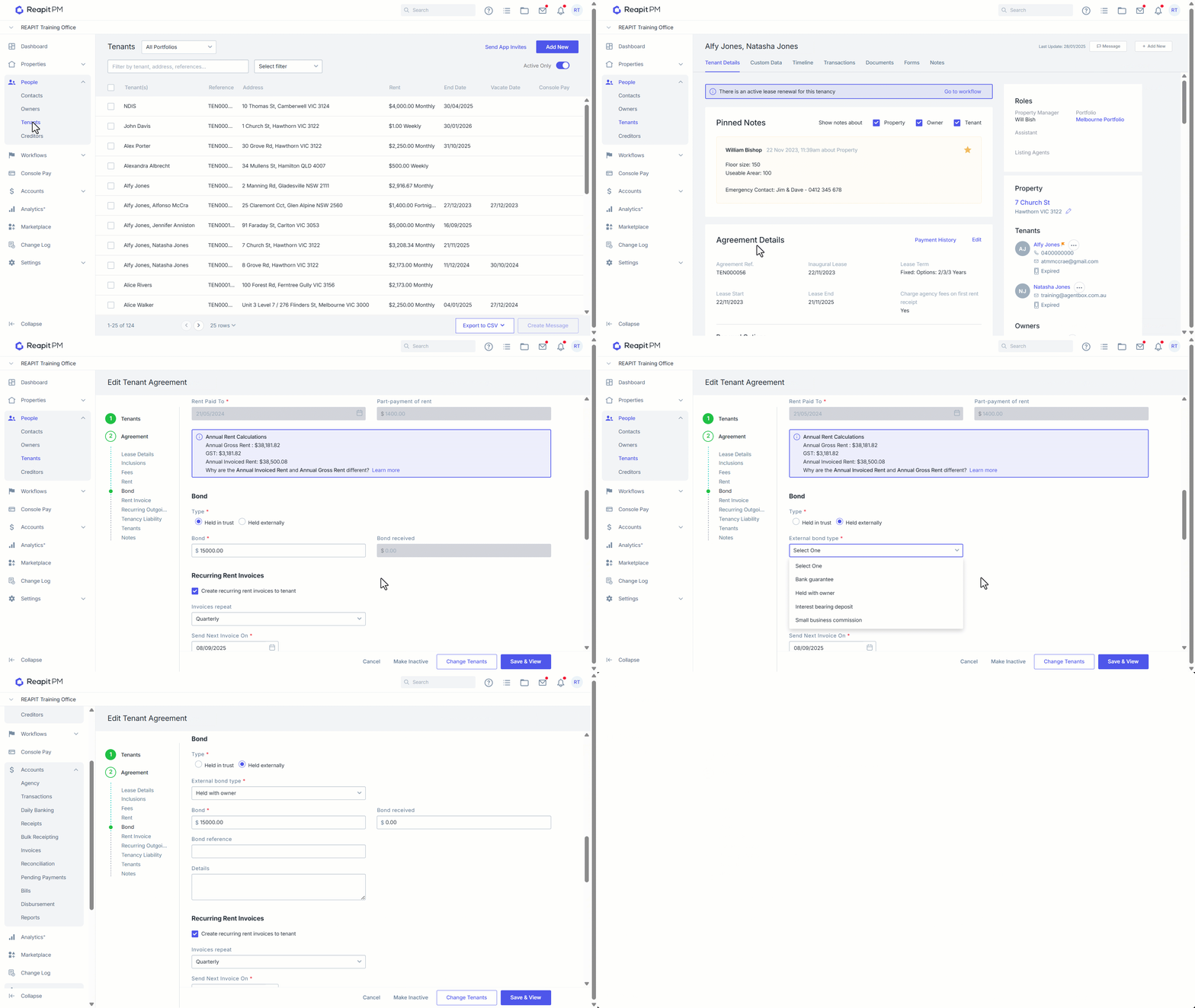
When entering bond information within the tenancy agreement, you have the option to select how the tenants bond is currently held, either in trust, or held externally. The following process shows how to enter an externally held bond into Reapit PM.
- Click on People.
- Click on Tenants.
- Search and Select the tenant.
- Click on Edit under Agreement Details.
- Select Held Externally.
- Select the External Bond Type form the dropdown.
- Enter any prompted information.
- Click on Save & View.