'%20d='M0%208a8%208%200%200%201%208-8h24a8%208%200%200%201%208%208v24a8%208%200%200%201-8%208H8a8%208%200%200%201-8-8V8Z'/%3e%3cpath%20fill='%23fff'%20d='M8.375%2013v14L20.5%2034l12.124-7v-7.737l-1.687-.975-2.806-1.62-1.082-.624v4.83l-.002%204.83H13.95V16.07l3.275-1.89%202.192-1.265%201.082-.625%203.275%201.877%202.192%201.256%201.083.62V9.782L20.5%206%208.376%2013Z'/%3e%3cdefs%3e%3clinearGradient%20id='reapit-pm__a'%20x1='20.702'%20x2='20.702'%20y1='.351'%20y2='31.228'%20gradientUnits='userSpaceOnUse'%3e%3cstop%20stop-color='%235573FD'/%3e%3cstop%20offset='.575'%20stop-color='%234E56EA'/%3e%3c/linearGradient%3e%3c/defs%3e%3c/svg%3e)
FLK it Over Integration
This article is a guide on how the FLK it Over integration works and how to set it up in Reapit PM. The FLK it Over integration allows users to create agreements and documents in FLK it Over, by calling the existing tenant, owner, and property data in Reapit PM. The processes in this article include: • Activating the FLK it Over Integration • Data Syncing - What is Shared
Overview
FLK it Over Integration
This article is a guide on how the FLK it Over integration works and how to set it up in Reapit PM.
The FLK it Over integration allows users to create agreements and documents in FLK it Over, by calling the existing tenant, owner, and property data in Reapit PM.
This includes:
- Storing the signed Residential Tenancy Agreements + Lease Renewals from FLK it Over to Reapit PM
- Storing a copy of the signed/returned document in Reapit PM - against the property [Files] and Tenant [Documents] record tab.
- Storing the Termination Notice against the property [Files] and Tenant [Documents] record tab.
- Storing the Rent Increase Notice against the property [Files] and Tenant [Documents] record tab.
- Storing the Breach Notice against the property [Files] and Tenant [Documents] record tab.
- Storing the Entry Notice against the property [Files] and Tenant [Documents] record tab.
- Storing the Intention to Sell Notice against the property [Files] and Tenant [Documents] record tab.
The processes in this article include:
- Activating the FLK it Over Integration
- Data Syncing - What is Shared
Activating the FLK it Over Integration
A FLK it Over account is required to be able to set up the integration.
- Click on Marketplace.
- Navigate to Forms and select FLK it over.
- Click Add to Reapit PM.
- Select if you are a New or Existing FLK it over user. Click Next.
- Your API Key will be shown with the ability to copy the key to clipboard.
Once the key has been copied, you will need to sign in to the FLK it over website and access the integrations menu. This will display the option to enter the API Key copied into the section for Reapit PM. Once done, click to save the changes.
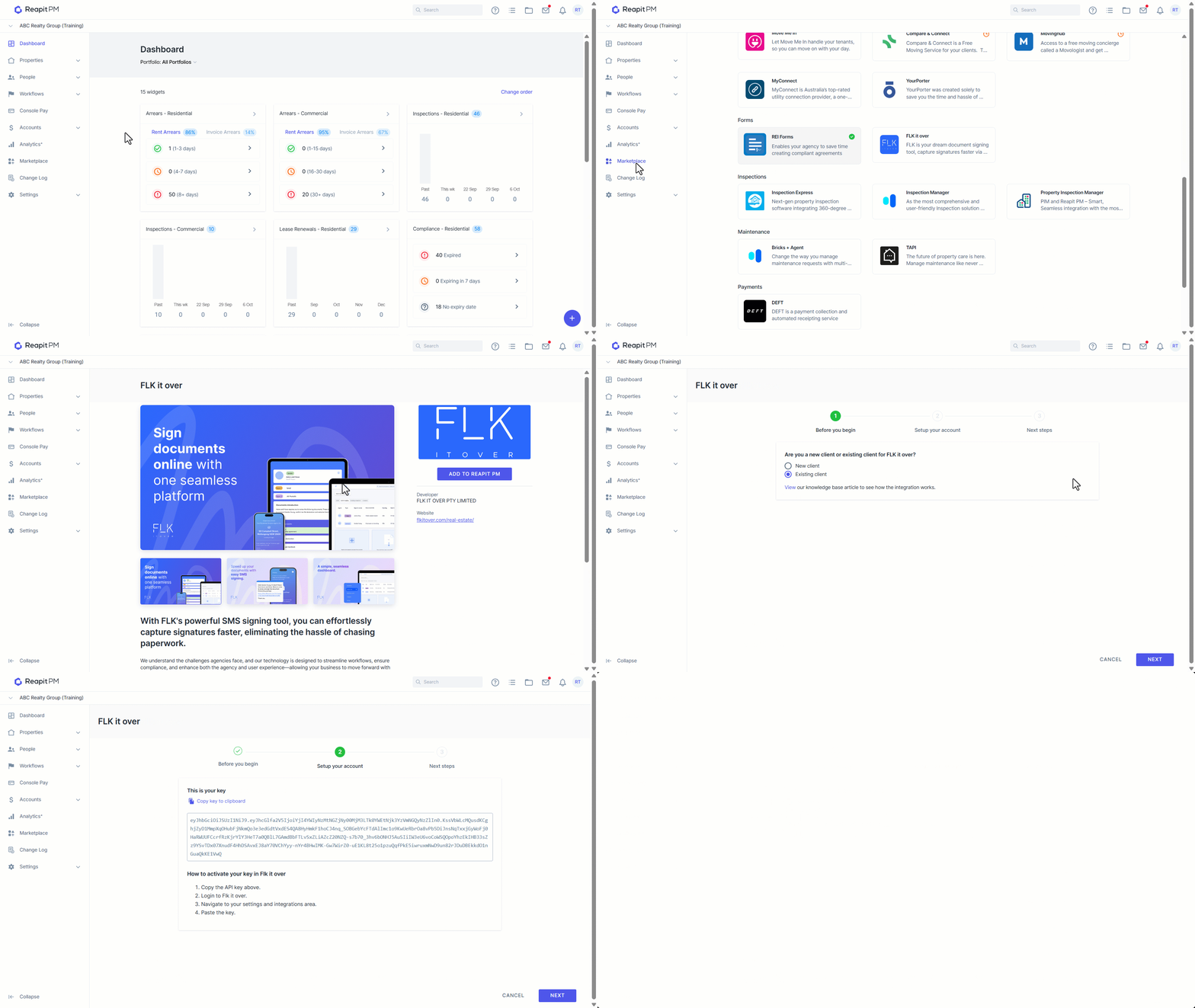
Note: Once the integration has been connected, a green confirmation tick will appear on the FLK it Over tile in the Marketplace tab.
Data Syncing - What is Shared
You will now be able to create new lease agreements through FLK it Over.
Reapit PM will populate key information over to FLK it Over including:
- Address
- Landlord / Owner information
- Tenant information
- Lease start date
- Rent increase data
Note: Some data will populate over in FLK it Over as 'suggested' which the agent creating the lease can determine if they want it to be included or not.